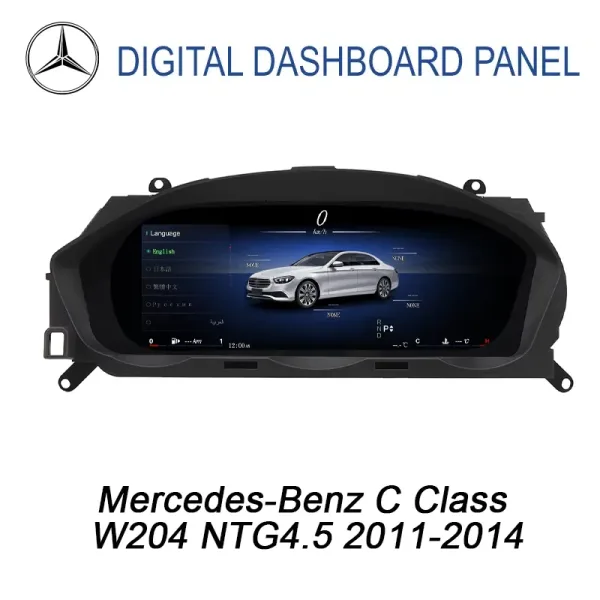
Mercedes W204 Digital Cluster — Make Every Drive Feel Like a Newer C-Class
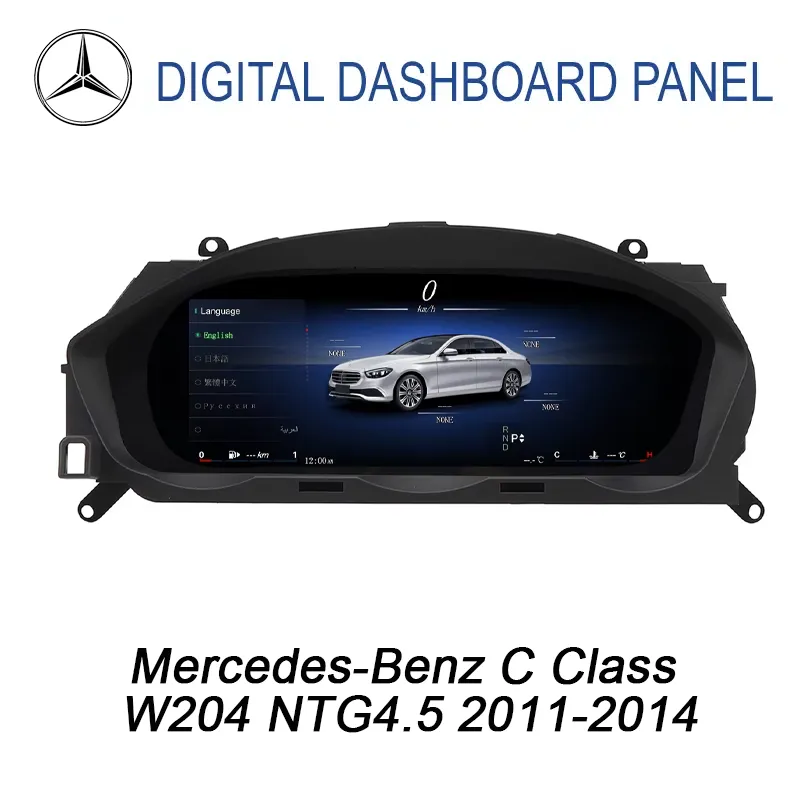
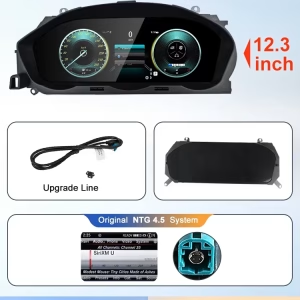
Your W204 can still be the C-Class you enjoy owning. Give the driver's instrument area a new 12.3-inch digital display with modern gauge styles, Wireless Apple CarPlay & Android Auto, while retaining supported original Mercedes vehicle information.
Version-specific preparation · 12-month limited hardware warranty · Eligible continuing software and parts support
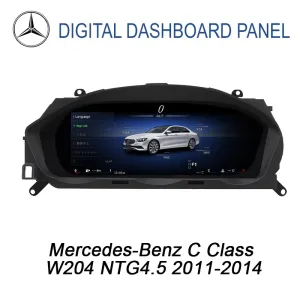
YB-199 · 2011–2014 W204 · 12.3-inch IPS display
Why Upgrade the Mercedes W204 Digital Cluster Instead of Keeping the Original Analog Gauges?
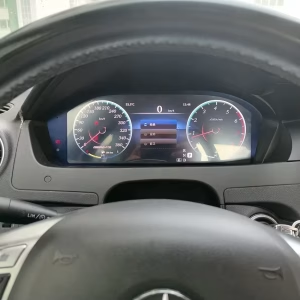
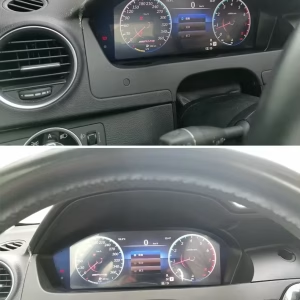
The facelift W204 is still a recognizable, driver-focused Mercedes C-Class. The analog instruments fit the car's original design, but the YB-199 changes the entire view behind the steering wheel. It is an upgrade you can see every time you enter the driver's seat.
The Same C-Class, a Very Different Driver's View
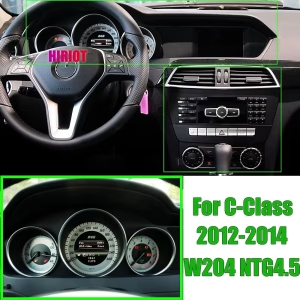
The factory cluster presents the speedometer, tachometer and central vehicle information using the instrument layout of its generation.
The digital upgrade replaces that visible arrangement with a wider display and selectable instrument styles, while using supported vehicle-data communication.
If you plan to keep driving your W204 rather than change the entire car, this places your upgrade budget in the part of the cabin you use most often.
The instrument presentation becomes a wide digital display instead of the original analog-style gauge arrangement.
The upgrade is concentrated behind the steering wheel rather than replacing the entire dashboard.
Vehicle matching and a known hardware version help with configuration and later technical support.
What Can You Actually Do With the Mercedes W204 12.3-Inch Digital Cluster?
This product changes the driver's display, not the way the C-Class itself drives. The benefits are most apparent in familiar activities: reading vehicle information, using smartphone functions and selecting the instrument presentation you prefer.
More Useful Information in the Driver's View
Driving the facelift C-Class to work or taking a longer route, you still need your speed, engine information and relevant warnings. Those functions should remain easy to identify after an instrument upgrade.
The YB-199 uses a matched CANBUS connection to show supported Mercedes data in the configurable digital gauge layout.
Available display themes include Classic, Sport and Navigation-style arrangements. The visual design changes while the matched vehicle remains the original data source.
- Supported driving speed and RPM data
- Vehicle status and warning information
- Multiple digital gauge themes
Change the Instrument Style to Match Your Preference
One advantage of a configurable digital cluster is that you do not have to keep the same visual arrangement for every journey.
The available classic, sport and navigation-style themes give the W204 driver a choice of instrument presentation without changing the factory steering wheel.
The product uses Linux and lists multilingual support. Available language and display settings follow the actual supplied software version.
Wireless Apple CarPlay & Android Auto in a W204 Driver Display
YB-199 supports Wireless Apple CarPlay & Android Auto. These functions add modern smartphone connectivity to the digital-cluster upgrade.
Phone-based navigation and supported media interfaces can be used through the correctly installed smartphone system.
For an owner who already relies on smartphone navigation, this offers a newer interface while retaining the familiar W204 cabin.
A Digital Instrument With Smartphone Functions
The published product route includes wireless smartphone support, Bluetooth and USB.
Pairing and playback behavior are checked during installation because correct hardware matching and configuration still matter.
This is a digital instrument product—not a claim that every original COMAND or Audio 20 function has been replaced by an Android center head unit.
Which Mercedes-Benz C-Class W204 2011–2014 Models Can Use This Digital Cluster?
YB-199 is designed around the later W204 instrument and dashboard route. The exact original Mercedes NTG system, vehicle generation and steering position are more important than simply matching the registration year.
| Vehicle / Market | Compatibility Direction |
|---|---|
| W204 C-Class Sedan / Saloon | Primary later-generation product fitment route for supported 2011–2014 dashboard configurations. |
| S204 Estate / Wagon / T-Model | Related C-Class body variant; confirm the actual cluster housing and NTG route before selecting this product. |
| C204 C-Class Coupe | Related Coupe platform; requires confirmation that the original instrument and dashboard match the YB-199 route. |
| USA / Canada | C-Class Sedan, Coupe and regional wagon naming may differ; confirm model year, original equipment and steering position. |
| UK / Europe | Saloon, Estate and Coupé market names. LHD or RHD version prepared according to verified original equipment. |
| Australia / New Zealand | RHD vehicle matching required against the original cluster and system layout. |
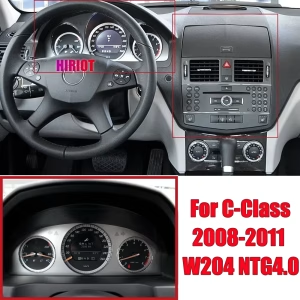
| Early W204 / NTG 4.0 | Separate early-model product route. Do not select YB-199 solely because an early W204 looks similar. |
Why Does the 2011 Facelift Boundary Matter?
Some 2011 W204 vehicles belong to the earlier dashboard system route, while others have the later facelift configuration. The original instrument and NTG architecture must determine the correct product.
iKAGOO lists NTG 4.5 and NTG 5.0 matching for this product. Exact compatibility is confirmed from the actual vehicle rather than treating every W204 with those system names as identical.
Identify the facelift dashboard and the correct original cluster shape.
Check the existing center display and NTG 4.5 / 5.0 connection route.
Select the correct steering-side version using actual dashboard confirmation.
Common engine or trim names include C180, C200, C220 CDI, C250, C300, C350 and C63 AMG. These names identify a Mercedes configuration, but are not proof of identical instrument electronics or YB-199 compatibility.
Owners of an earlier W204 can review the Mercedes W204 Digital Instrument Cluster 2008–2010 rather than selecting the later cluster by appearance alone.
Will the Mercedes W204 Digital Cluster Keep Original Driving Data and Steering-Wheel Controls?
Yes, on the correctly matched installation route. CANBUS integration is used to retain supported original vehicle information and compatible control behavior.
Supported speed, RPM and related vehicle readings are displayed through the matched instrument interface.
Supported factory warning and vehicle-status signals remain available through the correct CANBUS route.
Supported original control functions continue after correct connection and configuration.
Your Daily Controls Should Still Feel Familiar
A digital cluster should do more than show a modern gauge picture. The driver still expects the correct vehicle information and familiar control behavior.
The matched W204 installation is designed to preserve supported original warning data, steering-wheel buttons, parking-sensor information and dimming behavior where the vehicle system provides them.
The exact set of available warnings depends on the car's factory equipment, regional configuration, CANBUS communication and previous modifications.
How Is the Mercedes W204 Digital Cluster Installed Without Cutting Factory Wiring?
The intended YB-199 installation uses a vehicle-matched plug-in harness and appropriate dashboard connections. It is classified as Level 3 Advanced DIY: suitable for experienced owners or automotive electronics installers.
Verify the Original Dashboard
Confirm facelift instrument shape, original NTG system, model year and steering position.
Access the Factory Cluster
Carefully remove the appropriate trim and original instrument unit using correct service procedures.
Connect the Matched Hardware
Fit the prepared harness and appropriate CANBUS connections without intentionally cutting supported factory wiring.
Configure and Test
Check driving information, warnings, buttons, brightness and phone functions before closing the dashboard.
A Proper Installation Ends With Functional Testing
Before the dashboard is reassembled, the installer should verify the speed and RPM display, warning information, CANBUS behavior, steering-wheel controls, brightness and dimming, supported parking information, CarPlay and Android Auto.
The prepared harness is intended to avoid cutting supported original wiring. This does not mean the original cluster can be changed without dashboard access, connection checks or physical installation work.
What Makes the Mercedes W204 Digital Cluster Useful Beyond the Initial Upgrade?
The value of a dashboard upgrade should continue after installation. A known display version, supported settings and an available technical service route make the product easier to own.
Keep the C-Class You Like. Update the Part You See.
W204 owners who appreciate the car's original interior and road manners do not necessarily want to replace the entire dashboard or center system.
This cluster focuses the change on the driver's instrumentation. The existing C-Class layout remains recognizable.
An Android head-unit-only upgrade changes the central infotainment area; it does not create the same instrument transformation behind the steering wheel.
A Clear Alternative to a Used Analog Cluster
Replacing a failed factory cluster with another analog-style unit can restore the original presentation. A digital-cluster route serves a different goal: a visibly updated instrument experience.
Three Different Upgrade Decisions
Repair the original instrument: restores the previous visual presentation.
Upgrade only the center infotainment: adds a different type of screen or connectivity while the original instruments remain.
Choose the YB-199 digital cluster: changes the driver's gauge presentation with supported original-data integration and smartphone functions.
Available instrument styles and multilingual settings follow the actual software version.
Known hardware revisions help determine the correct compatible settings and update route.
Order records help identify compatible components and available repair assistance.
Mercedes W204 Digital Cluster YB-199: Hardware Specifications
The current YB-199 listing confirms a 12.3-inch IPS LCD, Linux system and T507 Plus quad-core processor. These values belong to this specific product and are not borrowed from the early W204 variant.
| Parameter | Published Specification |
|---|---|
| Product | Mercedes W204 Digital Cluster |
| SKU | YB-199 |
| Product Type | 12.3-inch LCD Digital Instrument Cluster |
| Vehicle Platform | Mercedes-Benz C-Class W204 facelift route |
| Listed Years | 2011–2014; dashboard version confirmation required |
| Display | 12.3-inch IPS LCD |
| Resolution | 1920 × 720 |
| Operating System | Linux OS with multilingual support |
| Processor | T507 Plus quad-core, 1.8GHz |
| Smartphone Connection | Wireless Apple CarPlay & Android Auto |
| Other Connectivity | Bluetooth and USB support |
| Instrument Themes | Classic, Sport and Navigation-style |
| Vehicle Communication | Matched CANBUS integration |
| Original Controls | Supported steering-wheel controls and warnings |
| Parking Information | Supported where provided by original configuration |
| Factory System | NTG 4.5 / NTG 5.0 matching as listed |
| Steering Position | LHD / RHD after vehicle-specific confirmation |
| Wiring Route | Matched plug-in harness, no intentional factory wire cutting |
| Installation Level | Level 3 — Advanced DIY |
| Shipping Weight | 8 kg, as listed on the product page |
| Package Dimensions | 42 × 28 × 42 cm, as listed |
RAM/ROM capacity, standalone offline navigation capability and any separate full-map projection specification are not independently established in the current YB-199 description. They have not been invented or copied from another model.
Why Buy the Mercedes W204 Digital Cluster From iKAGOO Instead of Hardware Alone?
The right digital cluster is more than a screen with the correct shape. The real purchase includes matching the original C-Class system, installing the hardware correctly and having a support path later.
The W204 has early and later dashboard versions. iKAGOO reviews the exact original setup so the cluster, harness and supported connections can be prepared for the selected vehicle.
After payment, the order becomes a reference for hardware identification, installation assistance, diagnosis, tracking and future technical enquiries.
The Value Is Not Only in the First Installation
Imagine using your upgraded W204 for another two or three years. If a setting changes, a wireless connection needs attention, or a CANBUS-related display issue appears, identifying the exact cluster version matters.
iKAGOO can use the original order and supplied product information to guide compatible troubleshooting, configuration and available software or parts support.
Confirm the W204 generation, steering position, NTG route and original instrument configuration.
Assist with the appropriate wiring, display settings, vehicle-data and initial function checks.
Review photos, short videos and verified symptoms before choosing a diagnostic route.
Identify eligible firmware guidance, settings, compatible components and repair or upgrade options.
Why Does Long-Term Software Support Matter for a Mercedes Digital Cluster?
The cluster depends on both its hardware and its software configuration. Later questions may involve startup behavior, vehicle-data display, warning signals, Bluetooth, smartphone connectivity, settings or compatibility.
Not every issue is a hardware failure. Some are addressed through setup guidance, connection checks or compatible firmware. Other cases may need an installer, replacement part or repair assistance.
Automatic updates, where available, are not guaranteed to solve every problem. Some issues may require a compatible manual update, engineering guidance or further diagnosis.
This is why keeping the original order, product revision and matched configuration is valuable after the first successful installation.
Eligible manufacturing defects and hardware failures follow the published warranty terms.
Eligible original purchasers can receive technical help, diagnosis and compatible software guidance.
Support identifying eligible replacement components and repair routes; physical parts may be chargeable.
How Does iKAGOO Handle a Vehicle-Specific Order?
The process begins with checkout and a recorded order number. Required vehicle details and photographs are used for the final compatibility check before the correct hardware configuration is prepared.
iKAGOO then tests and packs the product, provides shipping information when available and remains the contact point for supported installation and after-sales questions.
If a confirmed cable or accessory issue appears, the support process can include appropriate parts handling or an approved technical solution. Verified unresolved incompatibility is handled under the published fitment-protection and returns conditions.
Warranty, Returns & Fitment Protection →
How Does the Mercedes W204 Digital Cluster Score for Upgrade Value, OEM Retention and Installation?
These three measures answer different questions. Upgrade Value concerns the improvement you receive. OEM Retention concerns the supported original vehicle functions. Installation Friendliness concerns the work involved in fitting the unit.
Upgrade Value · Strong Upgrade
9.1 /10The 12.3-inch display makes a substantial visual difference to the driver-facing instrument area of the facelift W204.
- Analog-style instruments become a digital display.
- Multiple themes change the cockpit presentation.
- Wireless CarPlay and Android Auto add smartphone utility.
- Good long-term value for an owner keeping the same C-Class.
Why not 10/10? The upgrade changes the driver's instrument area, not every component of the original Mercedes infotainment system.
Original iKAGOO Upgrade Necessity result: 91/100, displayed as 9.1/10.
OEM Retention · Near-OEM Match
9.0 /10The correct CANBUS and harness route is designed to maintain supported Mercedes vehicle information and original control functions.
- Supported speed and vehicle status communication.
- Original steering-wheel controls on the matched route.
- Warning and parking-information integration where supported.
- Instrument housing and dashboard-version matching.
Why not 10/10? Factory options and regional configurations differ. Supported function retention depends on exact hardware and correct CANBUS setup.
Original iKAGOO OEM Compatibility result: 90/100, displayed as 9.0/10.
Installation Friendliness · L3 Advanced DIY
6.5 /10The matched harness supports an organized installation, but dashboard access, instrument removal, wiring verification and full function testing remain necessary.
- Dedicated plug-in harness for supported configurations.
- No intentional cutting of supported factory wiring.
- Original instrument and trim must be accessed.
- CANBUS, warnings, dimming and phone functions require testing.
Why not 10/10? This is not a tool-free display swap. Appropriate trim-removal skills and automotive electronics experience are important.
The published canonical installation assessment is Level 3 Advanced DIY. The 6.5/10 figure is a separate editorial purchase-friendliness estimate, not an original iKAGOO numerical score.
Mercedes W204 Digital Cluster FAQ: Compatibility, CarPlay, OEM Functions and Installation
Does the Mercedes W204 Digital Cluster support Wireless Apple CarPlay and Android Auto?
Yes. The current YB-199 product lists Wireless Apple CarPlay & Android Auto, with Bluetooth and USB support. Correct matching and configuration are required for the supported functions.
Can I see Google Maps or Waze behind the steering wheel?
The product supports smartphone-based navigation through its CarPlay and Android Auto functionality. Specific full-screen Google Maps or Waze display modes within every gauge theme have not been independently verified.
Is there an independent navigation system inside the cluster?
The current YB-199 listing confirms Linux and smartphone connectivity. It does not separately establish an independent offline navigation application or a dedicated onboard map database.
Does it fit a 2011 Mercedes C-Class W204?
It fits supported later W204 configurations. Because 2011 falls near the facelift transition, the original dashboard, instrument and NTG system need to match the later YB-199 route.
What if my car uses NTG 4.0 instead of NTG 4.5?
NTG 4.0 belongs to the earlier W204 route. iKAGOO has a separate digital instrument product for supported 2008–2010 W204 configurations. Matching is determined by the actual original system.
Does the W204 Digital Cluster support NTG 4.5 and NTG 5.0?
Yes, the product lists NTG 4.5 / NTG 5.0 matching. The original system and instrument arrangement are checked so the correct product version is supplied.
Will original steering-wheel buttons still work?
Supported steering-wheel functions are retained through the correct matched connection and configuration. They should be tested during installation.
Will speed, RPM and vehicle warnings remain available?
Supported vehicle data and warning information continue through the compatible CANBUS route. Specific functions depend on original equipment and correct setup.
Can I retain parking-sensor information?
Supported parking-sensor and warning display routes are retained where provided by the original Mercedes configuration and matching system.
Does installation require cutting original Mercedes wiring?
No intentional cutting of supported factory wiring is part of the intended YB-199 installation. The correct supplied harness and original connectors are used.
Is this product completely plug and play?
The product uses a matched plug-in connection design, but installation still requires dashboard access, original-cluster removal, configuration and function testing.
Will this fit an RHD W204 in the UK or Australia?
LHD and RHD variants are listed. The correct version must be confirmed from the original dashboard and cluster arrangement for the vehicle.
What details should I provide to confirm compatibility?
Start with the model, year, steering position and original dashboard photograph. An NTG-system or connector photograph may be requested if required for the specific vehicle version.
Can I ask for actual product photos before dispatch?
Yes. iKAGOO can provide photos of the prepared unit and visible accessories when requested before packing.
What happens if I have a software or configuration question later?
Eligible customers can request version-specific troubleshooting, compatible firmware guidance, setting assistance and other available technical support.
Is long-term technical support included?
Eligible purchases follow the published 12-month limited hardware warranty, three-year software-support framework and five-year parts-support route, subject to their respective conditions.
Can I choose DDP international shipping?
DDP Shipping is available for eligible checkout destinations. It covers the applicable import duties and taxes included in the selected DDP service. Standard Shipping does not include those charges. Available methods and prices are calculated at checkout.
A Smart Digital Instrument Upgrade for the Mercedes W204 You Already Own
If you are keeping your compatible 2011–2014 C-Class and want a more modern driving interface, the YB-199 brings a substantial change to the dashboard you see every day.
Its 12.3-inch IPS display, supported original vehicle data, selectable gauge themes and Wireless Apple CarPlay & Android Auto make it more than a cosmetic instrument replacement.
Choosing iKAGOO also connects your purchase to vehicle-specific matching, installation assistance and a documented support route for future ownership.
Upgrade Your Mercedes W204 Digital Cluster With iKAGOO
Select the correct YB-199 configuration and complete your order through the original WooCommerce checkout. iKAGOO reviews the required vehicle information before dispatch.


Ryan Mitchell –
I fitted it in ~45 minutes with a T20 and trim tools. True plug-and-play, no errors. Steering buttons, dimming and PDC all work. The 12.3″ looks factory.