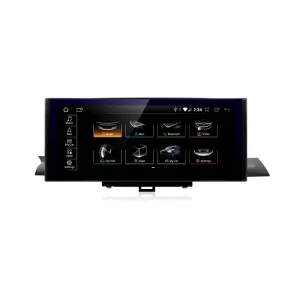
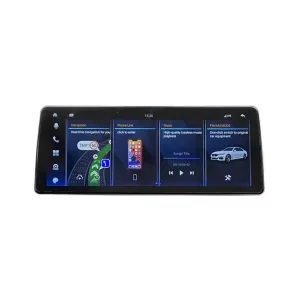
Your X5 or X6, Updated for Maps, Apps and Better Sound Control
Give the BMW you want to keep a wider center display, familiar phone apps and adjustable DSP audio. Choose the storage for your Android apps and files, with the frame and connection kit matched to your X5 or X6.
- Bring your preferred phone maps and music into the dashboard.
- Tailor supported sound settings to your listening preferences.
- Keep access to the original BMW system alongside Android.
Display, apps and DSP.
View Details → OEM RetentionVehicle-matchedOriginal-system access.
View Details → Installation FriendlinessProfessional fittingFrame, harness and setup.
View Details →iKAGOO connects vehicle matching, installation guidance and later technical support.
Match the X5/X6 kit first. The wide mounting frame differs from the F10/F11 frame. Your selected CIC or NBT version, dashboard and steering position determine the correct preparation.
What changes when you upgrade the X5 or X6 center display?
The center-screen area becomes a wide dual-display layout, with Android app access and phone integration. The driver’s gauges remain separate, so this is an infotainment upgrade rather than an instrument-cluster conversion.
Keep the BMW; change the screen experience
If your X5 or X6 still suits you, updating the display can make the cabin more useful without replacing the vehicle. Set a route on a compatible phone app, bring music into the dashboard and keep access to the original-system interface.
The change is especially relevant when you want the physical center display to look different as well as adding smartphone connectivity.
Choose the amount of change you actually want
Keep the factory monitor if its presentation already suits you. A compatible CarPlay-only interface is a different route when phone connectivity is the main goal.
Choose this 21-inch unit when the wider display, local Android apps and DSP adjustment are all part of the upgrade you want. Dual-screen layouts depend on the supplied software and compatible apps.
For the BMW X5 F15 X6 F16 dual screen, the frame is part of the decision. Review the actual X5/X6 mounting kit and original-system match, rather than choosing by screen appearance alone.
What do the DSP, 8GB RAM and two storage choices add to daily use?
DSP provides sound adjustment, RAM supports running Android apps, and storage holds installed apps and saved files. These are three different reasons to choose the upgrade, beyond its screen size.
Can I adjust the sound instead of only changing the screen?
Yes. The supplied configuration lists a 30-band DSP equalizer. Use its available frequency adjustments to tailor music playback to your listening preferences through the correctly configured BMW audio route.
A more considered listening setup. Adjust the available high-, mid- and low-frequency controls during handover, then listen with the music you normally use. Test navigation prompts and calls as well as media playback.
Match the original sound system. Identify Harman Kardon, other premium audio or previous retrofits when the kit is prepared. DSP settings do not replace correct audio wiring, source selection or vehicle configuration.
The equalizer is a tuning function; it does not replace your amplifier or speakers, add unlisted output power, or guarantee a measured sound-quality improvement.
Should I choose 8GB/128GB or 8GB/256GB?
Both listed configurations have 8GB RAM; the difference is built-in storage. Choose according to the Android apps and local files you intend to keep on the unit.
8GB RAM + 128GB
128GB built-in storageConsider this capacity if your use centres on phone-projected navigation, calls and music, with a smaller collection of local Android apps and files.
Phone projection and locally installed Android apps are different uses; you do not need to duplicate every phone app on the screen.
8GB RAM + 256GB
256GB built-in storageChoose the larger storage option when you plan to keep a larger compatible app collection, offline map downloads or media files on the Android unit.
It has twice the listed storage of the 128GB configuration, while RAM remains 8GB.
256GB does not mean twice the speed. The operating system and installed apps use part of the capacity, and performance also depends on software and workload. The MTK8667 eight-core platform is listed; an exact Android release and CPU clock are not inferred from another screen.
Can I use phone maps and music across the wider display?
Yes, compatible Apple CarPlay and Android Auto apps bring navigation, calls and music to the dashboard. Wireless Apple CarPlay is listed; the supplied software and compatible phone determine the available connection modes and app presentation.
Set your route before departure
Use supported phone navigation and voice functions for the journey. A projected phone map is separate from a native Android navigation app, and it does not establish turn-by-turn integration with the BMW instrument cluster.
The external microphone is part of the kit’s calling and voice setup. Check its placement and call quality during fitting.
Use the two display areas appropriately
The supplied interface supports dual-screen layouts for compatible navigation and media interfaces. Exact app pairings and split behaviour depend on software; the display format does not promise two independent operating systems or independent passenger control.
Keep video and entertainment playback for parked use. For driving, prioritise navigation, audio and supported hands-free operation.
Which CIC or NBT version should I choose for my BMW?
Choose BMW X5 2007–2013 (CIC) or BMW X5 / X6 2014–2017 (NBT) in the purchase options. After ordering, provide your vehicle and original-system details so iKAGOO can review the matching frame and connection kit before dispatch.
| Vehicle / market | Product route | Matching information |
|---|---|---|
| BMW X5 E70 · 2007–2013 | CIC version | Select X5 2007–2013 (CIC). The original system must be CIC; model year alone does not confirm the fitted system, particularly on earlier cars or vehicles with retrofits. |
| BMW X5 F15 · 2014–2017 | X5/X6-specific NBT frame and harness | Confirm the model year, original menu, dashboard and relevant equipment. The X5 name alone does not identify the system. |
| BMW X6 F16 · 2014–2017 | Matching X6 NBT application | Use F16 chassis and actual factory-system details; do not substitute an earlier or later X6 generation. |
| USA, Canada and continental Europe | Vehicle-specific review | Supply actual year and steering position. A model-year range from a different country or screen listing is not universal fitment confirmation. |
| UK, Australia, New Zealand and other RHD applications | Confirm steering-specific hardware | Ask iKAGOO to check the right-hand-drive dashboard and kit. Do not assume that an LHD installation photograph confirms RHD fitment. |
| CCC, NBT EVO or another chassis | Separate version review | The CIC and NBT options do not confirm CCC or NBT EVO compatibility. Mention previous retrofits when identifying the actual system. |
Start with your model and year, steering position and a clear photo of the original dashboard and system menu. Include factory audio, camera details and earlier modifications where relevant. Connector photos are useful if the hardware remains uncertain.
Read the vehicle-matching and installation process, or request a preliminary check. The correct X5/X6 frame is different from the F10/F11 5 Series frame.
Which original BMW functions remain part of the setup?
Original-system/Android switching, touchscreen operation and supported steering-wheel-button control are listed. Audio, cameras and other vehicle-specific functions are matched to the original equipment and supplied interface.
Familiar steering-wheel buttons
Supported button operation gives you a familiar control route alongside the touchscreen. The installer should test the actual supported buttons during handover.
Access to the original system
The listed switching function keeps original-system access alongside Android. This center-display kit does not replace the driver’s gauges or establish new instrument-cluster functions.
The correct BMW audio route
Match the original sound equipment and follow the supplied audio setup. Check source selection, music, voice prompts and calls before final reassembly.
Camera, parking and special equipment
Identify the original reverse camera, 360-degree system, parking displays and any aftermarket camera. Their retention, along with controller functions beyond the listed wheel buttons, requires specific confirmation for your configuration.
The practical goal is to make the new display work with your BMW’s actual equipment. An NBT menu or a similar-looking installation is not evidence that every vehicle function is reproduced on Android.
How is the X5/X6 display fitted, connected and tested?
The original center-display area is fitted with the wide unit, X5/X6-specific frame and matched connection kit. Professional installation is recommended for trim removal, cable routing and complete setup.
- Confirm the supplied version. Check the selected CIC or NBT system, steering position, frame and harness against the order guidance before removing the original display.
- Fit the display and X5/X6 frame. Protect the dashboard trim and use the correct mounting points. Keep the original components for later diagnosis or restoration.
- Connect and route the kit. Follow the matched power, display and vehicle-interface instructions. Position the GPS and 4G antennas, microphone and USB leads carefully.
- Test before closing the dashboard. Check picture, sound, calls, phone connection, original-system switching, supported wheel buttons and matched camera functions. Check sleep/wake behaviour and final display positioning.
What is shown in the matching package?
- 21-inch dual-screen unit and X5/X6 NBT mounting frame
- Power and vehicle connection harness
- GPS and 4G antennas
- USB leads, external microphone and mounting screws
What help can iKAGOO provide during fitting?
Keep the order number and supplied-version details available. Clear connection photos or a short video help iKAGOO identify the relevant wiring or setup guidance for that unit.
If a connector, pin layout or mounting point differs, pause and ask for the correct route. Do not force plugs, alter pins or cut the main harness to make unmatched parts fit.
A universal no-coding procedure is not confirmed for this package. Use the instructions for the supplied version rather than another BMW screen’s tutorial.
How can 4G, Wi-Fi and a saved setup make the upgrade more useful over time?
The listed 4G and Wi-Fi connections support compatible connected Android apps, while keeping your working setup details makes later assistance more specific to your installed unit.
Connect for the way you use apps
Use an appropriate Wi-Fi connection or the supported mobile-data setup for apps that need internet access. 4G operation depends on compatible local bands, a suitable SIM, coverage and a service plan where required.
GPS and 4G antennas are included in the package reference. Their placement and the final software setup should be checked in the vehicle; an antenna alone does not confirm service with every network.
Keep the configuration that works
Record the supplied hardware version and working audio, original-system and camera settings after fitting. Use that record if you change phones, need a setup check or request compatible software assistance later.
Update support follows hardware identification and the available compatible solution. Automatic updating is not confirmed, and a file for a visually similar unit may not be appropriate.
What hardware is listed for the 21-inch X5/X6 dual screen?
The supplied configuration identifies an MTK8667 eight-core platform, 8GB RAM, 128GB or 256GB storage, dual QLED display and a 30-band DSP equalizer.
| Parameter | Specification |
|---|---|
| Product type | Vehicle-specific center-infotainment dual-screen upgrade; driver’s instrument cluster is separate. |
| Vehicle route | BMW X5 2007–2013 (CIC), or BMW X5 / X6 2014–2017 (NBT), with the corresponding system, frame and harness. |
| CPU | MTK8667, eight cores. Clock frequency is not stated here. |
| RAM | 8GB. |
| Storage | 128GB or 256GB, subject to selected order configuration. |
| Screen | Dual QLED display with full lamination. |
| Display size | 21-inch dual-screen format, as described for the supplied product. |
| Resolution | Dual 1920 × 720, as stated on the supplier configuration sheet. |
| Operating platform | Android with original-system/Android switching. Exact Android release follows the supplied unit. |
| Phone integration | Wireless Apple CarPlay and Android Auto for compatible phones and supported apps. Confirm Android Auto connection mode for the supplied software. |
| Internet | 4G and Wi-Fi; local network, SIM and service requirements apply. |
| Audio | 30-band DSP equalizer; output route is matched to the original BMW audio system. |
| Controls | Touchscreen and supported steering-wheel buttons; other original controller functions require version-specific confirmation. |
| Included-parts reference | Display, X5/X6 NBT frame, power/vehicle harness, GPS antenna, 4G antenna, USB leads, external microphone and screws. |
| Matching information | Actual model year, steering position, original system, dashboard, audio/camera equipment and previous retrofits. |
View the configuration-sheet image. The selected order and confirmed vehicle match determine the supplied version; specifications from a similar-looking F10 unit do not replace this product’s configuration.
Why buy your BMW X5/X6 dual screen from iKAGOO?
iKAGOO ties the wide-screen hardware to the correct X5/X6 frame, original BMW system and a continuing technical-support route. That matters when two similar displays can require different connections, audio settings or software.
Before preparation: identify your BMW
Your chassis, year, steering position, original system and relevant equipment guide the matching process. Mention earlier retrofits so the team works from what is installed now.
A preliminary check is available before purchase. After payment, provide the requested vehicle information through the order process for final review before preparation and dispatch.
During installation: work from the supplied kit
If the screen displays correctly but sound, a camera or a control needs attention, iKAGOO can review useful connection photos and configuration details. Guidance follows the actual harness and unit, rather than a generic F10 or another seller’s diagram.
Later: identify the appropriate software
Keep the order and hardware details for setup help, diagnosis and available compatible updates. Some issues need manual instructions or technical review; automatic updating is not confirmed and would not replace checking the installation.
When a cable or component needs attention
The original order helps identify the matching accessory or repair route. Contact iKAGOO with the symptom and version details before choosing a replacement part or commissioning work you expect to be covered.
Defined support periods: eligible original purchasers receive a 12-month limited hardware warranty, three years of free remote software support and a five-year parts-and-upgrade support route from confirmed delivery. Compatible solutions depend on availability. Parts, shipping and physical repairs may be chargeable; the longer support route does not extend free hardware coverage.
See the iKAGOO order and support approach, warranty and long-term support terms, returns and compatibility remedies, and shipping information. Applicable policy terms and statutory consumer rights govern coverage.
How should I judge upgrade value, original-function retention and installation?
Judge the display change, the matched BMW integration and the work required to fit it as separate decisions. The three summaries above link to these product-specific buying considerations.
Upgrade Value Wide-screen upgrade
Best suited to an owner who wants the center display itself to change. The 21-inch format, Android platform, phone integration and DSP adjustment provide different parts of that change.
- The wider center-display format changes the visible infotainment area.
- Compatible phone apps address maps, music and calls.
- 8GB RAM and the two storage choices support planned local Android use.
- 30-band DSP adds supported sound adjustment.
Purchase boundary: if you only want phone projection and prefer the existing monitor, compare that narrower upgrade route. This kit does not convert the driver’s instrument cluster.
OEM Retention Vehicle-matched
The listed original-system switching and supported wheel controls are the starting point. Correct frame, harness and configuration are what make that integration useful in your vehicle.
- Original-system and Android access are listed.
- Touch and supported steering-wheel-button operation are listed.
- Audio equipment and the output route must match.
- Cameras, parking displays and additional controller functions need specific confirmation.
Purchase boundary: the selected CIC or NBT package is not a universal promise for all X5/X6 equipment or other BMW system generations. Complete the review against the functions you want to retain.
Installation Friendliness Professional fitting
Choose an installer comfortable with BMW trim work and vehicle-specific screen integration. The supplied frame and harness establish the route, while configuration and final testing complete the job.
- Center-display and related trim work are required.
- The long X5/X6-specific frame must fit the actual dashboard.
- Antennas, microphone, USB and vehicle connections need correct routing.
- Sound, system switching, phone connection and supported original functions need a complete handover test.
Purchase boundary: no universal fitting time or no-coding claim is made. iKAGOO can assist from the supplied-version details and useful installation evidence.
What else should I confirm before ordering the X5/X6 dual screen?
Select your vehicle/year and CIC or NBT version, then review the hardware configuration and equipment you want to retain.
Does this product support both BMW X5 and X6?
Yes. The purchase options are BMW X5 2007–2013 (CIC) and BMW X5 / X6 2014–2017 (NBT). Select the corresponding version; iKAGOO reviews the actual dashboard, steering position and original system before preparation.
Does it replace the original instrument cluster?
No. It upgrades the center infotainment display. The driver’s original instrument cluster remains separate.
Is this the same mounting kit as the F10/F11 dual screen?
No. Use the X5/X6-specific NBT frame and connection kit shown here. Similar displays do not make the mounting frames interchangeable.
Which memory and storage configurations are listed?
8GB RAM with either 128GB or 256GB storage. The larger option doubles the listed storage, not the RAM. Confirm the chosen configuration and its current price before ordering.
Does it support wireless Apple CarPlay and Android Auto?
Yes. Wireless Apple CarPlay and Android Auto are listed for compatible phones. Confirm the supported Android Auto connection mode and interface behaviour for the supplied software; not every app supports every display layout.
Can navigation and media use both display areas?
Supported dual-screen layouts can combine compatible interfaces. The app and supplied software determine the exact combinations. This does not confirm two independent operating systems or independent passenger control.
Does the 30-band DSP replace the BMW amplifier?
No. It provides supported equalizer adjustment. Your original audio equipment and correct connection still matter; it is not an amplifier-power or speaker-upgrade claim.
Can I keep the original BMW system?
Yes. Original-system/Android switching and supported wheel controls are listed. Camera, audio, parking-display and additional controller retention must be checked against your actual equipment.
Will my factory reverse camera or 360-degree system work?
This needs configuration-specific confirmation. Identify the original or aftermarket camera equipment during matching so the correct supported connection and setup can be checked.
Does the screen use AUX or Bluetooth for sound?
Follow the audio route specified for your supplied unit and original sound equipment. Do not copy another owner’s AUX, Bluetooth or amplifier arrangement without checking that it applies.
Can I use 4G with any SIM card?
Not automatically. Confirm the unit’s supported local bands and SIM requirements, then use a suitable service plan and coverage. Wi-Fi is also listed.
Is a right-hand-drive version or a particular model year confirmed by the photo?
No. The reference image does not confirm all steering positions or years. Send your actual year and dashboard details for the appropriate CIC or NBT match.
What should I send for a compatibility check?
Start with model, year, steering position and clear dashboard/system-menu photos. Mention premium audio, camera equipment and earlier retrofits. Supply connector photos if the hardware remains uncertain.

Can I install it myself, and is coding required?
Professional installation is recommended. Trim work, matched connections, setup and complete testing are required. A universal no-coding procedure is not confirmed for this package.
What if a connector or mounting point differs?
Pause and contact iKAGOO with clear photos and the supplied-version details. Do not force connectors, change pins or cut the main harness to make unmatched components fit.
Can I request software or parts help after installation?
Yes. Keep the original order and version details for applicable diagnosis, settings, available compatible software and accessory enquiries. Warranty, software support and physical-parts coverage have different terms; future Android releases and automatic updates are not promised.
A Wider Display for the X5 or X6 You Want to Keep
Choose this upgrade when you want a visible cabin update, familiar phone apps, local Android capacity and DSP sound adjustment together. The strongest result starts with the correct CIC or NBT frame, the right storage choice and a complete installation test. iKAGOO connects those decisions to preparation, fitting guidance and continued version-specific support.
Plan Your BMW X5/X6 Dual-Screen Upgrade
Select BMW X5 2007–2013 (CIC) or BMW X5 / X6 2014–2017 (NBT) in the purchase options. Submit the requested vehicle details after ordering for iKAGOO’s final fitment review. For the listed 8GB RAM configurations, confirm whether 128GB or 256GB storage meets your needs.
The matching vehicle details are reviewed before the order is prepared for dispatch.
Reviews
There are no reviews yet.