


BMW F30 Screen Upgrade: Choose NBT, EVO and Screen Size
BMW 3 SERIES F30 · SCREEN BUYING GUIDE
A bigger map. The same F30 dashboard.
A BMW F30 screen upgrade replaces the small centre display with a 10.25- or 12.3-inch Android screen, adding wireless CarPlay, Android Auto and Android apps.
The change you notice is above the air vents: a wider display for navigation, calls and music. The original BMW system remains accessible through the correctly matched interface.
For the iKAGOO kit covered here, choose NBT or EVO, then your preferred screen size. It is listed for supported 2013–2017 F30 configurations.
Compare the two screen sizes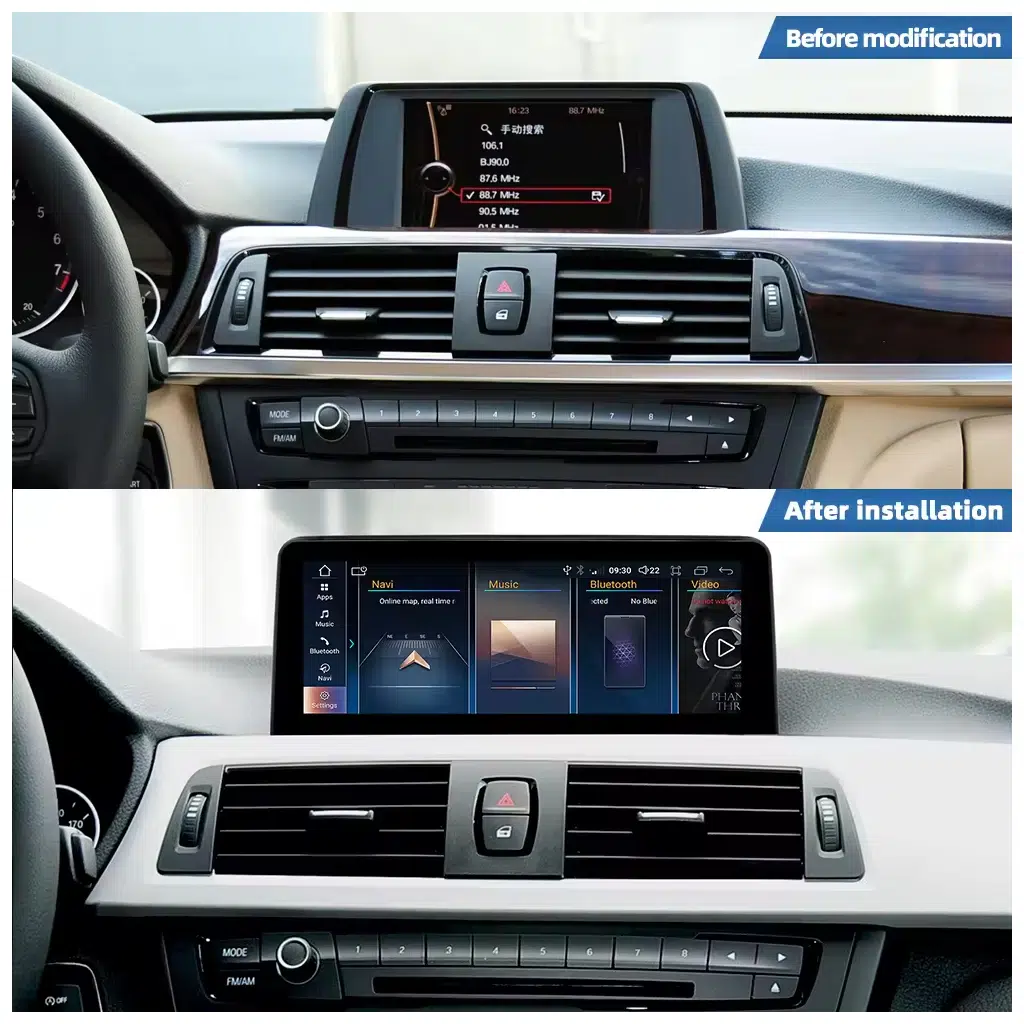
THE FIRST DECISION
Do you need a new screen, or just CarPlay?
If you like the existing display and only want your phone’s maps and music, a compatible CarPlay interface is worth considering. It adds phone projection while keeping the screen you already have.
Choose the Android screen when the display itself is what you want to change. You get a larger viewing area and can also run compatible apps on the unit, rather than relying only on your phone.
| Your priority | The useful route |
|---|---|
| Keep the cabin looking unchanged; add phone projection. | A CarPlay interface matched to your original BMW system. |
| Replace the small display; use phone projection and Android apps. | A matched F30 Android screen. |
| Repair a failed factory display. | Diagnose the fault first, then choose a suitable replacement. |
The gauges behind the steering wheel are a separate upgrade. For that decision, use our F30, F31 and F34 OEM 6WB versus aftermarket cluster guide.
MATCH THE BMW SYSTEM
NBT or EVO? The menu can be misleading.
An EVO ID4 menu can look like the earlier NBT menu. That is the F30 detail worth checking before selecting a screen. Registration year and screen size alone do not settle it, especially if the car has already been retrofitted.
Where your navigation menu provides version information, photograph the complete page. The InCarTec BMW system-identification guide distinguishes software labels beginning with NBT_ and NBTevo_. If you cannot find that page, a dashboard photo and a clear main-menu photo give iKAGOO a starting point.
You can place the order and provide those details afterwards. iKAGOO checks the vehicle information before dispatch to prepare the screen, harness and interface. Selection help before ordering is also available.
This product offers NBT and EVO versions. A CIC or CCC reference in a general BMW guide does not make it a supported option for this listing.
THE VISIBLE CHOICE
10.25 or 12.3 inches: how much screen do you want?
Choose 10.25 inches if you want a larger display that remains relatively restrained in the F30 cabin. Choose 12.3 inches if you prefer a more prominent screen for maps and apps.
| 10.25-inch display | 12.3-inch display |
|---|---|
| A less dominant look above the centre vents. | A wider, more noticeable display in the same dashboard area. |
| A good starting point if you want phone navigation without the largest screen. | Worth considering if a larger map view is your main reason for upgrading. |
| Both sizes still need the correct NBT/EVO version. Check the supplied mounting style and your dashboard layout. | |
Screen diagonal is not the full assembly width. If clearance or seating position concerns you, ask for the chosen version’s dimensions rather than judging from a generic dashboard mock-up.
Choose memory for the way you use it
The listing includes 2+32GB, 4+64GB, 6+128GB and 8+128GB options. If you mainly use CarPlay or Android Auto, much of the app work happens on your phone. If you intend to install and switch between Android navigation and media apps on the screen itself, give the higher-memory options more weight. Check the selected variation for its full hardware specification.

DAILY USE
Keep the BMW controls you already use
The matched kit supports access to the original BMW system, iDrive-style control, steering-wheel buttons and factory audio output. Supported camera and parking functions also need the correct connection and settings.

Check the sound and camera, too
A working Android picture is only part of the installation. Music must reach the speakers, the BMW menu must display correctly, and the fitted camera must switch when expected.
Tell iKAGOO about a factory amplifier or an earlier camera retrofit. These details affect the connection guidance supplied with your order.
Centre-screen CarPlay does not by itself establish map display in the instrument cluster or HUD. Those are separate display routes.
Watch the product demonstration
FITTING THE KIT
Test it before the trim goes back
iKAGOO rates installation Level 3: Advanced DIY. An experienced DIY owner or automotive electronics installer should be comfortable removing trim, connecting the matched harness, routing cables and configuring the vehicle interface.
Correctly matched installations are designed to avoid cutting the supported factory wiring. There is still practical fitting and setup work to do.
- Original BMW view: open the factory menu and check the picture.
- Sound and controls: test music, calls, iDrive and steering-wheel commands.
- Reversing: check the supplied camera/parking integration.
- Phone and navigation: connect CarPlay or Android Auto, then test the apps and navigation functions included in your configuration.
If a connector does not match or a function fails, leave access available and contact iKAGOO with photos or a short video. That makes it easier to identify the connection or setting before reassembly.
Is the upgrade worth it for your F30?
It makes the strongest case if you use maps, calls and music often and want to keep the car. If the current display already does everything you need, the benefit is smaller.
These are iKAGOO’s published product assessments, not independent laboratory test scores.
Compare the fitted cost, including your chosen screen, any required accessories, installation and checkout shipping/tax options. For coverage and return conditions, read the current warranty policy and returns policy.
A few questions before you choose
Can I add CarPlay without changing the screen?
Yes, a compatible interface module can retain the existing display. Choose an Android screen if you also want the larger display and apps running on the unit itself.
Does a bigger screen mean I need the EVO version?
No. Screen size and BMW system version are separate choices. Match the NBT/EVO interface first; either listed screen size still needs the correct version.
Will this kit fit an F31 Touring or F34 Gran Turismo?
The linked listing covers supported 2013–2017 F30 configurations. For an F31 or F34, send the exact chassis, year and dashboard photo so iKAGOO can identify the appropriate product.
Does plug-and-play mean there is no setup?
The matched harness simplifies the connection, but the installer still needs to fit the screen, configure the interface and test the supported functions. Confirm any coding requirement for the supplied kit and existing equipment.






Add comment