Audi Q7 4L Digital Instrument Cluster: A Driver Display Worth Looking Forward To
Keep the spacious, long-distance character of your first-generation Q7 and bring its instrument area up to date. The 12.3-inch digital cluster presents vehicle information and compatible map projection behind the wheel—with the right display connection prepared for your car.
Order-linked fitment review · 12-month limited hardware warranty · Eligible software and parts support
Why Does the Audi Q7 4L Digital Instrument Cluster Make Such a Difference?
The first Q7 was built for substantial journeys and practical everyday use. Its original circular instruments still deliver familiar information. For owners who intend to keep their Q7, the driver display is a highly visible place to refresh the interior without changing the SUV itself.
From Familiar Gauges to a Wider Driving Display
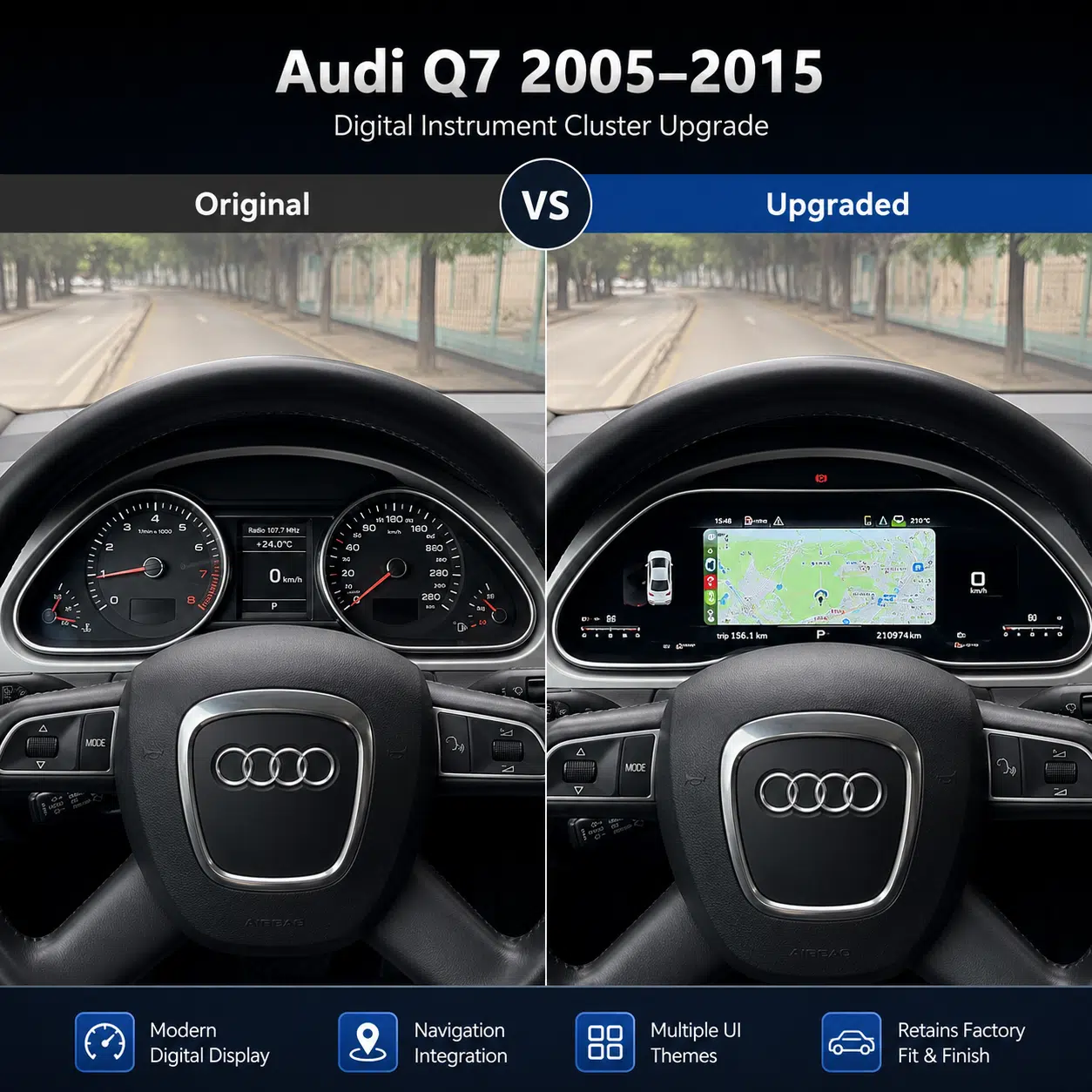
The original layout uses separate analog dials and a smaller center information area. The replacement brings compatible vehicle readings and digital display themes into one 12.3-inch focal point.
From your normal seating position, the difference is apparent before opening any menu. The Q7 dashboard and steering wheel remain visually recognizable; it is the instrument experience that changes.
For longer journeys, the available map display also makes a practical visual difference when the required video-input route is connected.
What Does the Audi Q7 4L Digital Instrument Cluster Actually Display?
The YB-190 focuses on the information a Q7 driver already expects—plus screen configurations that the original instrument panel did not provide. Map projection and smartphone interfaces are available only through a compatible controller, Android player, synchronization cable or other confirmed video source.
See Speed, Engine Information and Vehicle Status at a Glance
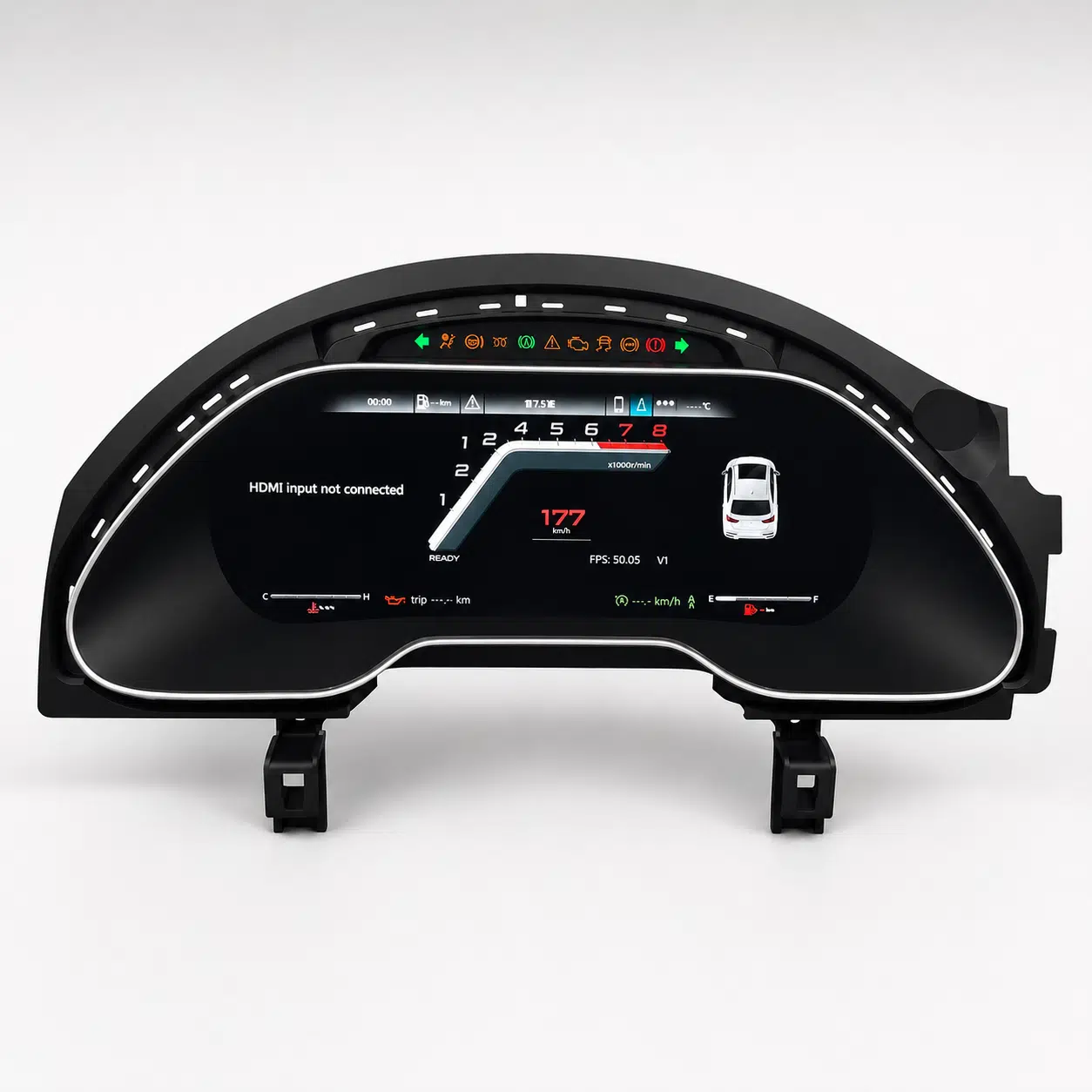
During a normal drive, speed, RPM, fuel and trip information remain the essential readings. On the matched Q7 route these are arranged within the digital interface, alongside the supported warning-icon area.
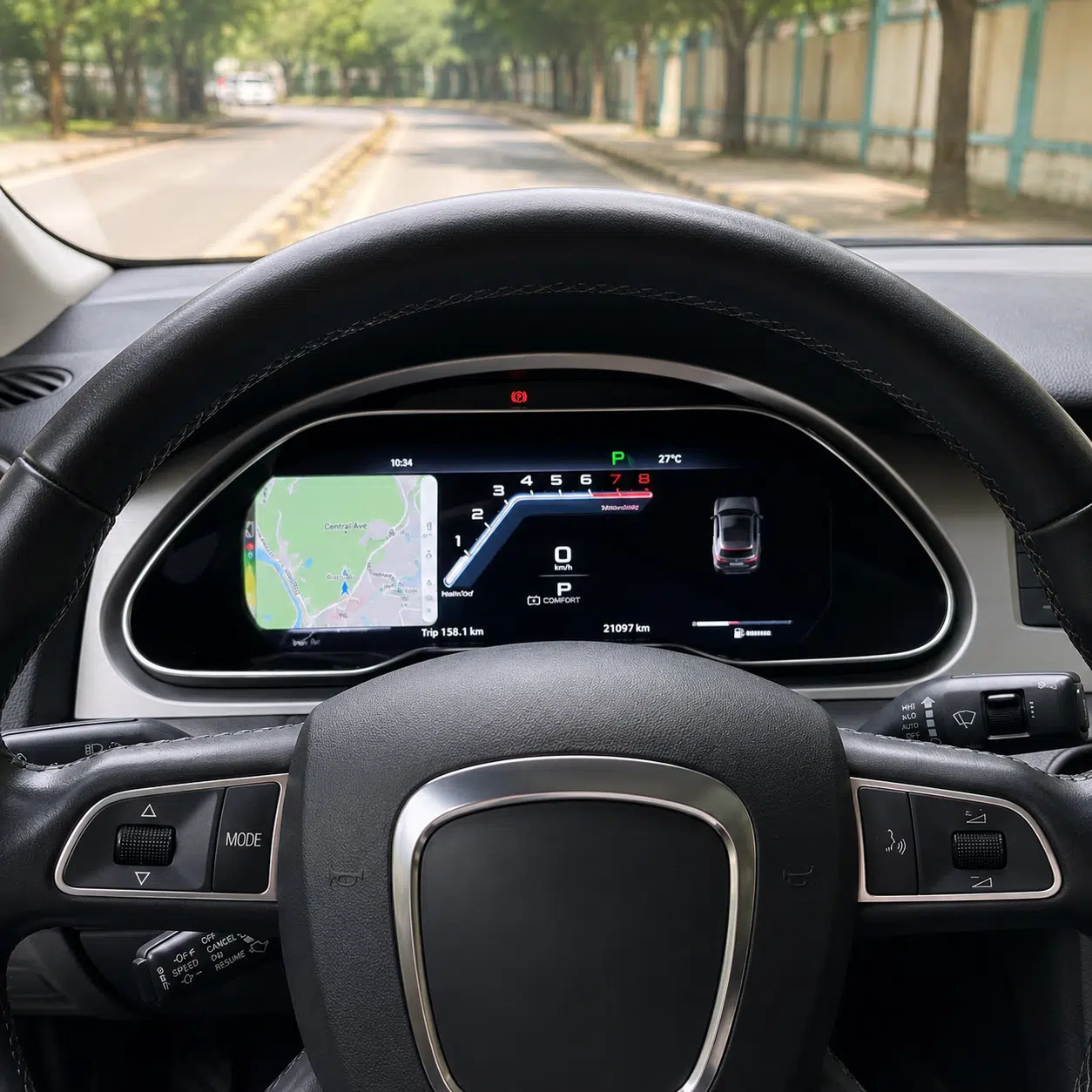
A sport-style display can combine a digital speed readout, tachometer presentation and vehicle-status illustration. These are display improvements, not claims that the cluster changes engine output or factory sensor capability.
- Supported speed and engine-RPM data
- Fuel and trip readings from the matched vehicle interface
- Selected warning indicators and status information
Put Compatible Navigation Maps Behind the Wheel
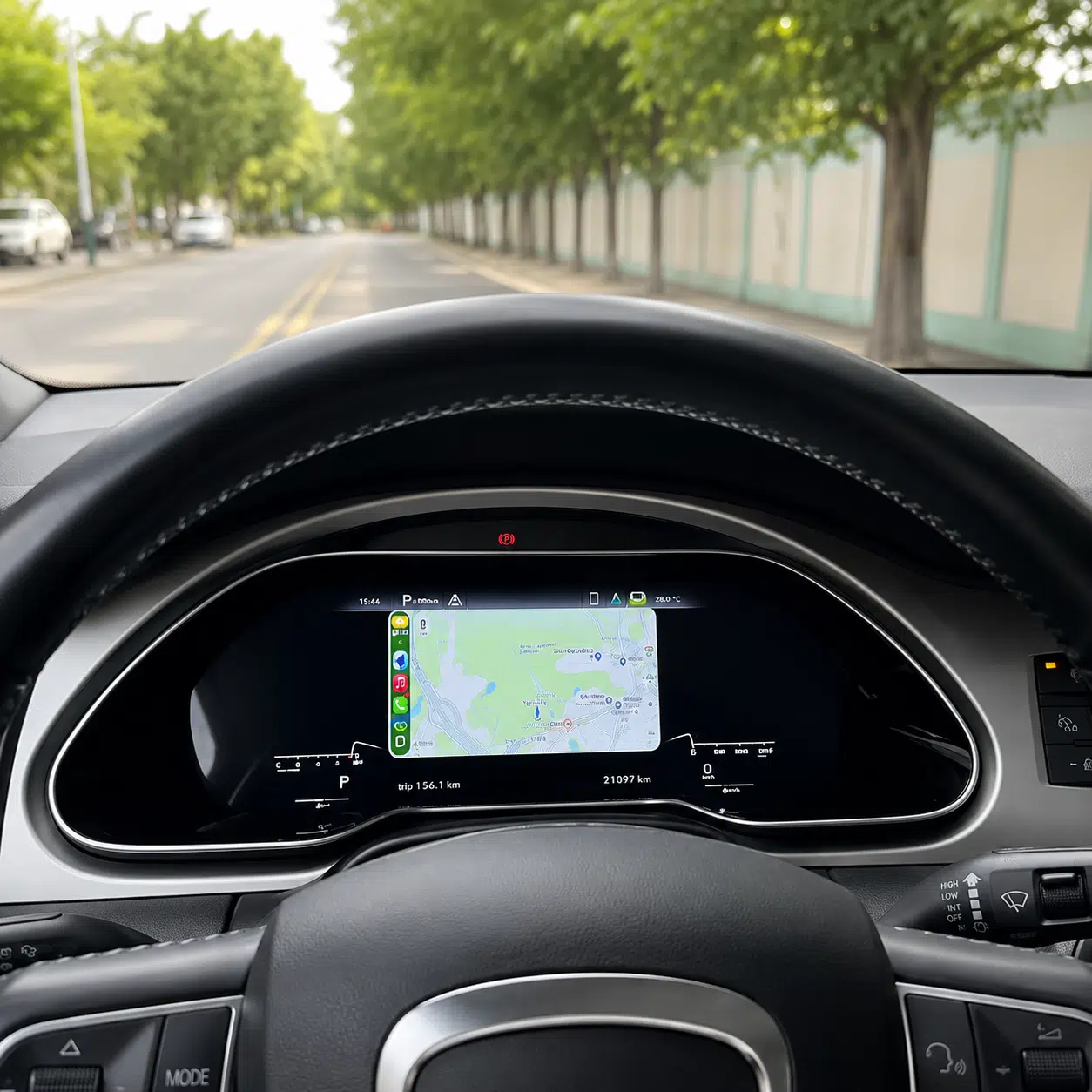
On a longer drive, map visibility is one reason a Q7 owner may choose this cluster over an appearance-only gauge change. The product-gallery screen shows road-map information directly inside the instrument area.
The navigation source matters. YB-190 is a digital instrument unit, not a standalone Android head unit; full map display requires a compatible external controller, Android player or supported synchronization/video connection.

iKAGOO reviews the desired map source while confirming the version and installation components for your vehicle.
CarPlay, Android Auto, HiCar and AirPlay: Understand the Display Route
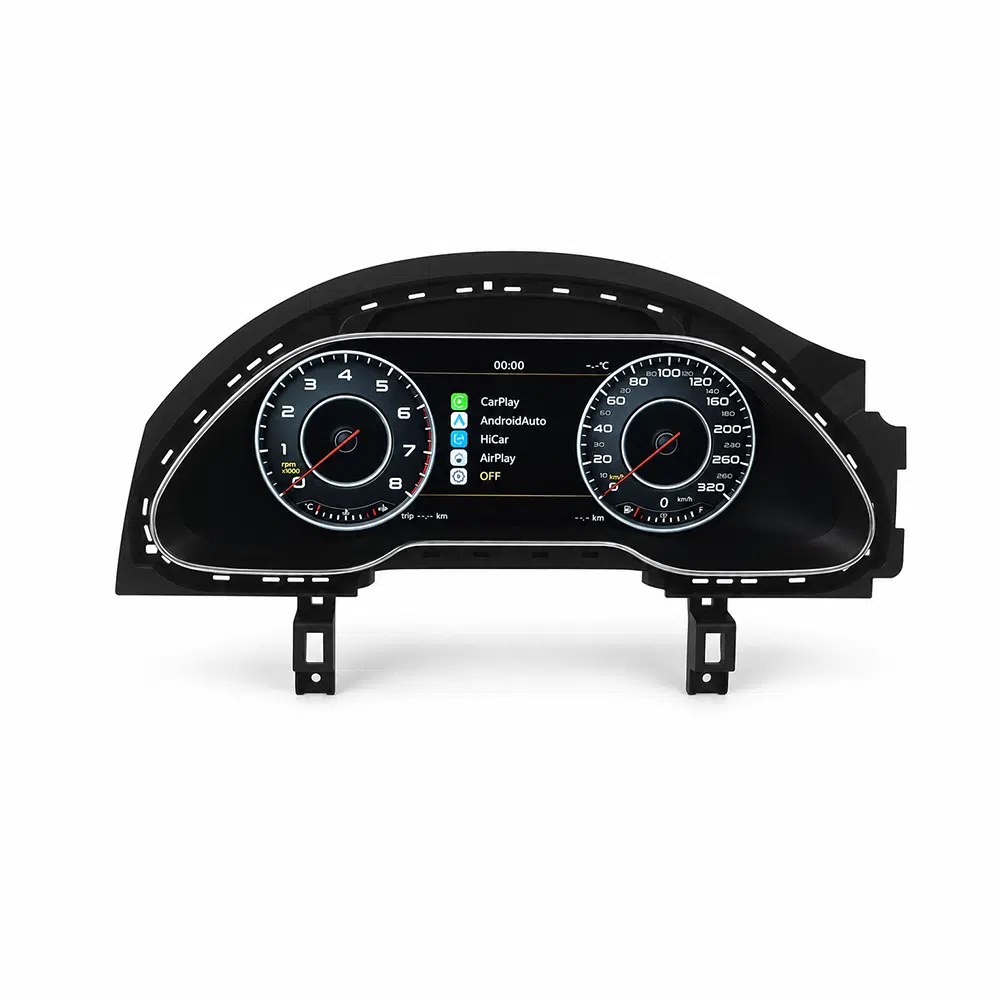
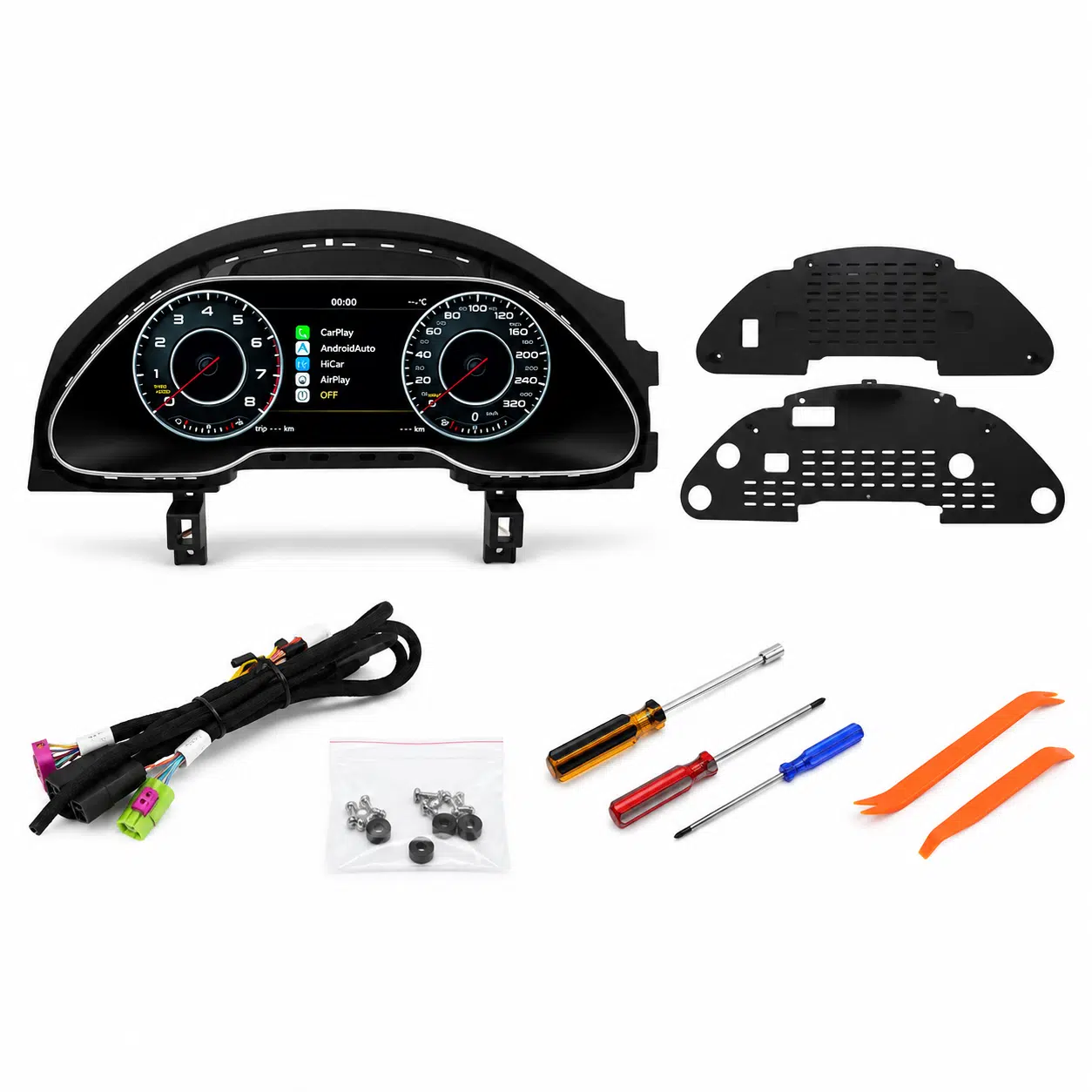
The physical product image shows a menu with CarPlay, Android Auto, HiCar and AirPlay options. This is evidence of selectable projection modes in the displayed system.
When the corresponding compatible controller or player is connected, the supported phone-projection picture can be displayed in the digital instrument area. Availability and control method depend on the external device, connection and supplied configuration.
Important distinction: a CarPlay menu on the cluster does not mean the YB-190 has its own independent CarPlay processor, built-in Android navigation, wireless receiver or smartphone apps.
Which Audi Q7 4L Models Fit This Digital Instrument Cluster?
This is a first-generation Audi Q7 4L / Typ 4L digital-cluster retrofit. Exact compatibility is determined by the original instrument housing, dashboard structure, market version and steering position—not only the registration year or engine badge.
| Vehicle / Market | Fitment Direction |
|---|---|
| Audi Q7 4L / Typ 4L | Primary vehicle family for the YB-190 cluster; matching original dashboard and cluster arrangement required. |
| Q7 Mk1 / First Generation | English-language names for the same 4L platform. Some regions describe the model range as 2005–2015, 2006–2015 or 2007–2015. |
| Europe / UK | Confirm the original cluster outline, market equipment and steering position. Do not assume UK right-hand-drive compatibility from model year alone. |
| North America | Confirm chassis, year, instrument and available matching installation route for the market-specific Q7. |
| Australia / New Zealand | Right-hand-drive compatibility requires specific approval. The standalone YB-190 is not compatible with a confirmed 2009 Australian RHD Q7 4L configuration. |
| Audi Q7 4M / Mk2 | Different Q7 generation; this product is for the 4L route, not the 4M. |
Compare the original instrument face, housing and dashboard opening with the YB-190 assembly.
Confirm the correct harness and any external display-sync/controller connection required for the selected function.
Retain the confirmed configuration and purchased hardware version for future setup and support.
How Do I Get the Correct Q7 Configuration Prepared?
Start with your model year, country, steering position and one clear photo of your existing cluster in the dashboard. iKAGOO can ask for a rear-connector or system photo if the selected hardware route requires one. Owners wanting CarPlay or full-map display should also identify the planned compatible external player or controller.
The 4L is not the later 4M, and a standalone cluster is not interchangeable with the separate Audi Q7 digital cluster + Android head unit package.
Which Factory Driving Functions Remain Available After the Q7 4L Digital Cluster Upgrade?
Modern appearance matters only when the new instrument remains useful. On the correct vehicle-specific interface, supported Audi Q7 speed, engine, fuel, trip and warning data continue to be presented to the driver.
Key driving readings remain visible in the configured digital gauge layout.
Supported fuel level, mileage/trip information and related vehicle data use the matched original signal route.
The display includes warning-icon areas for selected supported vehicle messages and indicators.
Preserve the Driving Information You Already Rely On
In the Q7 4L, a familiar fuel reading before a long trip or an instrument warning while driving remains important. The retrofit is designed to change the display presentation while respecting supported vehicle information.
Available warning messages and control behavior depend on the exact Q7 hardware, CANBUS configuration and installation. A photo of an icon row is not proof that every factory warning is supported on every vehicle.
Steering-wheel interaction must be checked against the actual fitted Q7 controls. Do not treat a digital display retrofit as a change to the original MMI, BOSE amplifier or parking system.
Read the iKAGOO Factory Function Retention Standard →
How Is the Audi Q7 4L Digital Instrument Cluster Installed?
YB-190 is a vehicle-specific instrument retrofit. The supplied cluster, mounting pieces and matching harness provide a defined starting point, followed by any necessary external video/synchronization wiring and function checks.
Match the Original Q7
Check generation, steering position, instrument shape and approved wiring route.
Access the Instruments
Remove surrounding trim and factory cluster using appropriate service procedures.
Fit the Matched Hardware
Install approved brackets, wiring and, if selected, the verified video/controller interface.
Verify and Reassemble
Check vehicle data, warnings, power behavior and any connected map display before closing the dashboard.
Why Guided Installation Is the Correct Expectation
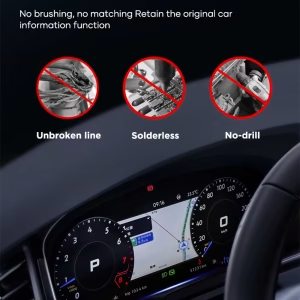
The original instrument assembly must be accessed and new hardware fitted to the correct Q7 route. The correct matched wiring can avoid unnecessary cutting of supported factory main wiring, but the installation is not simply placing a tablet on the dashboard.
Any required transfer of an original PCB, soldering, special equipment or Audi coding must be confirmed for the actual version before instructions are issued. The current public product information does not establish a universal “no coding” or “no board transfer” claim.
iKAGOO provides order-linked support to help the installer verify the connections and required configuration before final reassembly.
How Does the Digital Cluster Suit Longer Trips and Everyday Q7 Ownership?
Q7 4L owners commonly keep these vehicles for their spacious cabin and established road manners. A useful digital-cluster upgrade improves the view they use on short daily journeys and extended driving, provided the chosen display source matches how they drive.
Choose the Screen Experience You Will Actually Use
For everyday driving, the digital gauges keep the information in the instrument position. For a trip requiring navigation, a compatible video source can bring a map view into that same visual area.
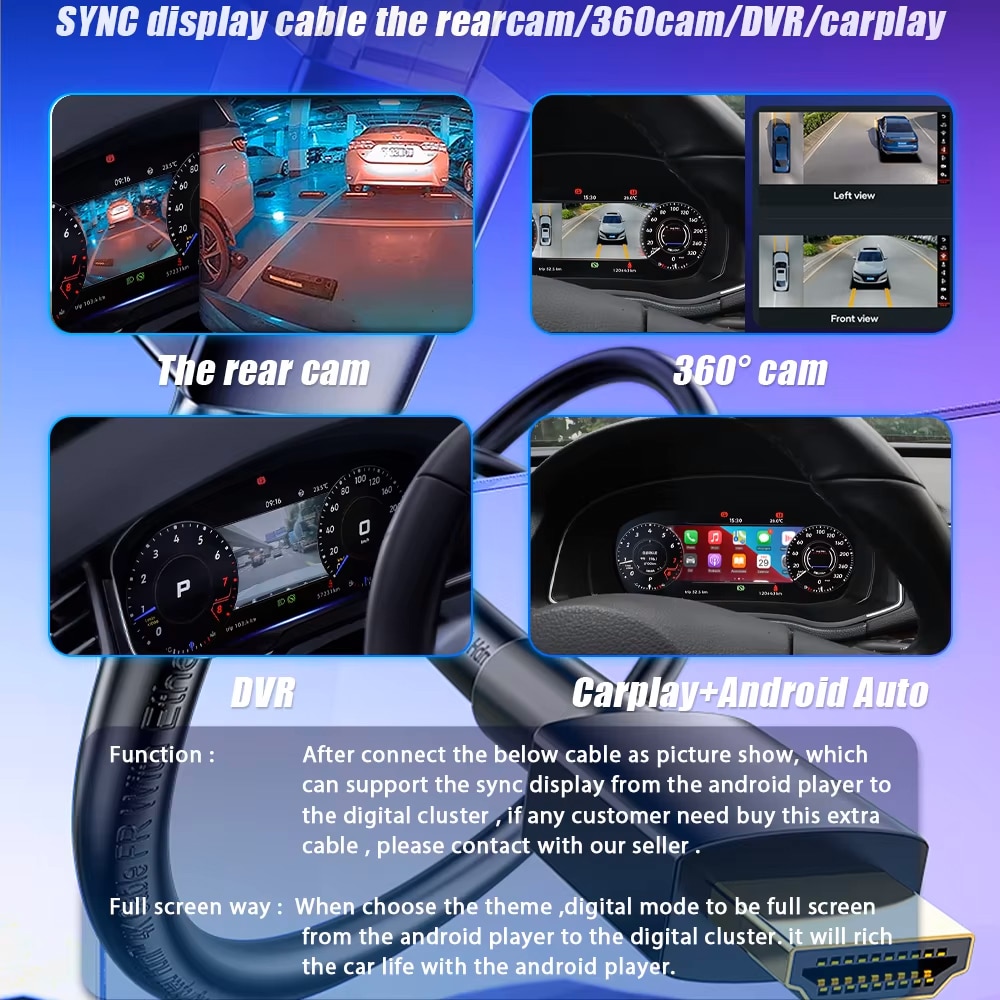
The YB-190 gallery also includes a synchronization diagram showing several possible video scenarios, including rear camera, 360-degree camera, DVR and smartphone interfaces. These are configuration-dependent display routes—not a promise that each external camera, player or module comes in the basic cluster box.
That distinction matters over time: iKAGOO should be able to identify what was fitted, how it receives its picture and which compatible settings or software guidance apply later.
Audi Q7 4L Digital Instrument Cluster YB-190 Specifications
These are the published facts for the standalone cluster. They are not the hardware specification of the separate Q7 Android head-unit bundle.
| Product & SKU | Audi Q7 4L Digital Instrument Cluster, YB-190 |
|---|---|
| Supported platform | Audi Q7 4L / Typ 4L / Mk1 first-generation; exact vehicle fitment subject to confirmation |
| Listed model years | 2005–2015; regional MY names include 2006–2015 and 2007–2015 |
| Display diagonal | 12.3 inches |
| Resolution | 1920 × 720 pixels |
| Instrument functions | Supported speed, RPM, fuel, trip, mileage and selected warning information on matched route |
| Navigation screen | Compatible maps/video displayed via confirmed controller, Android player, sync cable or other supported signal route |
| CarPlay / Android Auto | Compatible phone-projection display route where required external hardware and connection support it; not independent built-in Android head unit functionality |
| Related display menus | CarPlay, Android Auto, HiCar and AirPlay entries are shown in original product imagery; exact use is configuration-dependent |
| Wiring | Vehicle-specific harness and connection approach, conditional on supported original dashboard |
| Installation rating | Guided Retrofit · L3; additional setup determined by hardware route |
| Driving position | Vehicle-specific verification; confirmed 2009 Australian RHD Q7 4L not compatible with this standalone SKU |
| Product role | Aftermarket digital instrument cluster; not original Audi Virtual Cockpit, not a standalone Android head unit |
| Published package weight | 4.2 kg (WooCommerce listing) |
| Published package size | 45 × 28 × 42 cm (WooCommerce listing) |
Processor, RAM, ROM, screen technology and standalone navigation OS are not established in the current standalone product specification; values from the separate Android head-unit kit are intentionally not imported.
Why Is iKAGOO Support Important for an Audi Q7 4L Digital Cluster?
Buying a digital instrument is a decision about the next few years of ownership, not only the appearance on installation day. For YB-190, the exact cluster, vehicle route and any linked controller must be identifiable when a question arises later.
iKAGOO's value is a documented path from product selection to setup and future troubleshooting, with a real order identifying which parts and configuration were supplied.
The Product Is a System, Not Only a Screen
There is a meaningful difference between an instrument that displays Q7 driving data and an instrument receiving a live map or phone-projection picture. If the installed source changes, knowing the harness, controller and software version helps determine the correct next technical step.
Review the relevant 4L generation, original cluster and specific configured route.
Use the matched hardware reference for connector, display route and initial function checks.
Support diagnosis of supported driving-data, display and connection issues against the supplied version.
Identify eligible updates, configuration guidance, replacement parts or repair pathways.
Why Do Firmware and Manual Update Support Matter?
Connected cluster systems rely on firmware and interface settings. An automatic update may be convenient when supported, but a difficult issue can require version-specific manual update guidance, a compatibility check or further hardware diagnosis. A software update should never be advertised as a universal fix.
Firmware is only offered when a compatible package is available for the confirmed hardware revision. The purchased YB-190 order gives iKAGOO a reference for deciding which guidance applies; it is not a guarantee of perpetual new feature releases.
Eligible manufacturing-related hardware defects under the published policy.
Eligible purchasers receive remote troubleshooting and compatible software guidance under applicable terms.
A route to compatible parts and upgrade/repair assistance; physical parts and shipping may cost extra.
The iKAGOO Returns & Warranty Policy explains the limits of these services and eligible compatibility-error protection. Shipping and optional DDP terms are provided at checkout, without overriding WooCommerce's live freight calculation.
How Does This Audi Q7 4L Digital Instrument Cluster Score?
The three published measures answer different buying questions: how noticeable the change is, how useful the retained vehicle information is, and how approachable the installation is for the right Q7.
Upgrade Value · Excellent
9.0 /10The Q7 4L's original analog cluster is visibly different from the 12.3-inch digital presentation. For a compatible vehicle, the driver sees the improvement whenever the car is used.
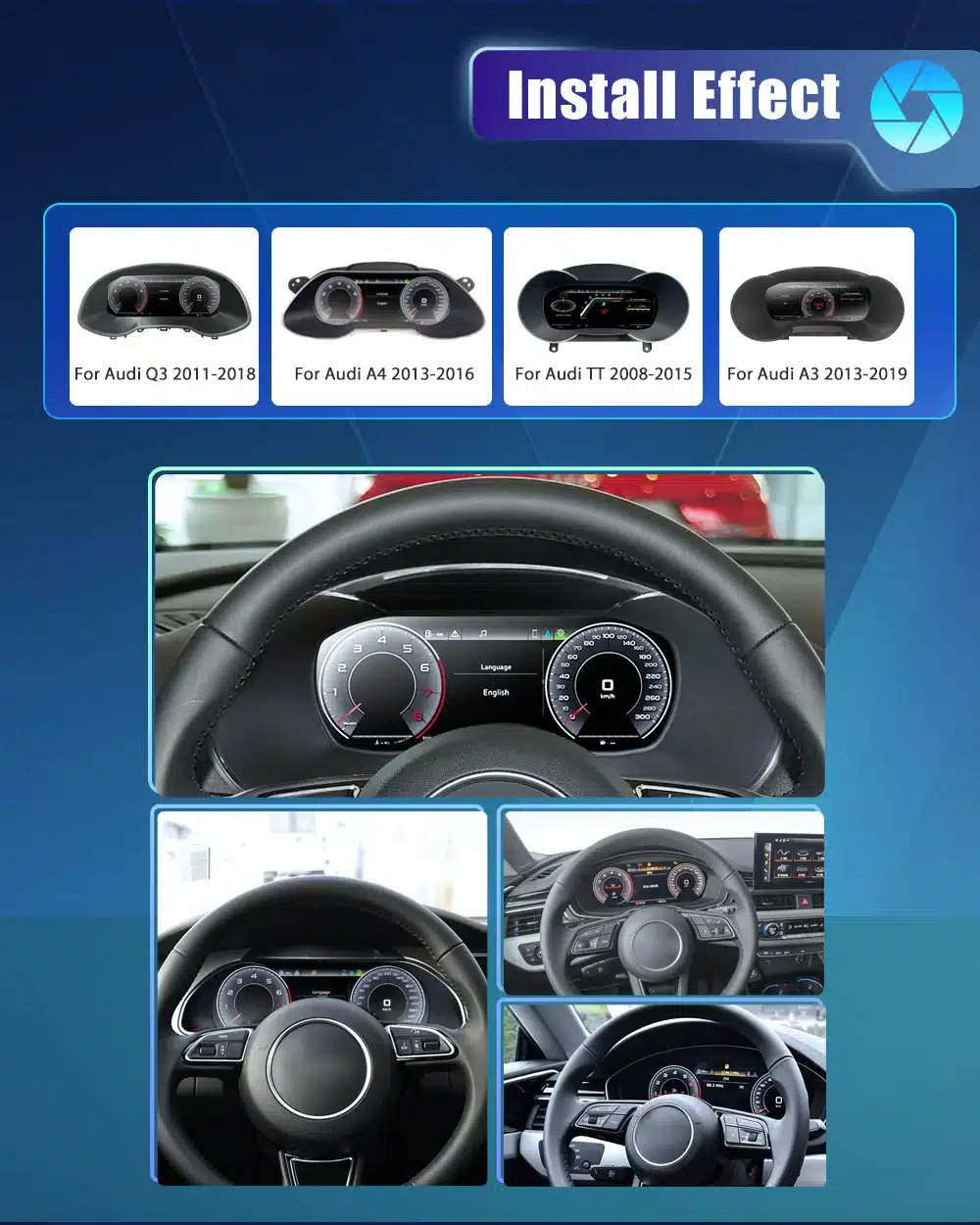
- Strong original-versus-upgraded cockpit difference shown in the Q7 comparison image.
- Wide digital gauge presentation with current instrument-area visuals.
- Compatible map-source display for owners who want navigation near the steering wheel.
Why not 10/10? Phone maps require a supported source/connection and the upgrade is limited to the instrument area, not the entire first-generation infotainment system.
OEM Retention · Very Good
8.8 /10The YB-190 retrofit aims to preserve the readings that are essential to everyday Q7 driving while refreshing the visible instrument architecture.
- Speed, RPM, fuel, trip and supported warning data on the matched route.
- Vehicle-specific preparation rather than a generic dashboard monitor.
- Original-data behavior and control interaction can be checked against the exact car.
Why not 10/10? Factory equipment, warning combinations and controller behavior differ; the aftermarket display is not electrically or visually identical to an original Audi cluster.
Installation Friendliness · Guided Retrofit · L3
7.6 /10The vehicle-matched hardware and installation route offer a structured process, but this is still a dashboard electronics retrofit with final function checks.
- Dedicated cluster, mounting pieces and matching harness pictured in the kit.
- Order-based guidance for connectors and any external video source.
- Realistic inspection and final setup steps before reassembly.
Why not 10/10? Instrument removal and installation work are required; board transfer, coding and input wiring details depend on the matched vehicle route.
Audi Q7 4L Digital Instrument Cluster FAQ
Does the YB-190 fit an Audi Q7 4L from 2005 to 2015?
It is designed for a matched first-generation Audi Q7 4L / Typ 4L configuration. Confirm the original cluster, dashboard and steering position before the correct unit is prepared.
Is Q7 Mk1 or Typ 4L the same as the first-generation Audi Q7?
Yes. These are common model-family descriptions. The later Q7 4M is a different generation and uses a different retrofit route.
Can the YB-190 display full Google Maps, Waze or CarPlay navigation behind the wheel?
It can display supported map and projection pictures when connected to the required compatible controller, Android player, sync cable or other approved input. A standalone cluster is not an independent Google Maps or Waze computer.
Does the digital cluster itself include wireless Apple CarPlay and Android Auto?
The screen's original menu includes CarPlay and Android Auto display entries. Actual phone connection and projection require the compatible external interface specified for the vehicle; do not confuse this standalone cluster with the separate Android head-unit bundle.
Are HDMI input, CarPlay, Android Auto, HiCar and AirPlay the same function?
No. HDMI/video input describes a display signal route; CarPlay, Android Auto, HiCar and AirPlay are smartphone projection modes offered by compatible source hardware. The source, cable or controller must match the selected function.
Will speed, RPM, fuel, mileage and trip information still display?
These are supported core data categories on the correct matched Q7 route. Exact availability depends on the vehicle's original signal and interface configuration.
Will all original warning lights and steering-wheel controls work?
The digital cluster includes supported warning and vehicle-data presentation. Specific warning icons and steering-wheel functions are verified for the actual Q7 configuration rather than promised universally.
Does this cluster support a 2009 Australian right-hand-drive Audi Q7 4L?
No. iKAGOO has confirmed that the standalone YB-190 is not compatible with that specific 2009 Australian RHD configuration. Other RHD variants require separate confirmation; do not assume compatibility from the model name.
Can I install it in a Q7 4M or second-generation Q7?
No. This product is for the first-generation 4L instrument route, not the later Q7 4M dashboard.
Will installation require PCB transfer, soldering or Audi coding?
These requirements cannot be stated universally from the current public YB-190 specification. iKAGOO checks the relevant matched hardware procedure before confirming the correct installation steps.
Is YB-190 a complete digital-cluster and Android head-unit kit?
No. This listing is the standalone digital instrument cluster. A different iKAGOO product combines a Q7 digital cluster with an Android head unit, and its memory, DSP, audio and infotainment claims should not be attributed to YB-190.
How do I confirm the right version without sending unnecessary photos?
Start with the Q7 4L model year, country, LHD/RHD position and a clear dashboard/cluster photo. More detailed connection photos are requested only when the matching route needs them.
What happens if the display needs configuration or a software update later?
Eligible iKAGOO customers can request order-specific diagnostic help, compatible firmware advice and manual-update guidance where applicable. Automatic updating is not guaranteed to solve every fault, and physical repairs follow published warranty and parts-support terms.
What warranty and shipping choices are available?
Eligible purchases include a 12-month limited hardware warranty plus the published 3-year software and 5-year parts-support frameworks. Available Standard Shipping or optional DDP methods are shown through live WooCommerce checkout for the destination.
Is This the Right Audi Q7 4L Digital Instrument Cluster for Your Car?
If you own a matched first-generation Q7 and want a visibly newer driver display with supported original driving data, YB-190 offers a strong instrument-area upgrade. A compatible map/phone projection route can be prepared when the external input equipment is correctly identified.
Choose iKAGOO for a documented vehicle review, a realistic installation route and continued version-specific technical assistance—not just the physical LCD assembly.
A Modern Driver Display for Your First-Generation Audi Q7
Select the YB-190 product and let iKAGOO verify the configuration required for your vehicle. Pricing, shipping and any available DDP option remain in the original WooCommerce checkout.


MatteoEsposito –
La differenza rispetto al sistema originale è notevole. Uso soprattutto Android Auto, Google Maps e Spotify.