


Volkswagen Passat B8 2017–2022 10.25-inch LCD Digital Cluster Installation Guide
Volkswagen Passat B8 2017–2022 10.25-inch LCD Digital Cluster Installation Guide

This guide explains how to replace a compatible original mechanical gauge cluster with the iKagoo 10.25-inch LCD digital instrument cluster on a confirmed European-market Volkswagen Passat B8 2017–2022 MQB route. The supplied installation video demonstrates the shared conversion procedure on a long-wheelbase VW Tiguan reference vehicle; Passat outer-trim removal and final fitment must still be confirmed from the customer’s original cluster and dashboard photos.
Evidence boundary: This page targets the European-market Volkswagen Passat B8 2017–2022 mechanical-cluster route. The source video is used as physical procedure evidence only. Related Volkswagen Passat B8 Variant / Estate and Volkswagen CC applications require original-cluster photo confirmation because outer trim and fitment details can differ by model.
Confirm Passat B8 2017–2022 Mechanical-Cluster Fitment Before Installation
This Volkswagen Passat B8 2017–2022 10.25-inch LCD digital cluster retrofit route is for vehicles that still use the compatible original mechanical gauge cluster. Confirm the outer frame, dashboard opening and connector route from clear photos before the iKagoo LCD cluster is ordered or installed.
Documented customer routes
- European-market Volkswagen Passat B8 2017–2022 — primary page route for compatible original mechanical gauge clusters.
- Volkswagen Passat B8 Variant / Estate — confirm original cluster shape and dashboard opening before ordering.
- Volkswagen CC — confirm the mechanical-cluster route individually before ordering.
- Supported RHD, diesel and hybrid configurations remain subject to correct cluster-version and photo confirmation.
Do not start this route when
- The original cluster shape does not match the mechanical-pointer reference shown in the video.
- The vehicle already has a factory digital instrument cluster rather than the compatible original mechanical gauge cluster.
- The dashboard frame or cluster mount has already been modified.
- A seller has not confirmed the correct cluster version for your photos and vehicle information.
Overseas-market naming and fitment boundary: This page uses European-market Volkswagen Passat B8 and Volkswagen Passat B8 Variant / Estate for overseas customers. It does not claim generic compatibility with U.S.-spec Volkswagen Passat vehicles. For any market not expressly documented by this installation route, confirm the original mechanical gauge cluster shape and the correct 10.25-inch retrofit version before ordering.
Factory digital cluster exception: This tutorial is written for vehicles originally equipped with a compatible mechanical gauge cluster. If the vehicle already has a factory digital instrument cluster, it does not follow the direct replacement steps shown here; a separate compatibility route must be confirmed before ordering the iKagoo 10.25-inch LCD retrofit cluster.
Prepare the Vehicle Before the Mechanical Cluster Is Replaced
Create a basic before-install record while the factory cluster is still installed. If a warning, missing display item or control issue appears later, this baseline helps separate an existing vehicle condition from an installation-stage issue.
Record before removal
- Photograph the original instrument cluster after power-on.
- Record any visible warning lights or existing fault messages.
- Take a clear wider dashboard photo showing the trim route.
- Record LHD or RHD layout and vehicle drivetrain type where relevant.
Tools and safe handling
- Prepare non-marring plastic trim tools and a padded work surface.
- Switch ignition off before beginning physical removal.
- Organise clips and screws during housing disassembly.
- Keep the original factory cluster and retained parts after completion.
Electronic protection
- Discharge body static before touching exposed boards.
- Hold PCB boards by their edges only.
- Do not touch electronic components directly.
- Never press the visible LCD panel during assembly.
Watch the Mechanical-Cluster to 10.25-inch LCD Cluster Reference Video
This video is the primary physical-installation reference for removing an original mechanical instrument cluster and fitting the iKagoo 10.25-inch LCD digital instrument cluster. Use it to understand the internal conversion sequence; confirm Passat B8 2017–2022 trim access and final fitment from the actual vehicle before disassembly.
Source video: mechanical gauge cluster to 10.25-inch LCD digital cluster procedure used as the physical reference for this guide. The extracted images are placed only inside the corresponding operation below and are not repeated as a second gallery.
Replace the Original Mechanical Gauge Cluster with the 10.25-inch LCD Digital Cluster
Complete each stage in order. The outer dashboard trim may vary between compatible MQB vehicles, but the documented workflow remains: remove the original mechanical gauge cluster, retain the required original components, fit the iKagoo 10.25-inch LCD digital instrument cluster, then verify operation before final trim closure.
Switch off the vehicle and release the outer cluster trim
- Confirm the original cluster has been photographed and the correct mechanical-pointer route has been identified.
- Switch the ignition off before physical removal begins.
- Use plastic trim tools to release the outer cluster trim without damaging visible surfaces.
- For Passat B8, Variant / Estate and CC applications, follow the actual trim shape of the vehicle instead of assuming the identical outer-panel removal movement.

Remove the original mechanical instrument cluster
- Release the original mechanical cluster as a complete assembly after the outer trim is removed.
- Support the unit by hand during removal.
- Disconnect the factory connector carefully; do not pull the cluster by its wiring.
- Move the removed assembly to a clean padded workbench.

Open the original cluster housing on the workbench
- Place the original cluster on a padded, static-safe working surface.
- Discharge body static before handling exposed electronics.
- Release the housing clips progressively to remove the rear cover without snapping the shell.
- Hold any exposed PCB by its edges only.

Release the retaining points from the rear side
- The filmed route shows four internal retaining points being loosened from the rear side.
- Use a suitable fine tool with controlled movement.
- Do not slip into nearby electronic components or scratch the circuit board.
- Do not use force if a retention point has not released correctly.

Transfer the original control-board structure into the 10.25-inch LCD cluster and retain the factory buzzer
The dashboard trim removal route can differ by Volkswagen model, but the internal control-board transfer and buzzer-retention procedure is shared for this iKagoo LCD cluster structure. Once the original mechanical cluster has been opened, use the reference sequence below to complete the internal stage before the replacement housing is closed.
- Locate the original control-board structure and its connector position before transferring any part.
- Transfer the required original board structure into the 10.25-inch LCD cluster assembly and keep the connector aligned and fully seated.
- Keep the factory instrument-cluster buzzer installed; do not discard or disconnect it during the transfer.
- Inspect the transferred-board area and the buzzer side again before closing the replacement housing.
- If a combination-instrument fault or abnormal warning behaviour appears after installation, re-open this stage first.
Shared Internal Transfer Reference — Follow This Procedure Inside the Cluster
These internal images are included because the control-board transfer and buzzer-retention method is shared across this iKagoo LCD cluster structure. They explain the internal action only; the Passat B8 exterior trim-removal route remains vehicle-specific.


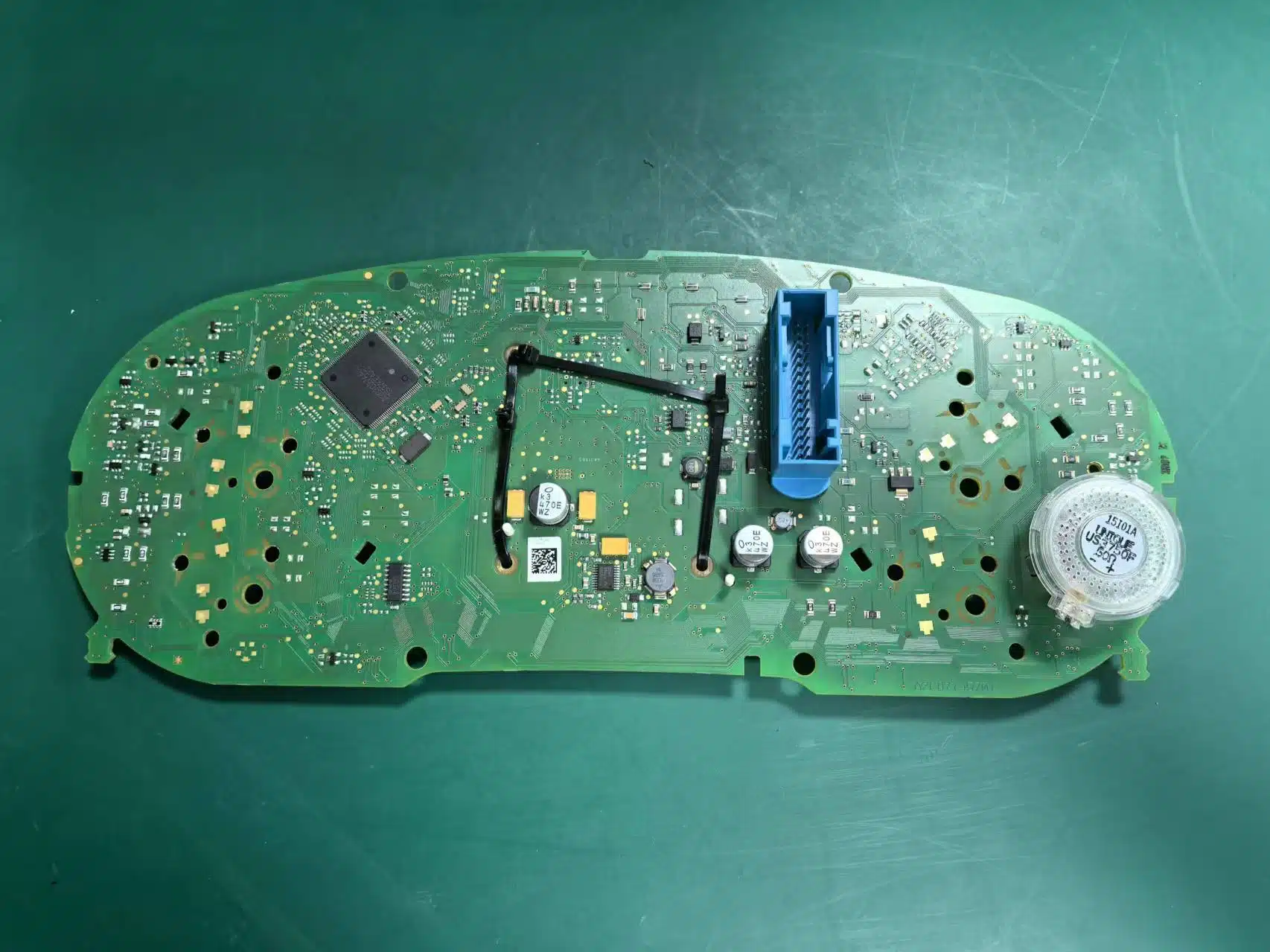

Do not remove the factory buzzer: The supplied technical instructions state that removing the original instrument-cluster buzzer can trigger a combination-instrument fault. This must be checked before the new LCD housing is closed.
Seat the iKagoo 10.25-inch LCD digital cluster without pressing the screen
- Align the iKagoo 10.25-inch LCD digital instrument cluster structure with the retained assembly.
- Apply light pressure only to structural locking points or the outer frame.
- Never push on the visible LCD surface or use it as a support point.
- Check housing alignment before fastening or clipping the assembly closed.

Route the USB lead and reconnect the 10.25-inch LCD digital instrument cluster
- Route the USB lead before the dashboard trim is fully closed.
- The source documentation identifies supported USB uses including projection-related connection, phone charging and software updates, depending on the supplied version.
- Reconnect the instrument cluster using the original vehicle connection route.
- Do not fully close the trim before the first-boot checks are complete.

Critical LCD Handling Warning
The LCD surface is not a pressure point. During alignment and reassembly, hold the unit by the structural frame and use only the locking areas shown in the procedure. Direct pressure to the visible screen can crack the panel even when the surrounding housing is undamaged.
A cracked screen is a physical-installation failure, not a software configuration issue. Stop immediately if the panel shows lines, black areas, pressure marks or visible cracking after fitting.

Verify the Installed 10.25-inch LCD Digital Instrument Cluster Before Final Closure
After the original mechanical gauge cluster has been replaced, test the installed iKagoo 10.25-inch LCD digital instrument cluster before the dashboard trim is fully closed. The source material lists steering-wheel control support, language and unit settings, vehicle-data display, warning display, projection and update-related functions; actual availability must be verified against the supplied version and the vehicle configuration.
Required first-boot checks
- Confirm the LCD cluster powers on normally.
- Compare warning lights and displayed reminders with the pre-installation record.
- Confirm available vehicle information is displayed as expected for the vehicle configuration.
- Test steering-wheel controls or the supported control route on the vehicle.
- Inspect the LCD for physical damage before securing trim.
Configuration checks where supported
- Language and measurement-unit setting.
- Available UI theme and driving-display preference.
- Supported phone-projection or connection route if included in the supplied version.
- Software update route only when an approved package or online update is provided for that version.
- Trim fit and connector stability before normal road use.
Vehicle-data boundary: This installation guide does not instruct users to change mileage, immobilizer data or original vehicle identity information. It describes a physical display retrofit and checks for correct visible operation after installation.
What to Inspect First When a Check Fails
| Symptom after installation | Inspect first | Do not assume |
|---|---|---|
| The cluster does not sit correctly in the dashboard opening. | Recheck whether the original mechanical cluster shape and trim route match the confirmed vehicle application. | Do not force the unit or modify factory trim without a confirmed instruction. |
| An instrument fault or abnormal warning appears after bench work. | Recheck retained original control-board connections and confirm that the factory buzzer was not removed. | Do not treat software updates as a fix for an incorrect physical transfer. |
| Information or control response differs from expectation. | Compare with the original pre-install record, verify connector seating and confirm feature support for the supplied version. | Do not claim every display item is identical across all trims or drivetrains. |
| Lines, black areas or cracks appear on the screen. | Stop use and inspect for physical LCD damage caused during handling or alignment. | Do not continue pressing the screen or treat cracked glass as a software fault. |
| Software update or version support is needed after correct fitting. | Use the supported iKagoo update guide or purchase the applicable FixMyDash digital-cluster upgrade package below. | Software support is not a hardware repair or wiring-fault guarantee. |
Documented Product and Installed-Appearance References
The following images are retained as product or installed-appearance references from the original page. They help a buyer recognise the expected product presentation and final visual result, but they are not used as evidence for trim removal or internal-transfer steps.
View Product and Package Reference Images


View Additional Installed Appearance Reference Images


Software Update and Upgrade Package Purchase Routes
Use a software-support route only after the physical installation, retained-component check and first-boot verification have been completed. A software package cannot correct a cracked LCD panel, an incorrect cluster route or an omitted original component.
iKagoo Update Instructions
For a supported iKagoo Volkswagen or Audi digital instrument cluster that needs the published online or USB software update process, review the official iKagoo update guide.
View iKagoo Update GuidePurchase a FixMyDash Digital Cluster Upgrade Package
Already own a supported Volkswagen or Audi digital instrument cluster? Purchase the applicable FixMyDash upgrade package to obtain the supported software upgrade route and your selected 1-year or 2-year package-related support period.
Purchase Digital Cluster Upgrade PackageFixMyDash purchase boundary: This link is for purchasing a supported Volkswagen / Audi digital-cluster software upgrade package and the selected 1-year or 2-year package-related support period. It is not a hardware repair service and does not guarantee resolution of LCD damage, wiring faults, connector faults, incorrect installation, communication faults or unrelated vehicle issues.
Need the Correct Passat B8 2017–2022 10.25-inch LCD Digital Cluster Version?
This installation procedure is for a compatible European-market Volkswagen Passat B8 2017–2022 mechanical gauge cluster replacement using the iKagoo 10.25-inch LCD digital instrument cluster. Before payment, submit clear photos of the original cluster and dashboard opening so the correct retrofit version can be confirmed.
The correct purchase route depends on the original mechanical-cluster shape, connector route and vehicle configuration. Confirm the matching 10.25-inch LCD retrofit version before ordering.
Confirm the Correct Version Before OrderingOptional DDP route: For eligible destinations, customers may request an optional Delivered Duty Paid import-charges prepayment assessment before shipment. DDP is not tax-free shipping; only the import charges stated in an accepted optional quote are prepaid through the supported route.
VW MQB Digital Instrument Cluster Installation Questions
What does the supplied installation video prove?
It demonstrates the shared MQB mechanical-gauge-cluster conversion procedure used as the technical reference for this article. This page targets the European-market Volkswagen Passat B8 2017–2022 customer route; final fitment still depends on the original cluster and dashboard photos.
Does this route support right-hand-drive, diesel or hybrid vehicles?
The supplied instructions state that the supported cluster route can cover overseas right-hand-drive vehicles as well as diesel and hybrid versions. Final confirmation still depends on the original mechanical instrument-cluster shape and the correct supplied version.
Is this a direct replacement route for a vehicle that already has a factory digital cluster?
No. This tutorial documents the replacement of a compatible original mechanical gauge cluster with the iKagoo 10.25-inch LCD digital instrument cluster. Vehicles already fitted with a factory digital cluster require a separate compatibility route and should be confirmed before ordering.
Does this 10.25-inch LCD digital cluster retrofit require dismantling the original mechanical cluster?
Yes, physical disassembly is part of the procedure. In this article, Plug-and-Play means the route is intended to avoid drilling and cutting the original factory wiring harness. The installation still involves trim removal, original mechanical-cluster removal, retained-component handling, fitting the 10.25-inch LCD cluster and post-install testing.
Why must the original instrument-cluster buzzer remain installed?
The supplied instructions specifically warn that removing the factory instrument-cluster buzzer can cause a combination-instrument fault. This must be checked during the bench-transfer stage before closing the replacement housing.
What is the most important LCD handling rule?
Never press the visible LCD surface during assembly. Align and lock the unit using its structural frame areas only. Direct pressure can physically crack the display panel.
Does this guide promise every data item and feature will display on every trim?
No. The source information lists vehicle-data display, warning display, steering-wheel control, language and unit settings, phone projection and OTA-related functionality. The final available functions depend on the correct supplied version and the vehicle configuration, and must be checked after installation.
Which VW MQB vehicles can use this mechanical gauge cluster to 10.25-inch LCD digital cluster route?
The supplied technical instructions identify compatible original mechanical-cluster routes for European-market Volkswagen Passat B8, Volkswagen CC and Volkswagen Passat B8 Variant / Estate applications after fitment confirmation. Supported right-hand-drive, diesel and hybrid versions must still match the required original mechanical gauge cluster shape before ordering.
Does this guide confirm compatibility with a U.S.-spec Volkswagen Passat?
No. This page documents verified overseas-facing MQB route names, including European-market Volkswagen Passat B8 and Volkswagen Passat B8 Variant / Estate. A U.S.-spec Volkswagen Passat should not be treated as compatible from the model name alone; confirm the original mechanical gauge cluster shape and the correct retrofit version before ordering.
Does this guide confirm compatibility with a U.S.-spec Volkswagen Passat?
No. This article targets the European-market Volkswagen Passat B8 2017–2022 MQB route. A U.S.-spec Passat should not be assumed compatible from the model name alone; original mechanical-cluster photos and the correct 10.25-inch retrofit version must be confirmed before ordering.
Where can I purchase the software upgrade package for an existing digital cluster?
Supported iKagoo units can use the published iKagoo online and USB update guide. Customers who already own a supported Volkswagen or Audi digital cluster can purchase the applicable software upgrade package through the FixMyDash Volkswagen Audi Digital Cluster Upgrade Package page, with the selected 1-year or 2-year package-related support period.
Installation disclaimer: This is a practical installation reference based on supplied source instructions and the supplied MQB mechanical-cluster conversion video route. The procedure involves trim removal and sensitive electronics. Customers without the required tools or experience should use a qualified automotive electronics installer. The correct hardware version must be confirmed before purchase.








Add comment