


VW Golf MK5 Digital Cluster: Repair, Replace or Upgrade?
Volkswagen VW Golf MK5 digital cluster · Supported 2008–2011
Repair, replace or upgrade the Golf MK5 instrument cluster?
If the instrument cluster in your Volkswagen Golf MK5 looks dated—or has started giving you problems—you have three very different options: repair the original unit, replace it with another factory-style cluster, or move to a vehicle-specific digital cluster.
The right choice depends on what you are actually trying to solve.Repair vs replace vs upgradeGolf MK5 / Golf 5 / Golf VVehicle-data routeInstallation Level 3
Product objectYB-134 / Product 9382
Supported listingGolf MK5 2008–2011
Primary roleVehicle-data digital cluster
Important boundaryNo cluster CarPlay claim
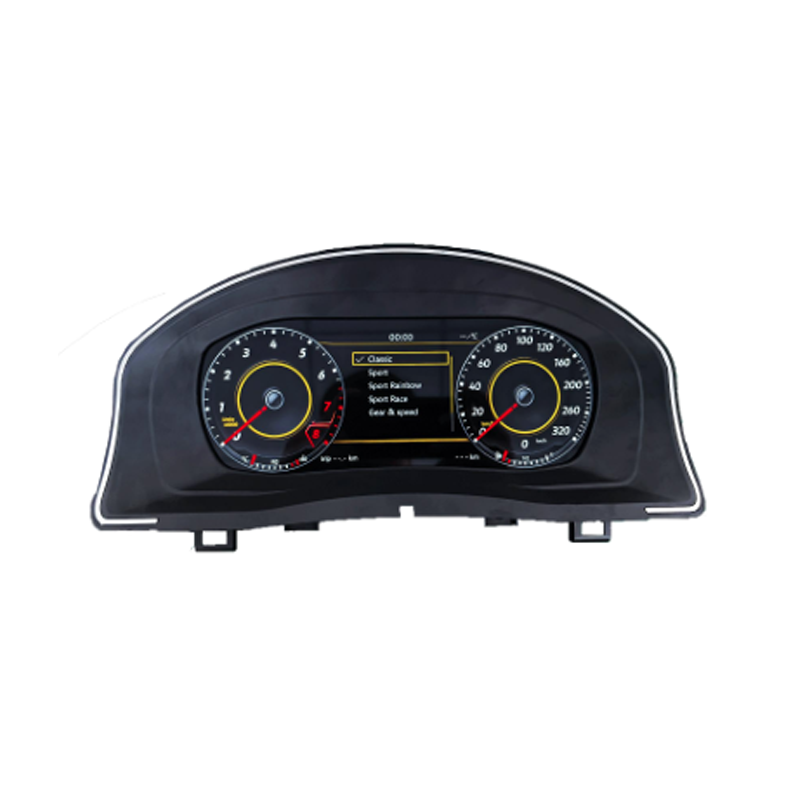
iKAGOO VW Golf MK5 digital instrument cluster (YB-134) for supported 2008–2011 vehicles.
Start with the real problem
Repair, OEM replacement or digital upgrade: what is the difference?
Repair the original cluster when originality is the priority
Repair makes the most sense when you are satisfied with the original dashboard and mainly need to restore a fault. That route preserves the factory appearance and avoids changing the driver's daily interface. For an owner keeping a Golf MK5 as close to original condition as possible, that can be the correct decision. But repair solves a recovery problem. It does not solve a modernization problem. If your cluster works but the analog display is the part of the cabin that now feels most dated, repairing it simply returns you to the same experience.Replace it with another factory-style cluster when you only need replacement
A factory-style replacement can also be appropriate when the objective is to replace a failed unit rather than change the cabin. The important point is not to assume that any visually similar cluster is automatically the correct solution for every Golf MK5. Vehicle year, configuration and adaptation requirements still matter. If your actual goal is a modern LCD driver display, replacing an old-style cluster with another old-style cluster does not deliver the same result.Choose a digital-cluster upgrade when the driver display itself is the problem
A vehicle-specific digital cluster changes the part of the cabin you look at on every drive. The current iKAGOO VW Golf MK5 Digital Instrument Cluster is designed for supported 2008–2011 Golf MK5 vehicles and keeps the display in the original instrument position rather than adding a loose universal screen. Its purpose is straightforward:- give the driver a clearer, more modern LCD interface;
- retain supported vehicle information through the matched route;
- retain supported steering-wheel interaction on compatible trims;
- avoid intentional cutting of factory wiring on the intended installation route.
Retained vehicle information
What does the Golf MK5 digital cluster actually retain?
For a correctly matched Golf MK5 route, supported driving information includes speed, RPM, mileage and trip information, fuel level, coolant temperature and vehicle warnings. This matters because a digital cluster should not be judged only by how the screen looks in a product photo. The useful question is whether it still performs the instrument cluster's original job. iKAGOO treats original-function retention as a separate buying issue. You can read the broader Factory Function Retention Standard if you want to understand how retained functions should be evaluated before choosing an automotive-electronics upgrade.
Golf MK5 digital cluster compatibility and vehicle-data product evidence for the YB-134 route.
Does it add CarPlay?
No—not on this Golf MK5 cluster route. This generation is primarily a vehicle-data digital instrument cluster. CarPlay or Android Auto should be handled through a compatible infotainment/head-unit solution rather than being attributed to this cluster. That distinction is important both for buyers and for search engines: a digital instrument cluster and an Android/CarPlay head unit solve different problems.Fitment boundary
Is your Golf MK5 actually within the supported route?
The published support range is Golf MK5 2008–2011. In some markets the same generation may be referred to as Golf 5 or Golf V, but the badge name alone should not be the final fitment check. The useful confirmation points are:- exact model year;
- original dashboard layout;
- original instrument-cluster appearance;
- left-hand-drive or right-hand-drive configuration;
- original connector condition;
- any previous dashboard, cluster or wiring modification.
iKAGOO three-metric buying check
Three different questions should be answered before you order
A good product description should not stop at specifications. A buyer needs to know whether the upgrade is worthwhile, how closely it works with the original vehicle, and how difficult the installation really is.
iKAGOO Upgrade Necessity91/100
Strong Upgrade Case. The instrument cluster is one of the most visible areas of the cabin, so a correctly matched LCD route changes the daily driver experience more than a cosmetic accessory would. This does not mean every owner needs it; originality can still be the rational priority.
iKAGOO Original Vehicle Compatibility90/100
Near-OEM Route. Vehicle-specific matching, supported CAN-bus data, original information retention and LHD/RHD preparation are the basis. The score is not a promise that every Golf MK5 has identical wiring.
iKAGOO Installation EaseLevel 3
Advanced DIY / professional installer recommended. The intended route avoids intentional factory-wire cutting, but cluster removal, connector handling and complete testing still require experience.
Mid-funnel purchase decision
Considering the digital upgrade route?
If your Golf is within the supported 2008–2011 range and your goal is a newer driver display rather than simply repairing the original gauges, you can review the full Golf MK5 Digital Instrument Cluster product page.Practical order path: Choose the product → place the order → provide the requested vehicle/original-cluster information → iKAGOO reviews the route before shipment and prepares the correct version.
If you are not confident that your dashboard is original, use the compatibility guide first or send the vehicle details for confirmation. This keeps compatibility checking in the buying process without turning every normal order into an unnecessary technical consultation.
Installation risk control
What should be tested before the dashboard is closed?
Do not judge installation success only by whether the display powers on. Before final reassembly, check:- startup and shutdown behavior;
- speed and RPM display;
- mileage/trip information;
- fuel and coolant information;
- warning indicators;
- supported steering-wheel interaction;
- brightness and display settings;
- sleep/wake behavior.
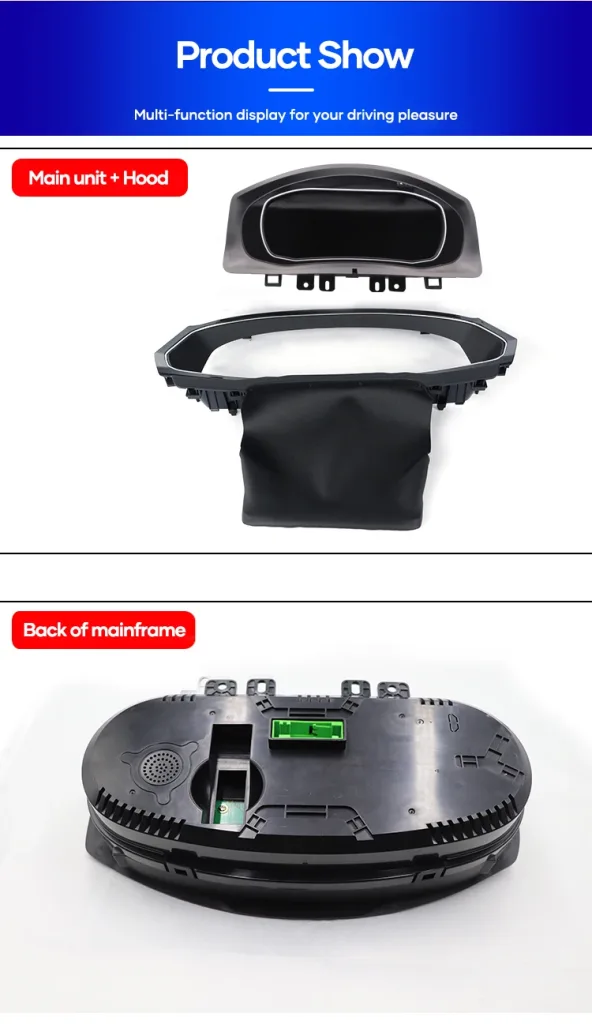
VW Golf MK5 digital cluster main unit with rear connector route.
Why the seller route matters
Why buy a vehicle-specific cluster from iKAGOO?
The value of an independent automotive-electronics store should not be reduced to the screen itself. Will the correct version be prepared? iKAGOO uses the vehicle year, dashboard/original-cluster information, steering position and connector route where required to reduce wrong-version risk. Is there a defined support process? When a technical issue occurs, photos, video and connector views can be used to identify the exact problem rather than treating every vehicle as identical. Is there a warranty route? Eligible hardware is covered under the current iKAGOO Warranty Policy. Can you evaluate the seller before ordering? The Is iKAGOO Reliable? page explains the company's ordering, support and buyer-protection approach. You should still judge the product by whether it fits your actual vehicle and goal—not by brand claims alone.Buyer fit
Who should buy this upgrade?
This Golf MK5 digital cluster is a strong match for an owner who:- has a supported 2008–2011 Golf MK5;
- wants the driver display to feel substantially newer;
- wants to retain supported vehicle information;
- prefers a vehicle-specific installation route over a generic display;
- is comfortable using an experienced DIY installer or automotive-electronics professional.
FAQ
Frequently asked questions
Is a digital cluster worth it on a Golf MK5 if the original cluster still works?
It can be, if the goal is cockpit modernization rather than fault repair. The digital route changes the driver's daily information interface; repairing the original unit mainly restores what you already have.What years does this Golf MK5 digital cluster support?
The current iKAGOO product route is for supported 2008–2011 Volkswagen Golf MK5 vehicles. Dashboard, steering position, cluster and connector details should still match the prepared version.Does this Golf MK5 cluster have wireless CarPlay?
No. This product route focuses on vehicle information and warnings. Smartphone projection belongs to the appropriate infotainment/head-unit route.Will original vehicle data still display?
Supported information includes speed, RPM, mileage/trip, fuel level, coolant temperature and warning data when the correct vehicle route is installed.Does installation require cutting factory wiring?
The intended supported route does not require intentional factory-wire cutting. If cutting, drilling or soldering appears necessary, stop and confirm the installation route.Can a beginner install it?
The installation is rated Level 3 — Advanced DIY. Experienced DIY owners may be comfortable with it, but a competent automotive-electronics installer is the safer choice for inexperienced buyers.Final buying decision
Choose the route that solves the problem you actually have
If the original cluster simply needs repair and you want to keep the Golf exactly as it is, repair may be enough. If you only need another factory-style cluster, replacement may solve the immediate problem. But if the reason you are researching the cluster is that your Golf MK5 still serves you well while the driver's display feels a generation behind the rest of your expectations, a vehicle-specific digital upgrade is the route that actually addresses that problem.After ordering, provide the vehicle information requested for the pre-shipment version review. If fitment is uncertain, use the compatibility resources before proceeding.








Add comment
You must be logged in to post a comment.