$759.00Original price was: $759.00.$485.00Current price is: $485.00.
Duty-Free
EU & USA · Shipping shown in cart
EU & USA · Shipping in cart
Details
Secure by
DDP Tax-Prepaid Service
We handle applicable VAT and import duties for eligible EU and USA orders.
Estimated savings:
$120–$280
.
Shipping is separate.
The exact shipping cost is calculated by destination and shown in your cart before checkout.
USA (48 States)AustriaBelgiumBulgariaCroatiaCyprusCzechiaDenmarkEstoniaFinlandFranceGermanyGreeceHungaryIrelandItalyLatviaLithuaniaLuxembourgMaltaNetherlandsPolandPortugalRomaniaSlovakiaSloveniaSpainSweden
Shipping toChina
Checking available shipping…
Final shipping is confirmed from your delivery address at checkout.
iKAGOO reviews fitment and provides defined compatibility protection, a 1-year hardware warranty, 3-year software support and 5-year parts support for eligible products.
Our goal is to get your order right before it leaves us.
We verify compatibility, prepare the correct setup and contact you only if something needs confirmation.
VW T5 Digital Cluster for a Modern OEM-Style Van Cockpit
Upgrade the T5’s large analog cluster area with a 12.3-inch IPS digital cockpit designed for selected Volkswagen Transporter, Caravelle, Multivan, Shuttle and California routes from the 2003–2015 T5 generation. The result is a cleaner driver view with supported vehicle data, selectable layouts, real-time maps and connected phone functions — while keeping the instrument position the driver already knows.
12.3-inch IPS LCD1920×720 wide digital driver display.
6 UI Themes × 3 ColorsClassic, Sporty Speed, Navigation/Road Info and more layouts.
Real-Time Maps on the ClusterNavigation where the driver already looks.
CarPlay / Android AutoConnected phone display on supported configurations.
LHD + RHD SupportedLeft- and right-hand-drive routes, no programming required.
Matched Installation RouteNon-destructive, plug and play with vehicle-specific connectors.
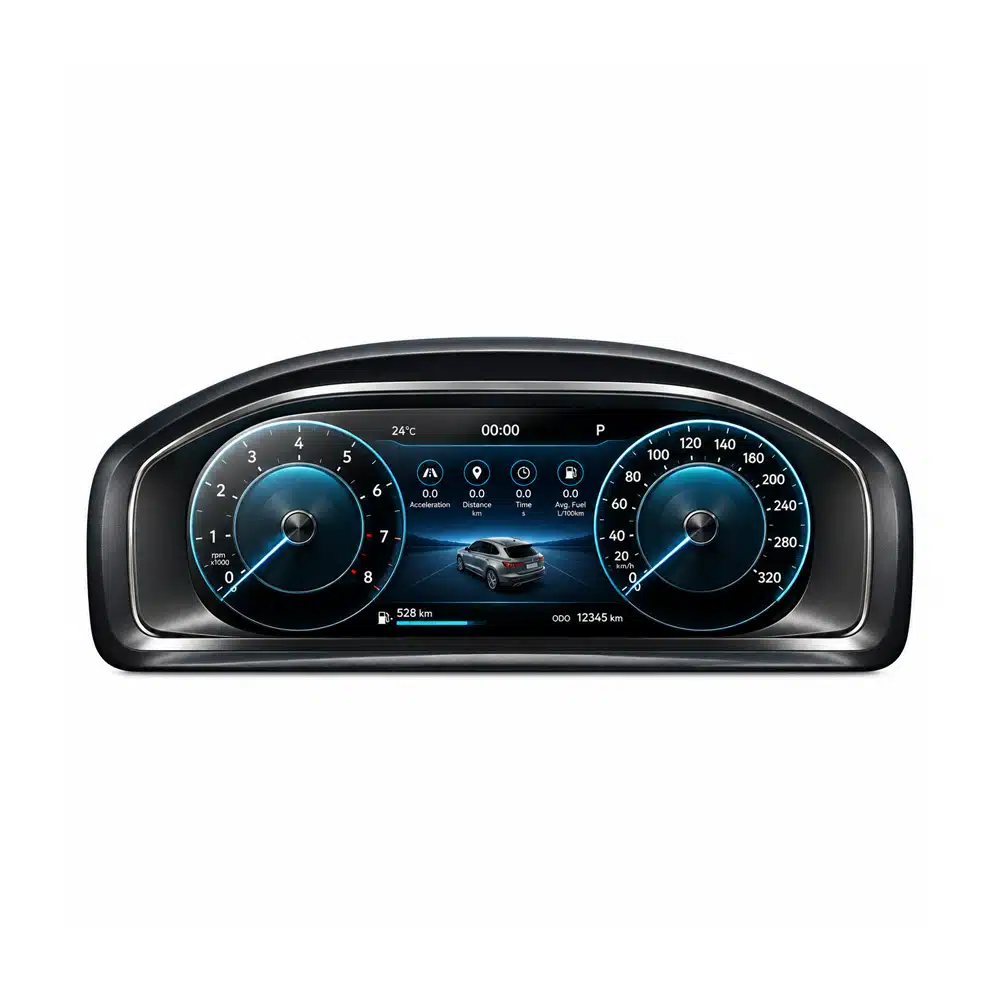
The 12.3 inch cluster unit in sport-blue theme
Upgrade Value
Turn the T5’s Most Dated Driver-Facing Area Into a Modern Digital Cockpit
The T5’s big analog binnacle is the first thing that dates the cab — whether it is a Transporter work van doing daily mileage, a Multivan family bus, or a California camper on long trips. This VW T5 Digital Cluster changes that view immediately while keeping speed, RPM and warnings where the driver already expects them.
A 12.3-inch IPS screen gives speed, RPM and vehicle information a cleaner, modern presentation than tired analog dials.
Six themes with three colors each create far more choice than fixed gauges — from a calm Classic layout to a Sporty Speed view.
Maps and CarPlay on the cluster reduce the need for a phone suction-mounted to the windscreen, a common sight in working vans.
The OEM-style position keeps the upgrade integrated — no universal tablet look added on top of the dashboard.
Before: analog T5 cluster. After: digital cockpit — shown working at -10°C
Core Functions
What the VW T5 Digital Cluster Adds to Daily Driving
Each real product image below is matched to the function it demonstrates: display hardware, themes, connected navigation, and optional camera routes.
A Larger, Clearer Driver Display in the Original Position
The screen stays in the original driver information area instead of adding a separate display above the dashboard. That gives the T5 cab a more finished, factory-style cockpit appearance — important in a vehicle you sit in for hours.
12.3″ IPS LCD
1920×720 resolution
Linux instrument system
Six UI Themes With Three Colors Each
Supported layouts include Classic, Consumption/Information, Data Record/Trip, Sporty Speed, Minimalist and Navigation/Road Info — each with three color choices. The benefit is a digital cockpit that adapts to the drive: calm on the motorway, information-rich on a trip, sporty when you want it.
6 themes
3 colors each
Driver-selectable
6 UI themes, each with 3 color choices
Real-Time Maps and Connected Phone Content in the Driver’s Sightline
On supported configurations, real-time navigation appears directly on the cluster, and CarPlay / Android Auto bring calls, messages, music and navigation prompts into the driver’s natural view. For delivery drivers and campers alike, that means fewer glances across to a phone mount.
Optional Camera and DVR Routes Extend the Cluster’s Job
Rear camera, 360° camera, DVR and sync display can appear on the cluster through an optional interface adapter. This is genuinely useful on a van — but the adapter is required and sold separately, not included as standard.
Rear camera
360° camera
DVR sync — via optional adapter
Camera & DVR sync display via optional adapter (adapter required — sold separately)
Compatibility
VW T5 Transporter, Caravelle and Multivan Compatibility Follows the Confirmed Variant Route
This product family is designed for the 2003–2015 T5 generation. The T5 badge covers everything from bare work vans to full campers, so iKAGOO confirms the exact route from your year, market version, dashboard, original cluster, steering position and connector details — never from the badge name alone.
Transporter (T5)Panel van and Kombi work routes; original cluster and connector confirmed before shipment.
Caravelle (T5)People-carrier routes after dashboard and cluster confirmation.
Multivan (T5)Supported where the vehicle shares the confirmed cluster and dashboard architecture.
Shuttle (T5)Confirmed from original equipment and cluster photos.
California (T5)Camper routes reviewed separately — the dashboard is shared but equipment levels differ.
LHD RoutesLeft-hand-drive vehicles across European and other markets.
RHD RoutesRight-hand-drive vehicles (UK, Australia, Japan imports and others) — steering position confirmed before shipment.
Excluded: T6 / T6.1Different dashboard architecture — not this product.
What Should You Send for the Correct Version?
Vehicle DetailsModel, model year and market/region.
Original ClusterClear powered-on front photo.
Dashboard OpeningDriver-side dashboard and cluster surround.
Connector RouteRear connector photo when available.
Steering PositionLHD or RHD.
Functions NeededNavigation / CarPlay display, camera routes, steering controls and retained data requirements.
Original Functions Retained
Keep the Vehicle Information That Makes the Cluster Useful
The confirmed T5 digital cluster route is designed to retain supported original vehicle data and control behavior while replacing the analog presentation with a modern LCD interface.
Original Vehicle Data Continues Through the Confirmed Interface Route
Supported speed, RPM, mileage, trip, fuel, temperature, gear and warning information remains tied to the vehicle’s data source, so the upgrade works as a real instrument cluster rather than only a cosmetic display. The exact displayed data follows the vehicle’s sensors and ECU.
After the correct wiring and configuration are completed, supported multifunction steering-wheel buttons can continue to control cluster menus and display functions. This keeps everyday interaction closer to the original Volkswagen experience.
Factory button logic
Cluster menu control
Matched vehicle setup
Installation
A Vehicle-Specific T5 Digital Cluster Retrofit With a Clear Installation Path
The supported route follows four core stages: confirm the correct hardware version, remove the original analog cluster, connect the vehicle-specific harness and components, then verify vehicle data and controls before final reassembly.
“Plug-and-play” on this product means the supported wiring route uses matched OEM-style connectors without intentionally cutting the factory harness; the exact physical work depends on the confirmed T5 variant. Vans often have aftermarket accessories wired behind the dash, so a professional automotive-electronics installer is recommended.
01
Confirm the Correct Main Unit and Rear Structure
The housing, cluster surround and connector position are matched to the confirmed T5 route — Transporter, Caravelle, Multivan, Shuttle or California, LHD or RHD — so the replacement assembly fits the original dashboard architecture.
02
Use the Matched Harness and Factory Connection Path
The supplied route uses vehicle-specific connectors and harness logic, giving the installer a cleaner path without intentionally cutting or splicing supported factory wiring. No programming is required on the confirmed route.
03–04
Complete Connection, Then Verify Every Function Before Reassembly
After connection, verify speed, RPM, fuel, mileage, warning indicators, steering-wheel controls, themes and supported navigation functions before closing the trim.
Vehicle data test
Control check
iKAGOO install support
More Everyday Value
More Reasons the T5 Digital Cockpit Feels Better Every Day
Beyond the initial visual transformation, the screen hardware and interface add useful flexibility in layout, readability, personalization and connected driving.
Dial Style Choices Make an Older Cab Feel Newer
Choose from six supported visual themes to give the cluster a more classic or more modern appearance without changing the entire interior — a small change the driver sees every single trip.
IPS Readability for Long Days Behind the Wheel
The 12.3-inch IPS panel keeps the display readable from the driving position as light changes through the day, helping the driver read speed and warnings at a glance on long motorway stretches.
IPS panel
Driver-position readability
12.3-inch view
Ambient-Light Sync Follows Your Existing Interior Colors
The cluster synchronizes with the van’s existing stock ambient lighting colors — it adds no new colors of its own, keeping the cabin lighting coherent.
Syncs with your existing ambient lighting colors — adds no new colors
Linux-Based Instrument System Keeps the Cluster Focused on Driver Information
The product uses a Linux-based instrument route designed around predictable cluster operation — gauges, data and warnings — rather than functioning as a general-purpose tablet.
Navigation Stays Closer to the Driver’s Natural Sightline
On supported versions, route prompts and real-time maps sit in the instrument area, reducing the need to shift attention toward a center display or phone mount for every navigation check.
Route guidance
Connected phone route
Driver-area visibility
Specifications
VW T5 Digital Instrument Cluster Specifications
Use these confirmed product details to check the main hardware, display and vehicle-interface requirements before choosing your configuration.
Display12.3-inch IPS LCD
Resolution1920×720
SystemLinux instrument system
Themes6 UI themes × 3 color choices
SteeringLHD and RHD supported
SKUYB-100
Product Type
VW T5 Digital Instrument Cluster / IPS LCD Cockpit Panel
SKU
YB-100
Primary Fitment Range
Selected Volkswagen T5 — Transporter, Caravelle, Multivan, Shuttle, California — within the 2003–2015 product range
Compatibility Basis
Vehicle year, market version, original analog cluster, dashboard opening, LHD/RHD position, connector layout and required functions
Display
12.3-inch IPS LCD
Resolution
1920×720
System
Linux instrument system
Display Layouts
6 UI themes × 3 color choices: Classic, Consumption/Information, Data Record/Trip, Sporty Speed, Minimalist, Navigation/Road Info
Phone Integration
CarPlay & Android Auto on supported configurations
Map Display
Real-time map display on the cluster
Optional Camera Routes
Rear camera / 360° camera / DVR / sync display via optional interface adapter (adapter required, sold separately)
Ambient Light
Synchronizes with existing stock ambient colors; adds no new colors
Steering Position
LHD and RHD supported
Vehicle Data
Supported speed, RPM, mileage, trip, fuel, temperature, gear, warnings and other available vehicle information
Steering-Wheel Controls
Supported multifunction steering-wheel control logic after correct configuration
Installation Route
Non-destructive; no programming required; matched OEM-style connectors without intentional cutting of factory wiring (plug and play)
Why Buy from iKAGOO
Get the Correct T5 Version With Support Attached to the Order
The value of a vehicle-specific digital cluster is not just the LCD panel. iKAGOO reviews the vehicle route before preparing the order and supports the confirmed hardware after delivery, helping the buyer move from compatibility to installation with one product record.
Correct Version ConfirmationTransporter, Caravelle, Multivan, Shuttle and California routes are checked from vehicle and cluster photos.
LHD / RHD MatchingSteering position is confirmed before shipment — essential across the T5’s many markets.
Honest Spec PublishingSpecifications are published as text because the supplier’s parameter image carries a test watermark — we don’t present watermarked material as final.
Matched Harness DirectionThe connection route is prepared around the confirmed vehicle configuration.
Installation SupportVersion-specific guidance, photos and connection details for the confirmed order.
12-Month Hardware WarrantyEligible hardware follows the applicable iKAGOO warranty terms, with 3-year remote software support and 5-year parts and upgrade support.
iKAGOO Purchase Assessment
Why iKAGOO Recommends This VW T5 Digital Cluster Upgrade
These three indicators summarize the buying value after display quality, OEM function continuity and the vehicle-specific installation route are considered together. Rated 4.8/5
Display Quality 4.8 — 12.3 inch IPS 1920×720, verified from the supplier’s attributes sheet.
OEM Function Continuity 4.8 — vehicle data, steering-wheel controls, ambient-light sync with existing colors.
Vehicle-Specific Installation Route 4.7 — LHD+RHD support, no programming, non-destructive; professional install recommended for vans with aftermarket wiring.
High-Intent FAQ
VW T5 Digital Instrument Cluster Buying Questions
Direct answers to the fitment and function questions that matter before choosing this T5 digital cockpit upgrade.
Will this fit my T5 Transporter, Caravelle or Multivan?
Yes, for the selected compatible routes within the 2003–2015 T5 generation. iKAGOO confirms the correct version from your year, dashboard, original cluster, steering position and connector details before shipment.
Does it fit the Shuttle or California?
Selected Shuttle and California routes are supported where the vehicle shares the confirmed dashboard and cluster architecture. Camper equipment levels differ, so the original cluster photo decides the correct version.
Can I use this on a T6 or T6.1?
No — the T6 uses a different dashboard architecture. This product is for the 2003–2015 T5 generation only.
What are the real specifications?
12.3-inch IPS LCD, 1920×720, Linux instrument system, 6 UI themes with 3 colors each — from the supplier’s Product Attributes sheet. LHD and RHD are supported, with no programming required.
Left-hand or right-hand drive?
Both are supported per the attributes sheet. Your steering position is still confirmed from photos before shipment — important for UK, Australian and Japanese-import T5s.
Does it need coding?
No programming is required on the confirmed route, per the supplier’s attributes sheet.
Will original vehicle data and warnings still display?
Yes. Supported speed, RPM, mileage, trip, fuel, temperature, gear and warning information continues through the matched vehicle interface, following the vehicle’s sensors and ECU.
Will steering-wheel controls still work?
Yes, on supported configurations after the matched wiring and setup are completed. The control route is confirmed from the original vehicle configuration.
Can it show the rear camera?
Rear camera, 360° camera, DVR and sync display are available via an optional interface adapter. The adapter is required and sold separately — it is not included as standard.
Does it add new ambient light colors?
No. The cluster synchronizes with the van’s existing stock ambient lighting colors and adds none of its own.
Do I need to cut factory wiring?
No intentional cutting is expected on the supported installation route. The product uses matched OEM-style connectors and vehicle-specific harness logic.
Is this suitable for DIY installation?
It follows a guided retrofit route: confirm the version, remove the original cluster, connect the matched harness, then verify every function. Vans often have aftermarket accessories wired behind the dash, so a professional automotive-electronics installer is recommended.
Why buy from iKAGOO instead of a cheaper generic listing?
Because the order includes vehicle-specific version review — Transporter through California, LHD and RHD — and a support path tied to the supplied hardware. With one T5 badge covering work vans, family buses and campers, that matching step is where cheap listings fail.
iKAGOO Final Recommendation
Give Your VW T5 the Digital Cockpit Upgrade It Deserves
Choose this VW T5 Digital Instrument Cluster if you want a sharper 12.3-inch driver display, supported original vehicle information, real-time maps, selectable cockpit layouts and a version-matched T5 retrofit route with iKAGOO support. Send your T5’s variant and cluster photo — iKAGOO confirms the correct 12.3 inch version before you pay.
Reviews
There are no reviews yet.
Be the first to review “VW T5 Digital Cluster 2003-2015 – 12.3″ IPS Virtual Cockpit with CarPlay, Maps & 6 UI Themes” Cancel reply
Clear information about vehicle compatibility, order preparation,
international delivery, warranty, returns and after-sales support.
Compatibility ReviewVehicle information is checked before dispatch.
Order ProcessingNormally 1–3 business days before dispatch.
12-Month WarrantyLimited hardware warranty for eligible defects.
Tracked DeliveryTracking information is provided after dispatch.
Vehicle-Specific Order Process
We Check the Details Before Your Order Leaves Us
Vehicle-specific electronics require the correct version,
wiring and configuration. Our process is designed to reduce
avoidable compatibility and installation problems.
Before Payment
Initial Compatibility Review
Vehicle model, year, original system and relevant configuration
information may be reviewed before purchase to reduce the risk
of selecting the wrong version.
After Payment
Final Compatibility & Configuration Check
Before dispatch, the order is checked against the confirmed
vehicle information so the appropriate version, configuration
and required vehicle-specific components can be prepared.
After Payment
We Work to Get It Right the First Time
Our goal is to get your order right before it leaves us.
We verify compatibility, prepare the correct setup and contact
you only if something still needs confirmation.
Shipping, Returns, Warranty & Order Questions
A practical summary of the main terms that apply to
vehicle-specific iKAGOO orders.
01
Where are orders shipped from and how long does delivery take?
Most iKAGOO orders are dispatched from our fulfillment
location in China after the product configuration and vehicle
information have been checked.
Normal order processing is approximately
1–3 business days.
Estimated delivery after dispatch is generally:
USA & Canada: approximately 5–9 business days
European Union: approximately 7–15 business days
UK & Australia: approximately 7–10 business days
Other supported regions: approximately 7–20 business days
Customs clearance, holidays, weather, carrier delays and
remote-area delivery may affect these estimates.
02
Will I need to pay VAT, import duties or customs charges?
Standard international shipping normally does not include
destination-country VAT, import duties, brokerage charges or
customs clearance fees.
For eligible European Union destinations,
DDP shipping may be available.
Import-related charges are included only when DDP is selected
at checkout or confirmed by iKAGOO in writing before shipment.
When DDP is not selected, charges collected by local customs
or the delivery carrier are normally the recipient's responsibility.
03
Can I request express shipping and how do I track the parcel?
Express or expedited shipping may be available for selected
products and destinations. Availability, carrier and any
additional cost are confirmed before shipment.
Depending on the route and product type, iKAGOO may use DHL,
FedEx, UPS, EMS, 4PX or another tracked logistics provider.
After dispatch, the tracking number or tracking link is
normally sent to the email address used for the order.
Tracking updates may take several business days to appear
during international carrier transfers.
04
What is the return and refund policy?
Return eligibility depends on the reason for return, product
condition, installation status, supporting evidence and
whether the return has been approved by iKAGOO.
For an approved non-defective return, the product must normally
remain unused, uninstalled, complete and suitable for resale.
The customer is generally responsible for approved return
shipping costs.
Original shipping, DDP, VAT, customs duties and other logistics
costs are generally non-refundable unless required by law or
otherwise confirmed by iKAGOO.
Do not send a product back before receiving an approved
return address and return instructions from iKAGOO.
05
What if the product still cannot be installed after compatibility review?
Additional protection may apply when iKAGOO reviewed the
vehicle compatibility, the customer supplied accurate vehicle
information and reasonable installation and diagnostic steps
have been completed.
If iKAGOO confirms that no reasonable technical solution is
available and the issue is reported within
7 calendar days after delivery,
the customer may be eligible for a refund of the product price
without being required to return the product.
Original shipping, DDP, VAT, customs duties and other
third-party charges are not included in this product-price refund.
06
What warranty is provided, and does opening the product cancel it?
Eligible products include a
12-month limited hardware warranty
covering verified manufacturing defects and eligible hardware
failures under normal use.
Depending on the verified issue, support may include remote
diagnosis, configuration assistance, replacement parts,
repair, replacement, partial refund or full refund.
Inspection or third-party examination does not automatically
cancel the entire warranty. However, damage caused by
unauthorized repair, incorrect modification, broken circuits,
improper reassembly, incorrect wiring, impact, water ingress
or misuse is not normally covered.
Contact iKAGOO before dismantling, modifying or repairing
the product so the correct diagnostic procedure can be provided.
07
What if my order arrives damaged or has missing parts?
Contact iKAGOO within
7 calendar days after delivery
and keep the original packaging, shipping label, accessories
and product.
Please provide clear photos or video showing:
The external shipping carton and shipping label
Visible packaging damage
The product and affected area
All accessories and wiring received
After verification, iKAGOO may arrange a missing-part shipment,
replacement, repair, refund or another reasonable solution.
08
What if I ordered the wrong version or need to change my order?
Contact iKAGOO as soon as possible and before installation.
For address, vehicle configuration or product changes, contact
us preferably within
12 hours after placing the order.
An exchange or return may be approved when an incorrectly
selected product remains unused, uninstalled, complete and
suitable for resale. Customers are normally responsible for
relevant shipping costs and price differences.
Vehicle-specific products may enter procurement, programming,
testing or configuration shortly after payment. Once preparation
or shipment has started, cancellation may no longer be possible,
or reasonable costs already incurred may be deducted.
09
What is included in the package?
Package contents vary by product, vehicle model, factory system
and selected configuration.
Depending on the product, the package may include the main
device, vehicle-specific wiring harnesses, CANBUS interface,
adapters, USB cables, antennas, microphones, mounting hardware
or other required installation accessories.
Refer to the relevant product photos, specifications and order
confirmation for the exact contents of your order.
10
How do I contact iKAGOO for technical or after-sales support?
You can contact iKAGOO through the website contact form,
WhatsApp or other available support channels. Typical response
time is within 24 business hours.
For faster technical diagnosis, include your order number,
vehicle model and year, relevant factory-system photos,
product photos and a clear video showing the issue.
Is payment secure and are installment options available?
Payments are processed through the secure payment methods
displayed during checkout.
Available card, wallet and installment options may vary by
country, currency, payment provider and customer eligibility.
Installment services, including options offered by PayPal or
another payment provider, remain subject to that provider's
regional availability and approval requirements.
Complete iKAGOO Policies
Review the published policy pages for complete terms and conditions.
This section is a simplified customer guide. The complete published
policy pages, order confirmation and applicable consumer law take
priority if any wording differs.
Ethan Chen-AIAI Product AdvisorOnline•Product support available
Compatibility Review
Vehicle-Specific Advice
Long-Term Support
Tools
AI Product Advisor · Still learning · Long-term support.
iKAGOO Compatibility Support
Check Compatibility Before You Order
Select what you plan to buy. We only show the
details needed for that product.
123
✓
Your compatibility request has been received.
We will review the details and send the recommended
product version to your email.
Save your result and make ordering easier
Create an iKAGOO account with Google. A private
72-hour offer can be linked after registration and
compatibility confirmation.
Continue with Google
Privacy & Cookies
We use essential cookies to keep the site secure and working properly. With your consent, we may also use analytics cookies to improve browsing experience. See our Privacy Policy.












Reviews
There are no reviews yet.