XStore theme

Volvo Digital LCD Cluster 12.3″ for XC60, XC90, S90, S60

Brand:
(1 customer review)

From: $357.00

Duty-Free EU & USA Only
Details
Secure by PayPal
DDP Tax-Prepaid Service

We handle all VAT and duties. Estimated savings: $120–$280.

USA (48 States)AustriaBelgiumBulgariaCroatiaCyprusCzechiaDenmarkEstoniaFinlandFranceGermanyGreeceHungaryIrelandItalyLatviaLithuaniaLuxembourgMaltaNetherlandsPolandPortugalRomaniaSlovakiaSloveniaSpainSweden
or

Have any Questions?

Feel free to Get in touch

Pay safely with Paypal Pay safely with Visa Pay safely with Master Card Pay safely with JCB Pay safely with American Express Pay safely with Alipay Pay safely with Google pay Pay safely with Klarna Pay safely with DISCOVER Pay safely with  Apple Pay
Guarantee Safe and Secure Payment Checkout
iKAGOO Buyer Protection

Purchase Protection for This Product

Compatibility review, secure checkout, tracked delivery and practical after-sales support.

Volvo 12.3-inch digital cluster upgrade

Volvo Digital LCD Cluster for XC60, XC90, S90 and S60

Upgrade your Volvo dashboard with a 12.3-inch full-color LCD instrument cluster, OEM-style information layout, map guidance display and iKAGOO vehicle-specific activation support.

12.3" full-color LCD XC60 / XC90 / S90 / S60 options Map and road-sign display Multiple driver display modes Remote activation support Original connector matching

Choose the correct model option in the purchase area, then provide your VIN, dashboard photo and current instrument-cluster information. iKAGOO uses that information to help match the correct cluster version and activation path for your vehicle.

XC90 Dashboard Upgrade with a Modern 12.3-Inch Digital Cluster

This Volvo XC90 digital LCD cluster gives the driver display a cleaner, more modern OEM-style look while keeping key driving information directly in front of you.

Volvo XC90 digital LCD cluster upgrade installed dashboard display

Quick Answer: Is This the Right Volvo Digital LCD Cluster Upgrade?

This Volvo Digital LCD Cluster is for buyers who want a 12.3-inch digital instrument cluster upgrade for Volvo XC60, XC90, S90 or S60 instead of simply keeping the older low-configuration driver display. It is best suited for owners who want clearer driving data, map guidance, multiple display styles and iKAGOO support for the correct vehicle version and remote activation.

Product type: Digital Instrument Cluster Installation level: Level 3 — Advanced DIY Activation: Required for selected functions Warranty: 12-month hardware warranty

What This Volvo 12.3 Digital Instrument Cluster Improves

01

Modern Driver Display

Replace the older dashboard look with a full-color 12.3-inch LCD display that makes speed, RPM, fuel, mileage and driving information easier to read.

02

Navigation in View

The Volvo digital cluster map display helps keep guidance closer to your line of sight, with road-sign and direction information shown in the driver display when the vehicle system and activation support it.

03

Multiple UI Modes

Chrome Rings, Glass, Minimalistic and Performance-style layouts let your Volvo dashboard feel more current without changing the basic driver-focused layout.

04

Prepared by Vehicle

iKAGOO checks your vehicle details, dashboard photo and selected option so the correct cluster version and activation path can be prepared for your order.

Factory Functions Retained After Correct Installation

This upgrade is designed to keep the driving information your Volvo needs while giving the dashboard a more modern 12.3-inch digital display.

Driving Data

Speed, RPM, fuel level, mileage and trip-related information continue to be displayed after correct installation and configuration.

Navigation and Road Information

Map, road sign and navigation-related information are supported when the vehicle system, selected cluster version and activation path allow it.

Original Connector Matching

The matched original connector approach is designed to connect without intentionally cutting the supported factory wiring.

Steering-Wheel Control Continuity

Original steering-wheel control behavior is retained after correct installation, matching and activation for supported vehicles.

CarPlay / Android Auto Map Information

Where your Volvo system and activation route support it, CarPlay or Android Auto map-related information can continue to appear in the driver display.

Vehicle Warning Display

Supported warning icons and vehicle information continue to appear through the digital cluster after setup and function testing.

Special factory audio systems, previous aftermarket modifications, non-standard regional configurations or unusual instrument-cluster versions may require additional connection or activation instructions. Provide the requested vehicle information before shipment so iKAGOO can prepare the correct version.

Vehicle Fitment and Regional Model Names

This vehicle may be sold under different market names or configurations depending on region. iKAGOO prepares the correct Volvo Digital LCD Cluster version according to the vehicle generation, model year, dashboard layout, factory system, steering position and connector configuration—not only the badge name.

Supported Volvo Options on This Product Page XC60 Digital Instrument Cluster, XC90 Digital Instrument Cluster, S90 Digital Instrument Cluster, S60 Digital Instrument Cluster, Universal Digital Instrument Cluster (Used Parts), Instrument Cluster Software Activation.
Required Before Shipment VIN number, vehicle year, dashboard photo, current instrument-cluster photo, steering position and original system information.
Why We Ask This helps iKAGOO prepare the correct screen, connector matching, vehicle interface and activation path for your order.
LHD / RHD Provide steering position during compatibility confirmation. The cluster version and installation details may vary by region and dashboard configuration.
Universal Used Parts Option Select this only when you understand that used original-type clusters require extra matching and activation attention. Contact iKAGOO before ordering if you are not sure.

How iKAGOO Prepares Your Volvo Cluster Order

Vehicle Information Review

We check your Volvo model, year, VIN, steering position, dashboard photo and current cluster type before preparing the order.

Configuration Matching

iKAGOO helps match the correct Volvo 12.3 digital instrument cluster option for XC60, XC90, S90 or S60 based on the information provided.

Connector and Interface Preparation

The matched connection solution is prepared around the vehicle’s original connector configuration, helping protect the supported factory wiring.

Remote Unlocking and Software Activation

After hardware installation, contact iKAGOO to arrange the Volvo instrument cluster software activation or remote unlocking step required for your selected configuration.

Function Testing Support

After setup, check speed, RPM, fuel, mileage, warning information, steering-wheel control behavior and navigation display before final reassembly.

Why Owners Choose iKAGOO

Vehicle-Specific Preparation

iKAGOO does not treat every Volvo order as the same part. We ask for the information needed to help match the correct version before shipment.

Original Wiring Protection

The matched original connector approach is intended to avoid unnecessary cutting of supported factory wiring during correct installation.

Activation Path Support

For this Volvo digital dashboard upgrade, hardware installation and software activation are both important. iKAGOO helps guide the activation step after installation.

Correct Option Selection

XC60, XC90, S90, S60, used parts and software activation are different order paths. We help you avoid choosing the wrong one.

Practical Installation Guidance

You receive support for the installation and configuration path that matches your selected product and vehicle details.

12-Month Hardware Warranty

Eligible hardware issues are covered by iKAGOO’s 12-month limited warranty, with after-sales assistance for configuration and diagnosis.

iKAGOO Purchase Evaluation for This Volvo Digital Cluster

iKAGOO Upgrade Necessity

89/100

Strong Upgrade Case. This product makes the most sense when your Volvo still drives well but the dashboard feels low-configuration, dated or less informative than the rest of the cabin.

  • 12.3-inch LCD display upgrade
  • Clearer daily driving information
  • Navigation and road-sign display value
  • Suitable for owners keeping the vehicle

How this result is determined: iKAGOO Upgrade Necessity framework

iKAGOO Original Vehicle Compatibility

91/100

Strong integration result for a correctly selected Volvo cluster version. The score reflects the overall integration quality of the upgrade; it does not mean that 9% of factory functions are lost.

  • Original connector matching
  • Driving data and warning display support
  • Navigation display after activation path
  • Vehicle-specific option selection required

How this result is determined: iKAGOO Original Vehicle Compatibility framework

iKAGOO Installation Difficulty

Level 3 — Advanced DIY

Suitable for experienced DIY installers or an automotive electronics installer. The work includes dashboard disassembly, cluster removal, connector matching, activation and full function testing.

  • Digital instrument cluster replacement
  • Remote activation may be required
  • Vehicle data must be tested before final assembly
  • Not a Level 4 integrated dual-screen system

How this result is determined: iKAGOO Installation Difficulty framework

Compare Your Choices Before You Upgrade

Keep the Old Cluster

Lowest cost, but your dashboard stays with the older display experience.

  • No modern 12.3-inch layout
  • No upgrade value
  • Still feels low-configuration

Repair the Original Cluster

Useful when you only want to restore the old function after a fault.

  • Restores old experience
  • Does not add modern display modes
  • Limited cabin improvement

Buy a Used Cluster Alone

A used part may look attractive, but matching, mileage, VIN and activation can create extra work.

  • Programming may still be needed
  • Vehicle match is not automatic
  • Support path may be unclear

Buying Conclusion

For Volvo owners who want more than a repair, this iKAGOO upgrade gives your dashboard a clearer 12.3-inch driver display, more modern visual modes and a prepared activation path. It is the more suitable choice when you plan to keep the vehicle and want the cabin to feel meaningfully newer.

Product Specifications

Product Name Volvo Digital LCD Cluster 12.3" for XC60, XC90, S90 and S60
Product Type Digital Instrument Cluster / LCD Cluster / Virtual Cockpit Retrofit
Screen Size 12.3 Inches
Display Type Full-Color LCD
Interface Original Connector
Compatibility Plug-and-play connection path for supported vehicles after correct model matching, installation and activation.
Supported Vehicle Options XC60, XC90, S90, S60, Universal Digital Instrument Cluster (Used Parts), Instrument Cluster Software Activation.
Displayed Information Speed, RPM, mileage, fuel status, supported warning icons, map guidance, road-sign information and selected driver-display themes.
Activation Remote unlocking or software activation may be required after hardware installation.
Product Weight 3 kg
Package Dimensions 45 × 35 × 25 cm
Warranty 12-month limited hardware warranty for eligible manufacturing defects and eligible hardware failures under normal use.
SKU VO-120

Choose the Correct Product Option

12.3" XC60 Digital Instrument Cluster

Choose this when your order is for a compatible Volvo XC60. Provide your VIN, year and dashboard photo before shipment.

12.3" XC90 Digital Instrument Cluster

Choose this when your order is for a compatible Volvo XC90. Confirm the original system and cluster layout before ordering.

12.3" S90 Digital Instrument Cluster

Choose this when your order is for a compatible Volvo S90. Do not assume V90 compatibility without vehicle confirmation.

12.3" S60 Digital Instrument Cluster

Choose this when your order is for a compatible Volvo S60. Provide the current cluster photo and vehicle information.

12.3" Universal Digital Instrument Cluster (Used Parts)

Choose this only after confirming your vehicle and activation needs. Used original-type clusters require careful matching.

Instrument Cluster Software Activation

Choose this when you already have suitable hardware and need the software activation or remote unlocking service path.

Volvo Digital Cluster Display and Installation Media

XC90 Installed View for a Strong First Impression

This installed XC90 dashboard view helps buyers immediately understand the final cabin effect: a cleaner, brighter and more modern Volvo driver display.

Volvo XC90 digital LCD cluster installed dashboard upgrade

Volvo Upgrade Flow Made Clear Before You Buy

Use this overview to understand the basic order path: provide vehicle information, confirm compatibility, install the hardware and complete the remote activation step.

Volvo digital cluster upgrade process for XC60 XC90 S90 and S60

12.3-Inch Cluster Hardware Ready for Dashboard Installation

The front hardware shape is designed for the Volvo dashboard cluster position, giving you a full digital driver display instead of the older low-configuration layout.

Volvo 12.3 inch digital LCD instrument cluster front hardware

Real Installation View for Better Buying Confidence

The cluster sits in the original dashboard location, helping the upgraded display feel like part of the Volvo cabin rather than an add-on screen.

Volvo digital LCD cluster installation view in dashboard

Dashboard Replacement Position You Can Understand

This view helps you see the original instrument area and why careful removal, connector matching and activation are part of a correct Volvo digital dashboard upgrade.

Volvo instrument cluster replacement position behind steering wheel

Fresh Cluster Face for a Cleaner Driver Display

The screen face and housing are prepared for the cluster position so the final result can deliver a cleaner, more modern instrument-panel appearance.

Volvo digital instrument cluster front face with protective film

Hardware Detail Before Final Installation

Seeing the real cluster housing helps buyers understand that this is a physical instrument-cluster upgrade, not a phone projection module.

Volvo digital cluster hardware detail before installation

Rear Structure and Original-Type Mounting Area

The rear structure matters because the cluster must physically match the dashboard position and connect correctly with the vehicle interface.

Rear side of Volvo 12.3 inch digital instrument cluster

Connector Area for Correct Matching

Correct connector matching is one of the main reasons to provide your vehicle photos and VIN before shipment. It helps avoid ordering the wrong version.

Volvo digital cluster side connector and hardware label detail

Map and Road Sign Display for Daily Driving

A Volvo digital cluster map display places route guidance and road information inside the driver display, making long drives and city navigation easier to follow.

Volvo digital cluster showing map and road sign display

Four Modes Plus Navigation System

The multi-mode interface gives you more than a simple replacement. You can enjoy a richer Volvo digital dashboard upgrade with different display styles.

Volvo digital instrument cluster four modes plus navigation system

Multi-Dial Switching for Different Driving Preferences

Switching display styles helps the cluster suit daily driving, simple information viewing or a more performance-focused dashboard look.

Volvo LCD instrument cluster multi dial switching display

High-Configuration Dashboard Feel

The full liquid crystal layout gives your XC60, S60, S90 or XC90 a more premium driver display experience than a basic low-configuration cluster.

Volvo full liquid crystal high configuration dashboard with navigation

Before Activation: Why Software Setup Matters

Hardware alone is not the full upgrade. Activation and configuration are important for enabling the right display functions after installation.

Volvo original liquid crystal dashboard before navigation activation

After Upgrade: Richer Driving Information

The upgraded display adds a more complete visual experience, with richer dashboard information and a more modern cabin feel.

Volvo upgraded liquid crystal dashboard with driving information display

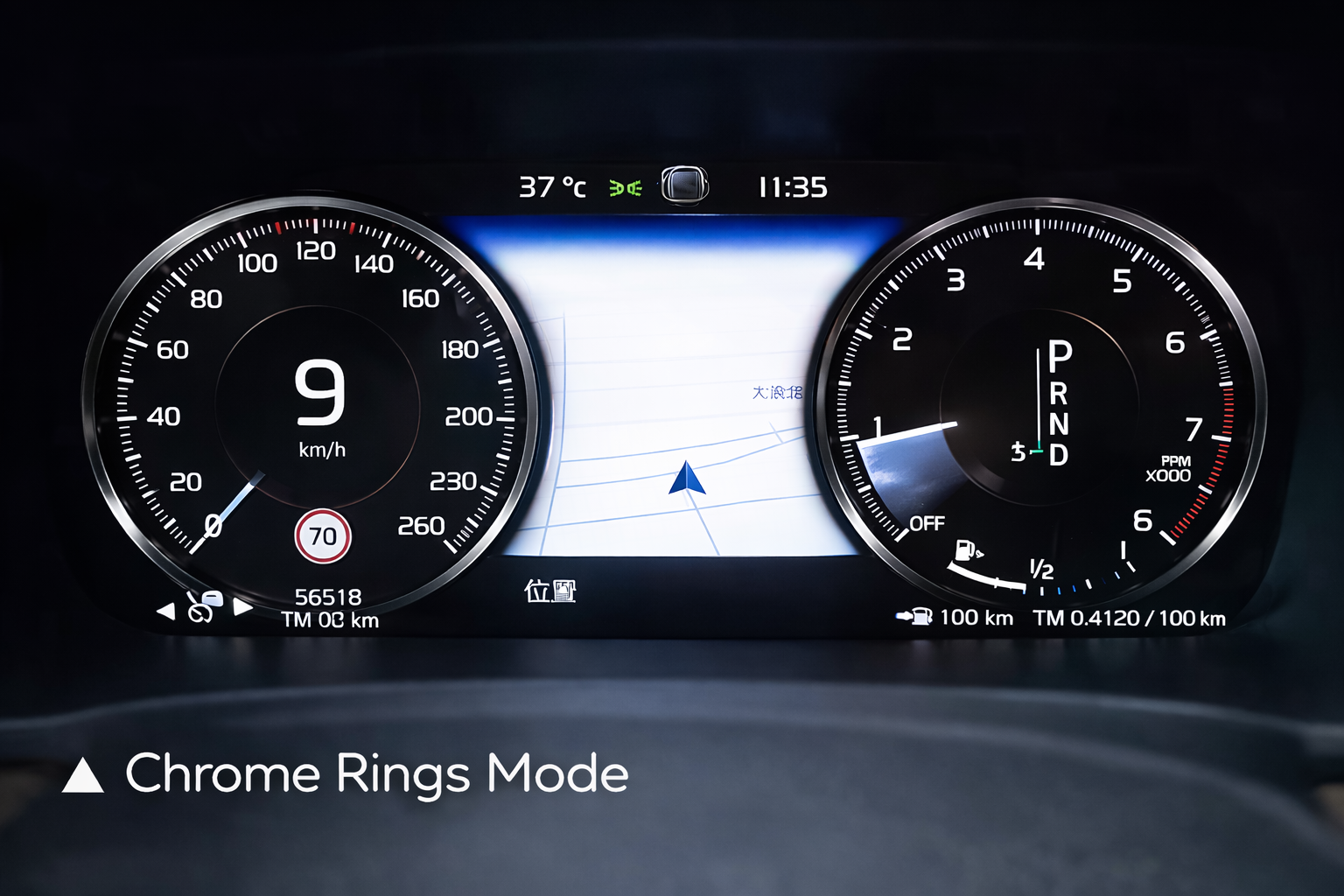
Chrome Rings Mode for a Classic Digital Look

Chrome Rings Mode keeps a familiar dual-gauge structure while giving the Volvo dashboard a cleaner digital presentation.

Volvo digital LCD cluster Chrome Rings Mode

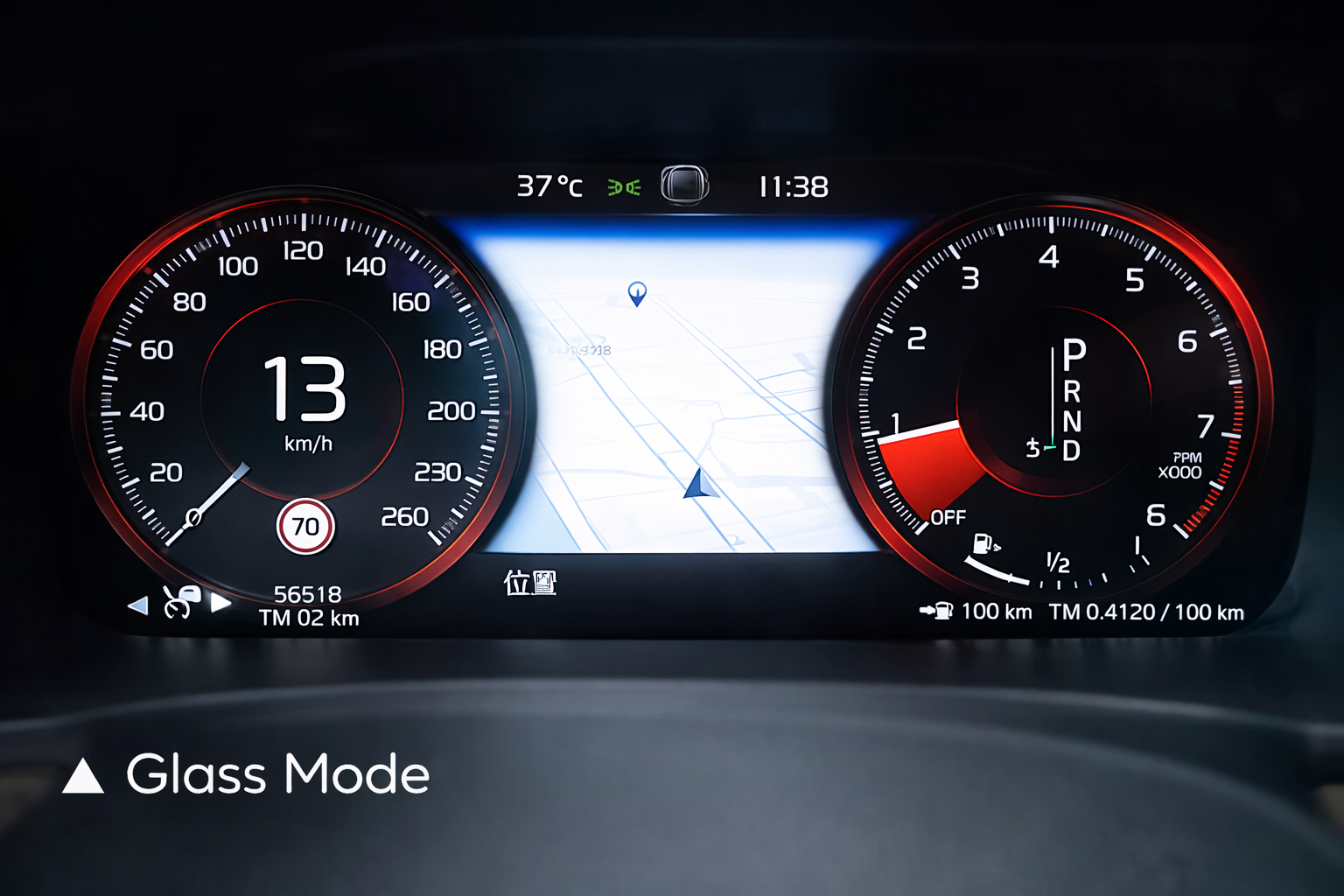
Glass Mode for a Sharper Premium Display

Glass Mode gives the cluster a brighter, more modern visual style while keeping speed, RPM and navigation information easy to read.

Volvo digital LCD cluster Glass Mode

Minimalistic Mode for Clear Daily Information

Minimalistic Mode reduces visual clutter and keeps the most useful driving information front and center for everyday use.

Volvo digital LCD cluster Minimalistic Mode

Performance Mode for a Sportier Dashboard Feel

Performance Mode adds red-accented gauges for owners who want the driver display to feel more dynamic without changing the basic Volvo cabin layout.

Volvo digital LCD cluster Performance Mode

Installation Path for This Volvo Digital Dashboard Upgrade

What the Installer Should Expect

Remove dashboard trim around the instrument-cluster area carefully.
Remove the original cluster and compare connector and mounting structure.
Install the matched Volvo 12.3 digital instrument cluster in the original position.
Complete remote unlocking or software activation when required.
Test speed, RPM, fuel, mileage, warning indicators, navigation display and steering-wheel control behavior before final assembly.

When to Stop and Contact iKAGOO

!The connector shape or pin layout clearly does not match.
!A pin is bent, broken or loose.
!The wiring does not match the supplied connection guidance.
!There is abnormal heat, smell, smoke or repeated fuse failure.
!The installation would require cutting the supported factory main wiring harness.

This is a Level 3 — Advanced DIY product. A capable installer can complete it with careful work, but the vehicle must be tested properly before the dashboard is fully reassembled.

Frequently Asked Questions

Does this Volvo Digital LCD Cluster fit XC60, XC90, S90 and S60?

This product page provides separate order options for XC60, XC90, S90 and S60. Fitment still depends on the vehicle year, dashboard layout, original system, connector configuration and activation path. Provide your VIN and dashboard photo before shipment.

Is this a Volvo Android head unit or a CarPlay module?

No. This is a digital instrument cluster / LCD cluster upgrade. It upgrades the driver display area, not the center Android head unit. CarPlay or Android Auto map-related information may appear in the cluster only when the vehicle system, main unit and activation path support it.

Does the Volvo 12.3 digital cluster need activation?

Yes, selected functions may require remote unlocking or instrument cluster software activation after hardware installation. This is why the product page includes both hardware options and a software activation option.

Will the cluster show navigation and road signs?

The product media and description support map, road sign and navigation-related display. The exact function depends on the vehicle system, selected cluster version and activation path.

Can I install this Volvo digital dashboard upgrade myself?

This is Level 3 — Advanced DIY. It is suitable for experienced DIY installers or an automotive electronics installer. The work requires careful dashboard disassembly, connector matching, activation and full function testing.

What information should I provide before ordering?

Provide your VIN, vehicle model, year, country or region, steering position, dashboard photo, current instrument-cluster photo and the functions you want to keep. This helps iKAGOO prepare the correct version.

What is the difference between hardware and software activation?

The hardware option is the physical Volvo 12.3 digital instrument cluster. The software activation option is for buyers who already have suitable hardware and need the activation or remote unlocking service path.

Should I choose Universal Digital Instrument Cluster (Used Parts)?

Choose the used-parts option only when you understand that a used original-type cluster still needs correct matching and activation. Contact iKAGOO before ordering if you are not fully sure.

Will I need to cut my original wiring?

The matched original connector approach is designed to avoid intentionally cutting the supported factory wiring. Stop installation and contact iKAGOO if the connector or wiring path does not match the guidance.

What happens if compatibility was confirmed but the product cannot be installed?

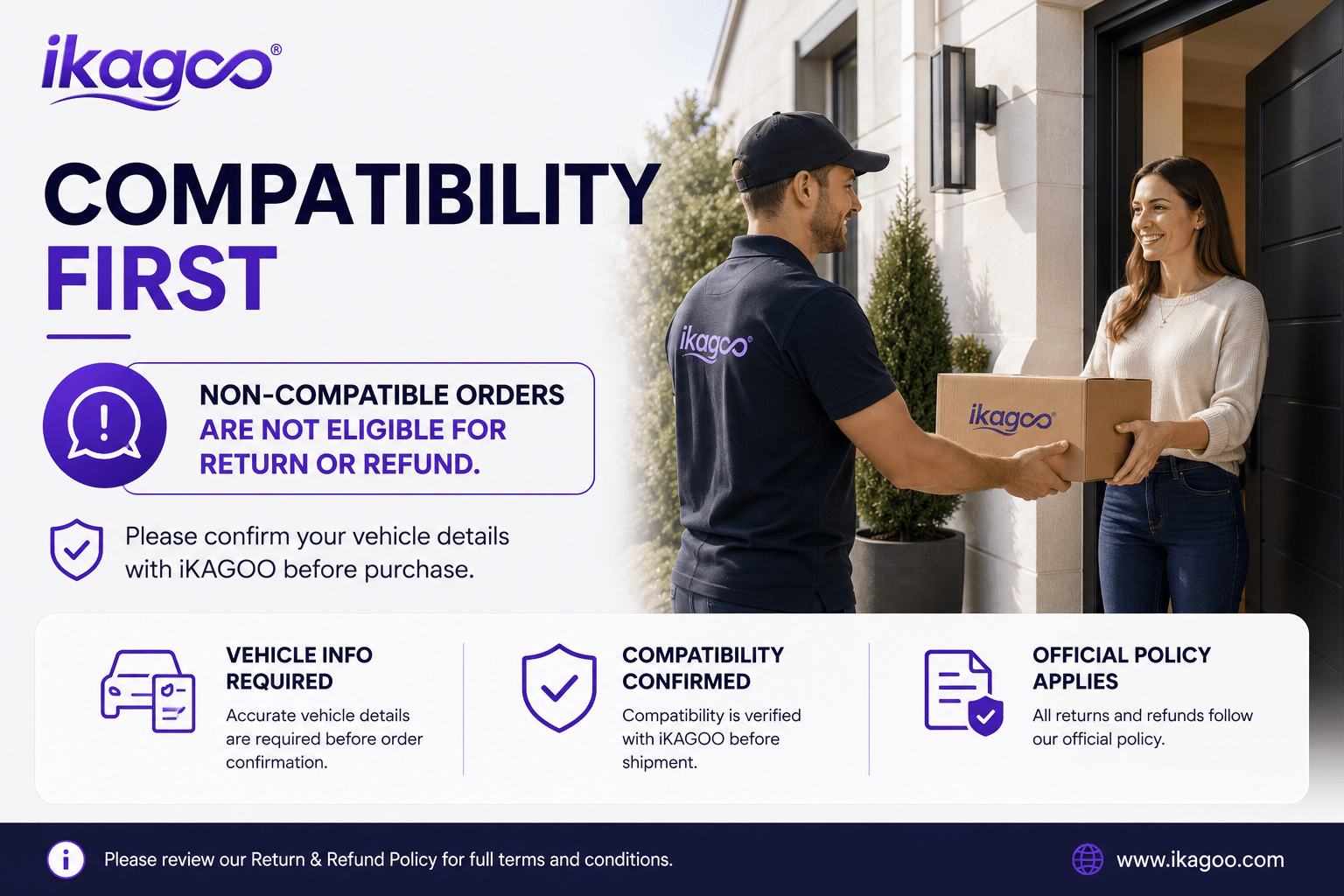
Provide accurate vehicle information before purchase and cooperate with installation checks. If iKAGOO confirmed compatibility before purchase and later confirms that no reasonable technical solution is available under the published policy conditions, the applicable return or refund policy will apply.

Make Your Volvo Dashboard Feel Modern Again

Choose the correct Volvo Digital LCD Cluster option, provide your vehicle information, and let iKAGOO help prepare the right 12.3-inch cluster and activation path for your XC60, XC90, S90 or S60.

5.00

Based on 1 reviews
1
0
0
0
0

1 review for Volvo Digital LCD Cluster 12.3″ for XC60, XC90, S90, S60

  1. Eric Swanson

    Total rating
    Value for money

    The one thing my 2011 XC60 R-Design lacked was a modern dash. This upgrade fixes that. The resolution is crisp, and the ‘Performance’ mode with the big center tachometer and digital speed is exactly what I wanted. I was worried about the odometer, but it automatically synced to my car’s actual mileage after installation. No SRS airbag errors either. Highly recommended.

    Is it helpful?
Add a review

Your email address will not be published. Required fields are marked

You have to be logged in to be able to add photos to your review.

iKAGOO shipping, warranty, returns and customer support
iKAGOO Customer Support

Shipping, Warranty & Returns

Clear information about order processing, international delivery, vehicle-specific products, warranty support, returns and damaged shipments.

Order processing Normally 1–3 business days before dispatch.
International delivery Normally 5–20 business days after dispatch, depending on destination.
Hardware warranty 12-month limited warranty for eligible manufacturing defects.
Vehicle-specific support Compatibility, wiring and configuration assistance are available.

Frequently Asked Questions

These answers provide a practical summary. The complete policy pages linked below apply to all orders.

01

Where are orders shipped from, and how long does delivery take?

Most iKAGOO orders are dispatched from our fulfillment location in China after the product configuration and vehicle information have been checked. Normal order processing takes approximately 1–3 business days.

Estimated delivery times after dispatch are:

  • USA and Canada: approximately 5–9 business days
  • European Union: approximately 7–15 business days
  • United Kingdom and Australia: approximately 7–10 business days
  • Other supported regions: approximately 7–20 business days

Delivery estimates may be affected by customs clearance, local holidays, remote-area delivery, weather or carrier delays.

02

Will I need to pay import tax, VAT or customs charges?

Standard international shipping normally does not include destination-country VAT, import duties, brokerage charges or customs clearance fees.

For eligible European Union destinations, an optional DDP shipping service may be available. Import-related charges are included only when DDP is selected at checkout or confirmed by iKAGOO in writing before shipment.

When DDP is not selected, the recipient is responsible for any charges collected by local customs or the delivery carrier.

03

Can I request express shipping?

Express or expedited shipping may be available for selected products and destinations. Availability, carrier and additional cost are confirmed before shipment.

Depending on the destination and product type, iKAGOO may use carriers such as DHL, FedEx, UPS, EMS, 4PX or another tracked logistics provider.

04

How can I track my shipment?

After the order has been dispatched, the tracking number or tracking link will normally be sent to the email address used for the order.

Tracking updates may take several business days to appear while a parcel is transferred between international and local carriers.

05

What is the iKAGOO return and refund policy?

Return eligibility depends on the reason for the return, the product condition, installation status, evidence provided and whether the return has been approved by iKAGOO.

For a non-defective return, the product must normally be unused, uninstalled, complete and suitable for resale. The customer is generally responsible for approved return shipping costs.

Original shipping charges, DDP charges, VAT, customs duties and other logistics costs are generally non-refundable unless required by applicable law or confirmed otherwise by iKAGOO.

Do not send a product back without receiving an approved return address and return instructions from iKAGOO.

06

What happens if iKAGOO confirmed compatibility but the product cannot be installed?

Additional protection may apply when iKAGOO confirmed compatibility before purchase, the customer supplied accurate vehicle information, and the customer cooperated with reasonable installation and diagnostic steps.

If iKAGOO confirms that no reasonable technical solution is available, and the issue is reported within 7 calendar days after delivery, the customer may be eligible for a refund of the product price without being required to return the product.

Original shipping, DDP, VAT, customs duties and other third-party charges are not included in this product-price refund.

07

What warranty does iKAGOO provide?

Eligible iKAGOO products include a 12-month limited hardware warranty covering verified manufacturing defects and eligible hardware failures under normal use.

Depending on the issue, the solution may include remote diagnosis, configuration assistance, replacement parts, repair, product replacement, partial refund or full refund.

The warranty does not normally cover damage caused by incorrect wiring, unauthorized modification, accidental damage, water ingress, impact, misuse, improper voltage, installation error or incompatible third-party equipment.

08

Does opening the product automatically cancel the warranty?

Inspection or third-party examination does not automatically cancel the entire warranty. However, damage caused by unauthorized repair, component replacement, incorrect modification, broken circuits or improper reassembly is not covered.

Contact iKAGOO before dismantling or repairing the product so that the correct diagnostic procedure can be provided.

09

What if my order arrives damaged or has missing parts?

Contact iKAGOO within 7 calendar days after delivery and keep the original packaging, shipping label, accessories and product.

Please provide clear photos or video showing:

  • The external shipping carton and shipping label
  • Any visible packaging damage
  • The product and affected area
  • All received accessories and wiring

After verification, iKAGOO may arrange a missing-part shipment, replacement, repair, refund or another reasonable solution based on the specific case.

10

What should I do if I ordered the wrong product?

Contact iKAGOO before installing or using the product. An exchange or return may be approved when the product remains unused, uninstalled, complete and suitable for resale.

Customers are normally responsible for shipping costs and any price difference when the wrong product, vehicle model, year or factory configuration was selected.

A free prepaid return label is not automatically provided.

11

Can I modify or cancel my order after payment?

Contact iKAGOO as soon as possible, preferably within 12 hours after placing the order, when requesting an address, vehicle configuration or product change.

A modification or cancellation is not effective until confirmed by iKAGOO. Vehicle-specific products may enter procurement, programming, testing, configuration or custom preparation shortly after payment.

Once preparation or shipment has started, cancellation may not be possible, or reasonable costs already incurred may be deducted.

12

What is included in the package?

Package contents vary by product, vehicle model, factory system and selected configuration.

Depending on the product, the package may include the main device, vehicle-specific wiring harnesses, CANBUS interface, adapters, USB cables, antennas, microphones, mounting hardware and other installation accessories.

Refer to the relevant product page, package photos and order confirmation for the exact included components.

13

How do I contact iKAGOO support?

You can contact iKAGOO through the contact form, email, WhatsApp or the available website support channels. Typical response time is within 24 business hours.

For faster technical support, include your order number, vehicle model and year, factory system photos, product photos and a clear video showing the issue.

Visit: iKAGOO Contact and Support

14

Is payment secure, and are installment options available?

Payments are processed through the secure payment methods displayed during checkout. Available card, wallet and installment options may vary by country, currency, payment provider and customer eligibility.

Any installment service, including options offered by PayPal or another provider, is subject to that provider’s regional availability and approval rules.

Read the Complete iKAGOO Policies

Review the full policy pages before ordering, especially for vehicle-specific products, international tax arrangements and installation-related returns.

This FAQ is a simplified customer guide. The complete published policy pages, order confirmation and applicable consumer law take priority if any wording differs.

Volvo Digital LCD Cluster Volvo Digital LCD Cluster 12.3...

From: $357.00

Select options