XStore theme
Sale 43%
  • 1 5
  • 3 3
  • 2 6
  • 4 2
  • 5 2
  • 6 1

Toyota Alphard Digital Cluster 2015-2019 12.3″ 1920×720 Linux

Brand:
(1 customer review)

Original price was: $999.00.Current price is: $568.00.

Duty-Free EU & USA Only
Details
Secure by PayPal
DDP Tax-Prepaid Service

We handle all VAT and duties. Estimated savings: $120–$280.

USA (48 States)AustriaBelgiumBulgariaCroatiaCyprusCzechiaDenmarkEstoniaFinlandFranceGermanyGreeceHungaryIrelandItalyLatviaLithuaniaLuxembourgMaltaNetherlandsPolandPortugalRomaniaSlovakiaSloveniaSpainSweden
or

Have any Questions?

Feel free to Get in touch

🔥 New customers get $35 off their first order.

Buy 1 items get $35.00 OFF
on each product
Buy 2 items get $80.00 OFF
on each product
Pay safely with Paypal Pay safely with Visa Pay safely with Master Card Pay safely with JCB Pay safely with American Express Pay safely with Alipay Pay safely with Google pay Pay safely with Klarna Pay safely with DISCOVER Pay safely with  Apple Pay
Guarantee Safe and Secure Payment Checkout
iKAGOO Buyer Protection

Purchase Protection for This Product

Compatibility review, secure checkout, tracked delivery and practical after-sales support.

Toyota Alphard 30 Series Digital Cluster Upgrade

Toyota Alphard Digital Cluster 2015-2019 for a Cleaner, Newer Driving Display

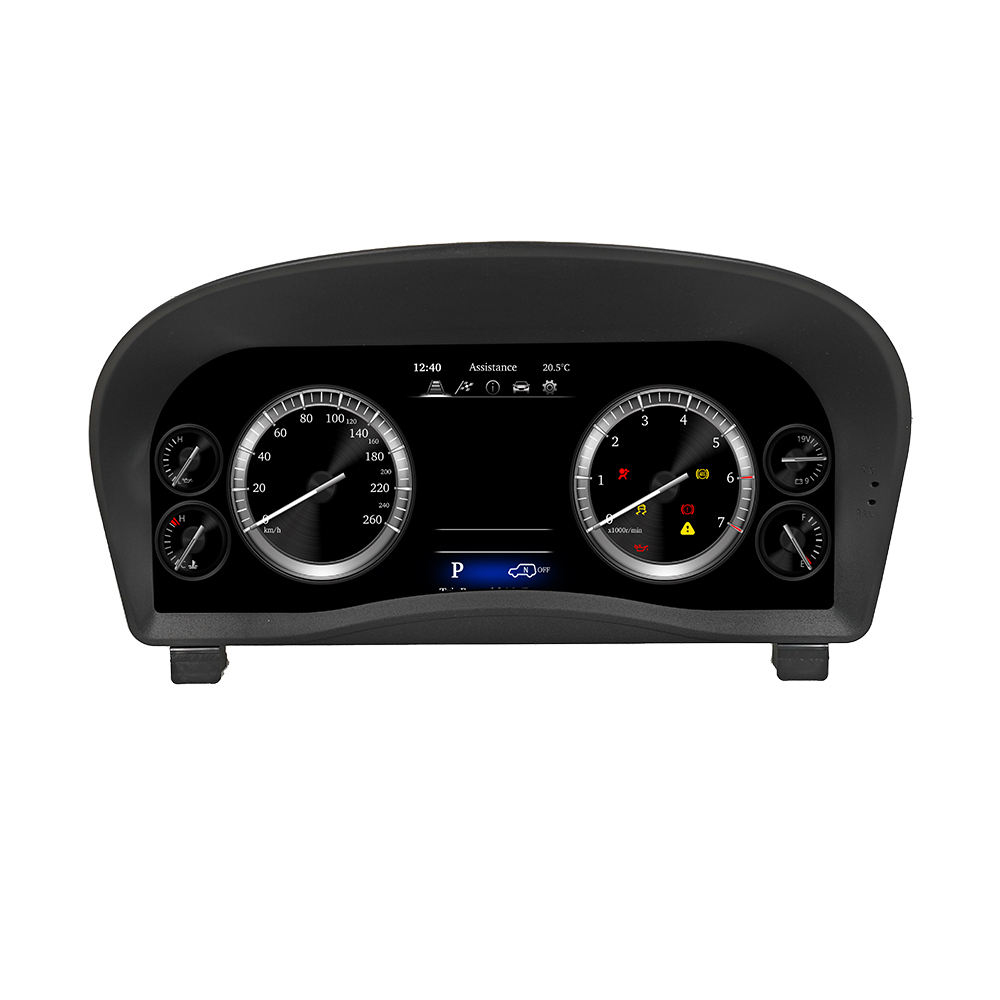
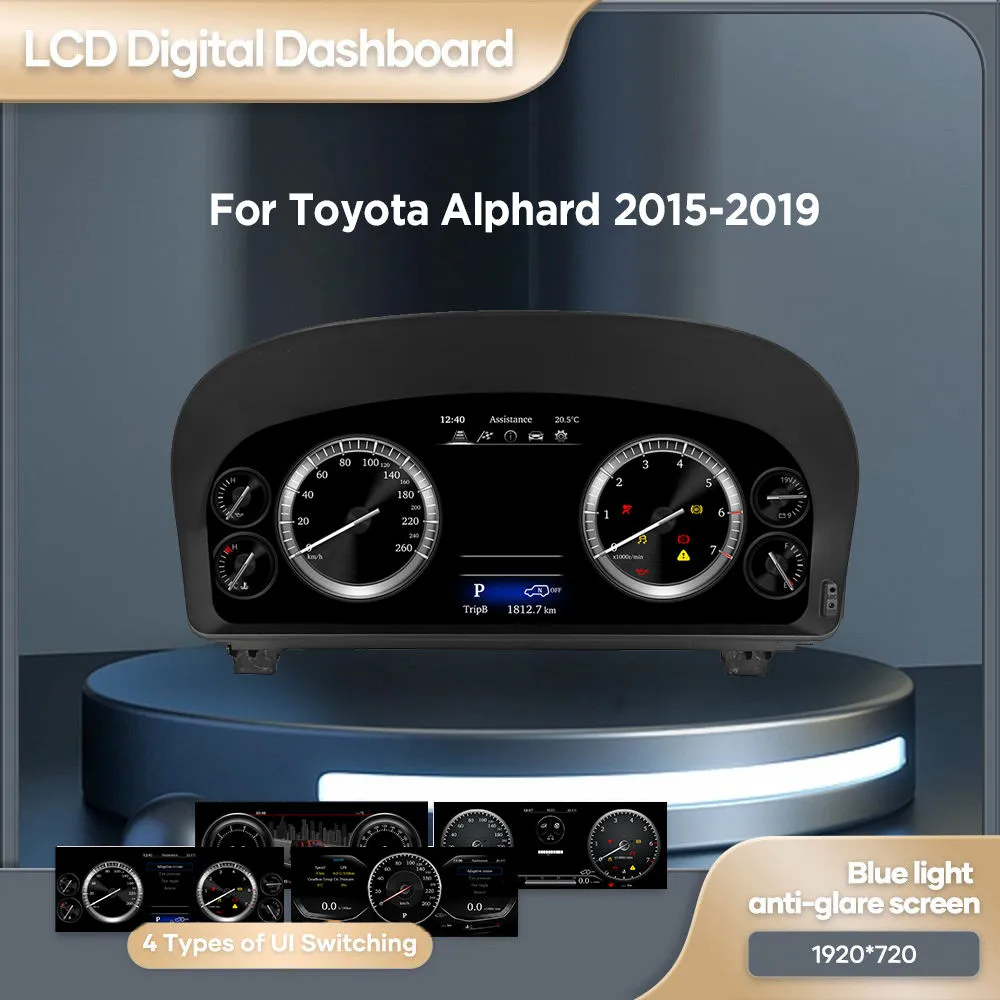
This Toyota Alphard Digital Cluster 2015-2019 upgrades the factory gauge area to a 12.3-inch 1920×720 Linux virtual cockpit display. It is built for owners who want the Alphard cabin to feel more modern while keeping essential vehicle information clear and easy to read.

  • 12.3-inch display
  • 1920×720 resolution
  • Linux dedicated cluster system
  • Speed, RPM, fuel and warning data
  • Steering wheel cluster-control support
  • Dedicated harness connection
  • OEM-style cockpit upgrade
Check My Vehicle First

To prepare the correct version, iKAGOO checks your vehicle year, dashboard photo, original cluster layout and connector configuration before shipment.

Make the Alphard cockpit feel current again

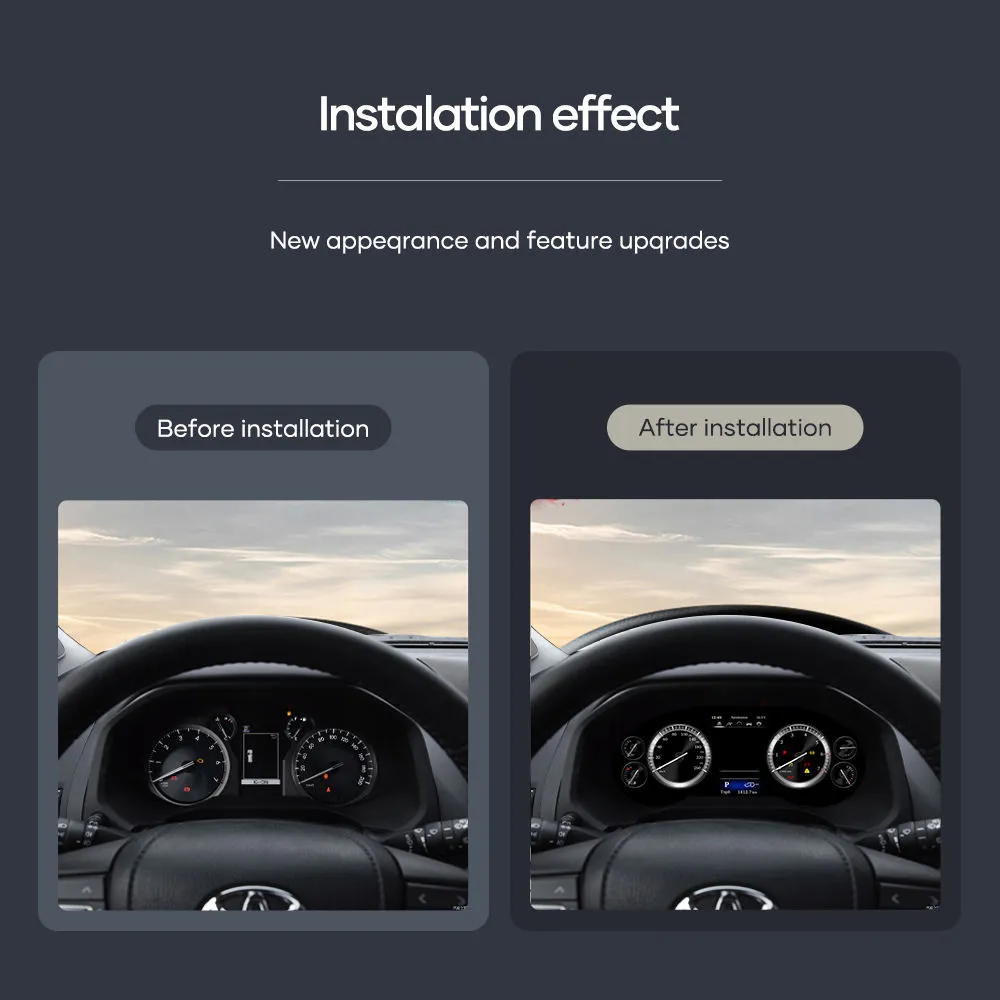
The first thing you see as a driver is the instrument cluster. This upgrade gives your Alphard a wider, clearer digital display while keeping the dashboard focused and practical.

Toyota Alphard Digital Cluster 2015-2019 12.3 inch dashboard upgrade
Quick Answer

What does this Alphard digital cluster upgrade do?

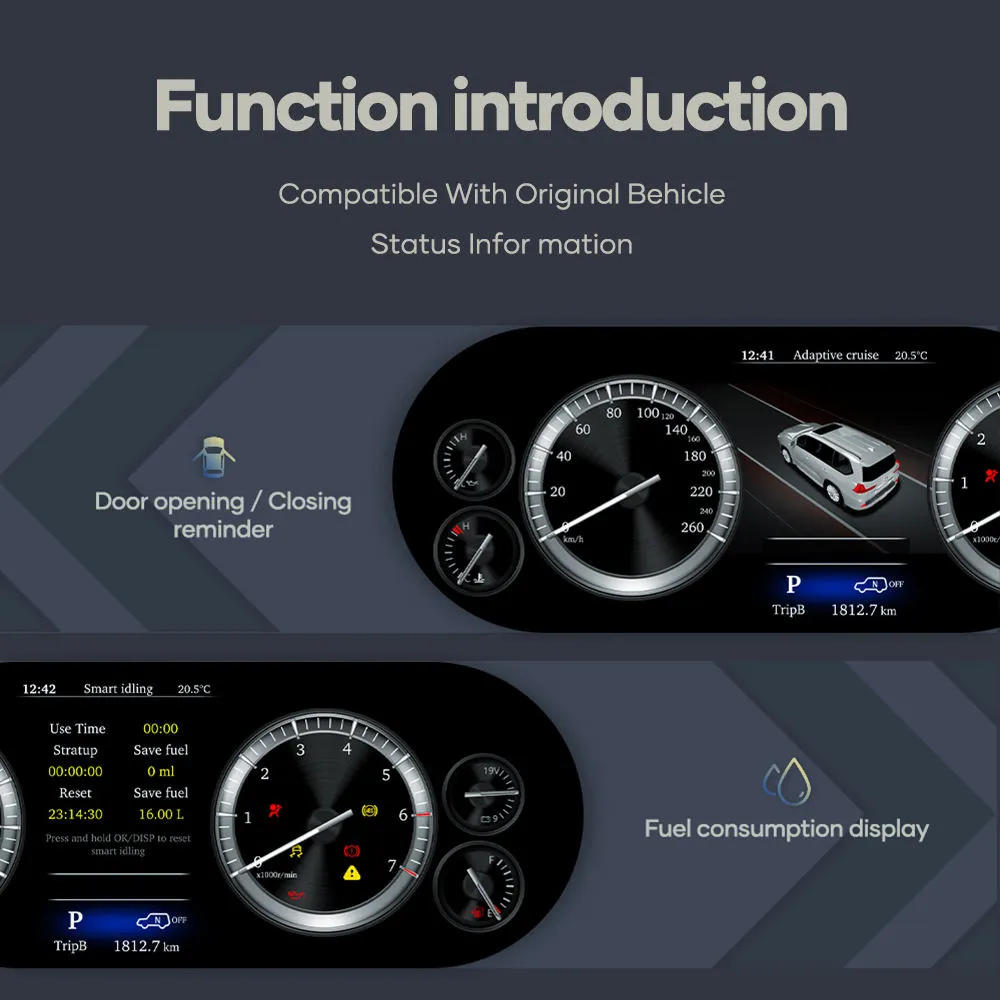
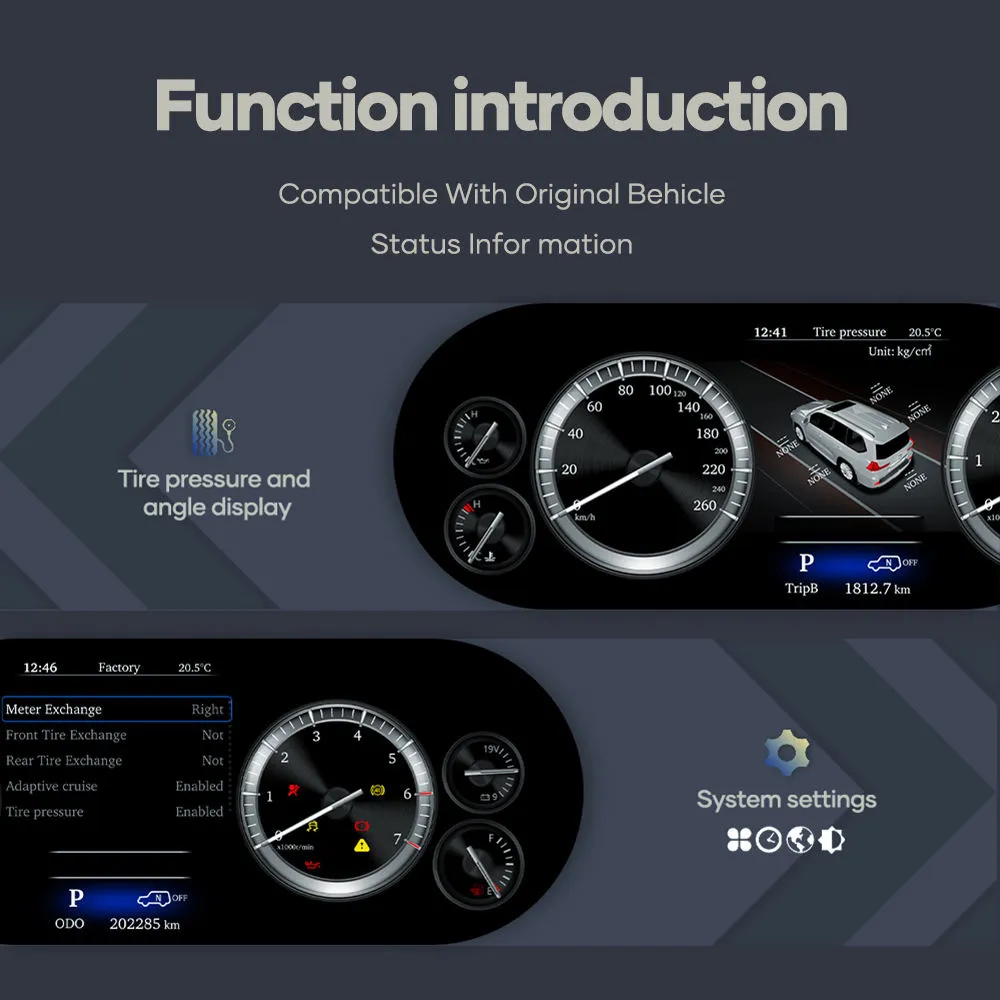
The Toyota Alphard Digital Cluster 2015-2019 replaces the older factory gauge look with a 12.3-inch Linux digital instrument cluster. It displays key driving information such as speed, RPM, fuel level, coolant temperature, warning indicators and vehicle status information in a more modern cockpit layout.

It is not an Android head unit and it is not designed for installing apps. It is a dedicated Linux instrument display system for the Toyota Alphard 2015–2019 dashboard.

Why Upgrade

Why Alphard owners choose this 12.3-inch digital dashboard cluster

Modern driver display

Your Alphard is a premium MPV, but the factory gauge layout can make the driver area feel older than the rest of the vehicle. This Toyota Alphard 30 Series digital cluster upgrade gives the cabin a more current visual center.

Clear daily information

The 12.3-inch 1920×720 display makes driving data easier to scan. Speed, RPM, fuel level, coolant temperature and warning information are presented through a dedicated instrument interface.

Vehicle-specific preparation

iKAGOO prepares the matched screen, wiring harness and vehicle interface according to your model year and original cluster layout. This reduces the chance of ordering the wrong Alphard instrument cluster replacement.

Factory Functions Retained

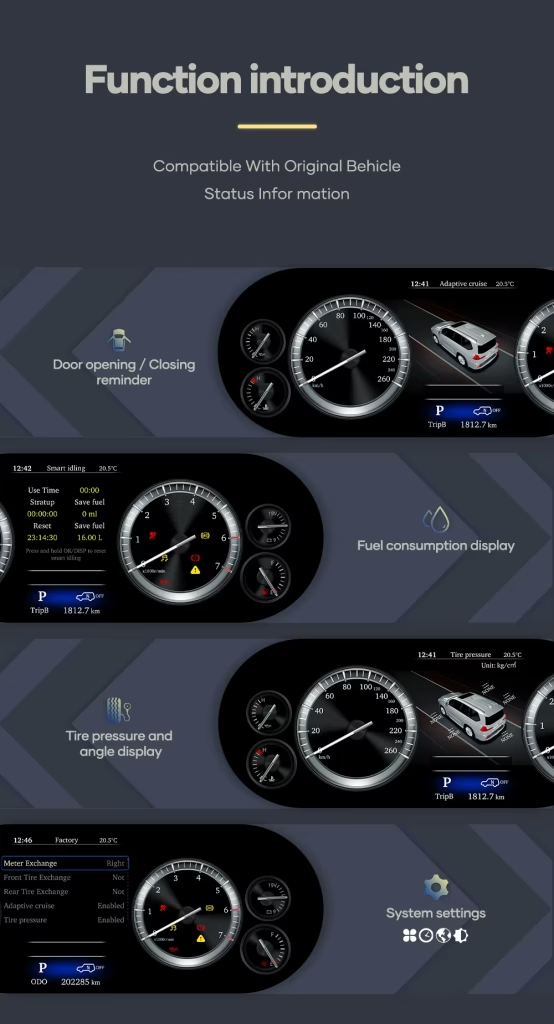
Original vehicle functions supported after correct installation

Driving data continues to display

  • Speed display is supported.
  • RPM display is supported.
  • Fuel level display is supported.
  • Coolant temperature display is supported.
  • Key warning indicators and vehicle status information are supported.

Controls and data behavior

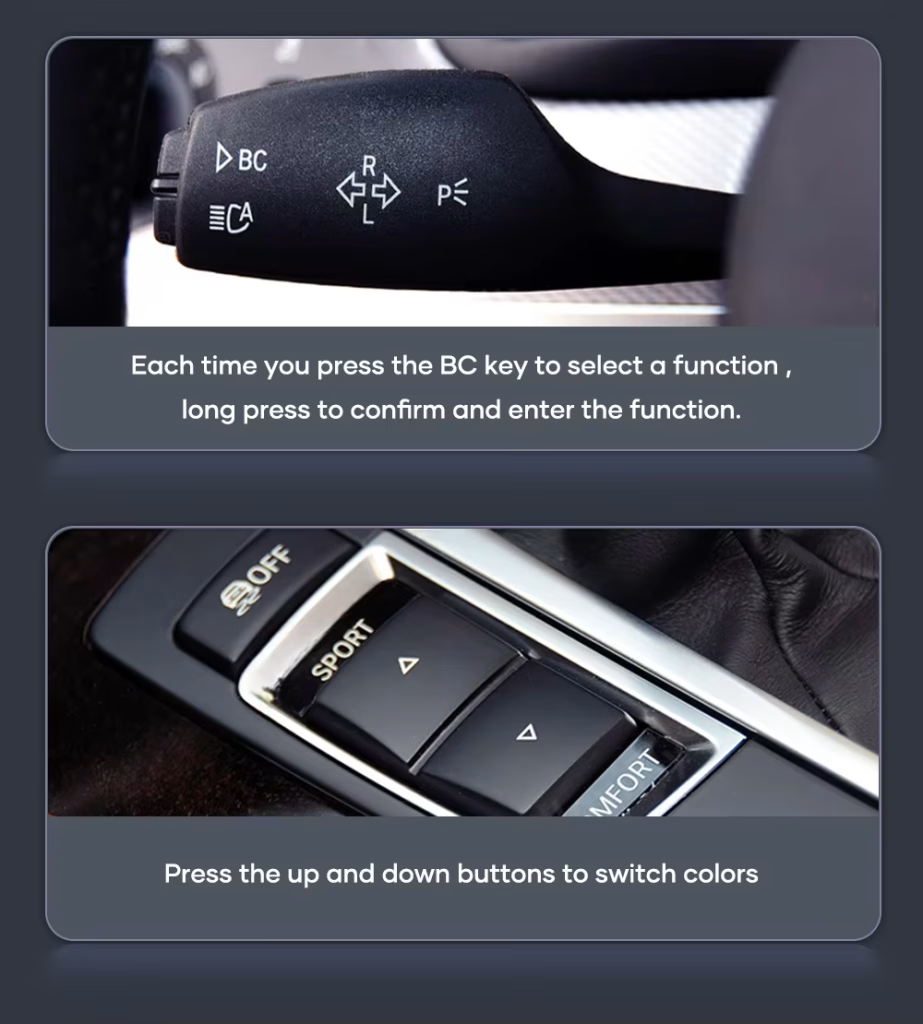
  • Factory steering-wheel buttons related to cluster menu control continue to work in most cases.
  • Mileage and trip information are designed to sync with the vehicle system.
  • Navigation prompts can be shown when paired with a compatible navigation source that supports cluster guidance output.
  • The dedicated harness is designed to connect without intentionally cutting supported factory wiring.

Special factory configurations, previous aftermarket wiring, non-standard regional versions or damaged connectors may require additional connection instructions. Please provide clear dashboard and original cluster photos before ordering.

Correct Order Preparation

How iKAGOO prepares your Toyota Alphard digital cluster order

1. Vehicle information check

We check your Toyota Alphard model year, market version, dashboard photo and original cluster layout. This is important because imported Alphard vehicles can be described differently by region.

2. Cluster and harness matching

iKAGOO prepares the correct 12.3-inch display route, matched wiring harness and vehicle interface according to the information you provide.

3. Installation support after delivery

After delivery, you can request practical connection and configuration guidance for the product route supplied by iKAGOO.

iKAGOO Purchase Evaluation

Three iKAGOO checks that help you decide before buying

iKAGOO Upgrade Necessity

86/100

Strong Upgrade Case. This upgrade makes sense for Alphard owners who plan to keep the vehicle and want the driver area to match the premium MPV experience more closely.

  • Older factory gauge look is improved.
  • 12.3-inch display gives a stronger daily-use change.
  • Linux cluster keeps the function focused on driving data.

How this result is determined: This product is evaluated under the iKAGOO Upgrade Necessity framework, which considers factory-system condition, daily-use improvement, long-term ownership value, alternatives and practical upgrade value.

Read the Upgrade Necessity framework

iKAGOO Original Vehicle Compatibility

88/100

High OEM-style Integration. The score reflects the overall integration quality of this Alphard digital cluster route, not a percentage of factory functions lost.

  • Vehicle data display is supported.
  • Steering-wheel cluster controls are supported in most cases.
  • Dedicated harness connection is used.

How this result is determined: This result is based on the iKAGOO Original Vehicle Compatibility framework. It evaluates function continuity, controls, vehicle data and warnings, physical architecture, factory-style interaction and installation integration.

Read the compatibility framework

iKAGOO Installation Ease Level

Level 3

Advanced DIY. This installation ease level means the upgrade is realistic for experienced DIY installers or automotive electronics installers. It requires careful dashboard disassembly, matched harness connection, configuration and full function testing before final reassembly.

  • The original instrument cluster area must be accessed carefully.
  • Matched harness and vehicle interface must be connected correctly.
  • Temporary testing should be completed before final reassembly.

How this result is determined: This installation ease level helps buyers understand the required installation skill before ordering. It does not mean the product is low quality or unsuitable for upgrade.

Read the installation ease level framework
Strong Buying Comparison

Why this iKAGOO digital cluster is the better upgrade path for long-term Alphard ownership

Keep the old factory gauges

Lowest cost, but the driver area keeps the older visual style. It does not make the Alphard cabin feel meaningfully newer.

  • No visual modernization
  • No wider digital layout
  • Best only if you do not care about cockpit appearance

Repair the original cluster

Repair can restore basic operation, but it usually returns the vehicle to the same older display experience.

  • Useful for fault recovery
  • Limited upgrade value
  • No virtual cockpit look

Used OEM replacement

A used original cluster may solve a hardware issue, but matching, mileage behavior and condition can still create uncertainty.

  • Still old-generation display style
  • Condition depends on the donor unit
  • May still need vehicle-specific handling

iKAGOO 12.3 Digital Cluster

This is the stronger choice when you want a real visual upgrade, clearer display experience and vehicle-specific preparation from iKAGOO.

  • 12.3-inch 1920×720 display
  • Linux dedicated instrument system
  • Vehicle data and warning display
  • Steering-wheel cluster-control support
  • Matched harness preparation

Buying conclusion

For owners who want more than a repair, this iKAGOO Toyota Alphard 12.3 inch digital dashboard cluster delivers a stronger improvement in daily display experience, cockpit appearance and long-term ownership value. It is the more suitable choice when you plan to keep the vehicle and want the cabin to feel meaningfully newer.

Vehicle Compatibility

Toyota Alphard 2015–2019 and regional name guidance

This product is prepared for Toyota Alphard 2015–2019. The same generation may be described as Alphard 30 Series or AH30 in many import markets. Some buyers also compare it with Vellfire 30 Series because the Alphard and Vellfire are closely related in this generation.

iKAGOO prepares the correct version according to the vehicle generation, model year, dashboard layout, factory cluster and connector configuration—not only the badge name used in your market.

Primary model Toyota Alphard
Common generation name Alphard 30 Series / AH30
Applicable page range 2015–2019 Toyota Alphard
Related regional references Japan domestic model, Hong Kong, Singapore, Malaysia, Thailand, China, Taiwan, Russia, Middle East and imported right-hand-drive or left-hand-drive markets
Before ordering Please send the model year, dashboard photo, original cluster photo and connector photo when requested. This helps iKAGOO prepare the correct screen, wiring harness and vehicle interface.
Product Specifications

Current confirmed specifications

Product type Digital Instrument Cluster / LCD Cluster / Virtual Cockpit Retrofit
Vehicle fitment Toyota Alphard 2015–2019
Display size 12.3 inch
Resolution 1920×720
Operating system Linux dedicated instrument display system
Android app installation No. This cluster is not an Android head unit and is not designed for installing Android apps.
Supported vehicle data Speed, RPM, fuel level, coolant temperature, key warning indicators and vehicle status information
Steering wheel controls Factory steering-wheel buttons related to cluster display switching and menu control are supported in most cases after correct installation.
Mileage and trip behavior Designed to sync mileage and trip information with the vehicle system. Actual behavior can depend on the exact vehicle configuration.
Navigation prompts Supported when paired with a compatible navigation source that supports cluster guidance output.
Connection method OEM-style connectors and dedicated harness route, typically without intentional wire cutting for supported wiring.
SKU T1003-1
Weight and package size 2 kg; 46 × 33 × 25 cm
Real Product Media

See the Toyota Alphard digital cluster from different upgrade angles

A clearer driving display for daily Alphard use

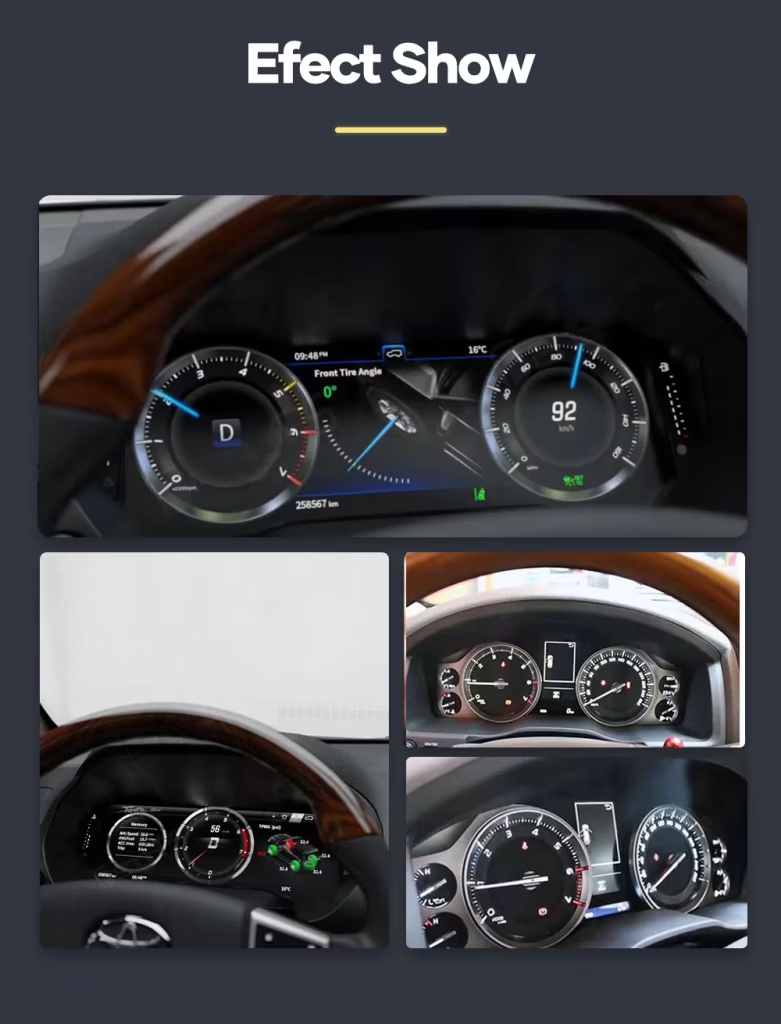
The digital cluster helps the driver read core information more quickly while giving the dashboard a cleaner, newer look.

Toyota Alphard 30 Series digital cluster driving information display

12.3-inch display area with a wider visual layout

The larger LCD layout gives the Alphard cockpit a stronger visual upgrade than simply repairing or replacing the old factory gauge unit.

Toyota Alphard 12.3 inch digital dashboard cluster screen layout

OEM-style cluster interface for a premium MPV cabin

The goal is not to make the dashboard look aftermarket. The upgrade should feel controlled, clean and suitable for the Alphard’s luxury MPV interior.

Toyota Alphard OEM style virtual cockpit digital cluster interface

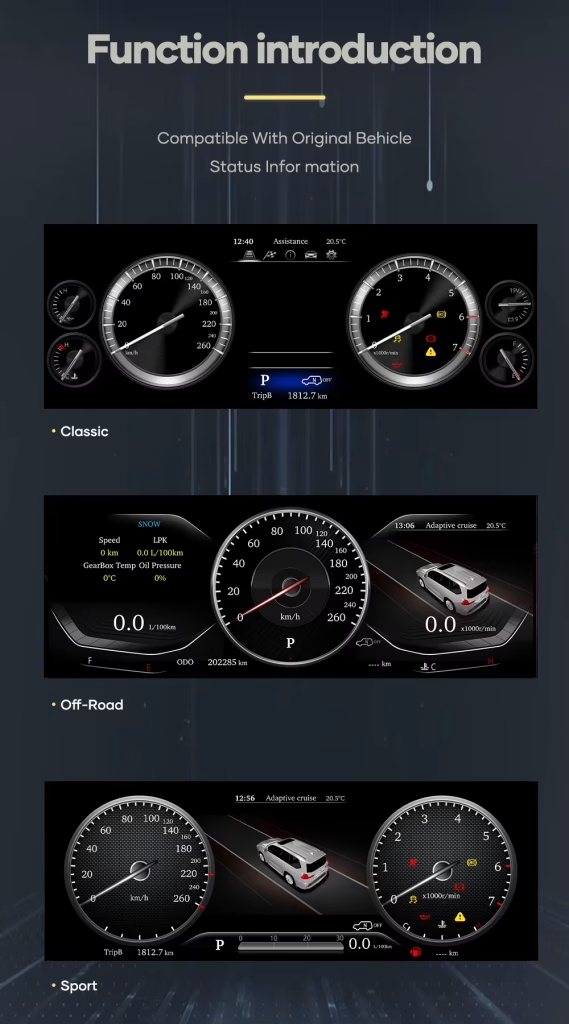
Multiple cluster layouts for different driving preferences

You can choose a display style that fits your own driving preference while keeping the cluster focused on vehicle information.

Toyota Alphard digital cluster multi layout display

Vehicle-specific upgrade route for the Alphard dashboard

Correct physical matching matters. iKAGOO checks the vehicle year, original cluster layout and connector configuration before preparing the order.

Toyota Alphard digital instrument cluster vehicle specific upgrade route

Driver-focused screen design for quick information reading

The cluster is designed to keep speed, RPM and vehicle information in the driver’s natural viewing area.

Toyota Alphard digital instrument cluster driver focused display view

Modern display style without turning the cluster into an app screen

This Linux cluster is dedicated to instrument display. It keeps the upgrade focused on driving data instead of unnecessary app functions.

Toyota Alphard Linux digital instrument cluster vertical display view

Clear speedometer and vehicle information presentation

A high-resolution display helps reduce the dated feeling of the factory gauge area and improves the dashboard’s first impression.

Toyota Alphard digital speedometer and vehicle data cluster display

Built for the Alphard owner who wants a premium cockpit result

The Alphard is often used as a family, executive or passenger vehicle. A cleaner driver display helps the whole cabin feel more current.

Toyota Alphard premium MPV digital cluster display upgrade

Matched display route for correct installation planning

The right cluster upgrade is not only about screen size. The order also needs the correct wiring route and vehicle interface preparation.

Toyota Alphard digital cluster matched display and wiring route

Useful for refreshing a luxury MPV that still drives well

If your Alphard still serves you well but the driver display feels old, this virtual cockpit retrofit gives a visible daily improvement.

Toyota Alphard virtual cockpit retrofit display for 2015 to 2019 models

A complete digital cluster upgrade instead of a small cosmetic change

This is the right direction when you want the Alphard driver area to feel newer, clearer and more aligned with a modern premium vehicle.

Toyota Alphard 2015 2019 digital instrument cluster replacement display
Installation Ease Level

Installation Ease Level: Level 3 — Advanced DIY

What the installation normally involves

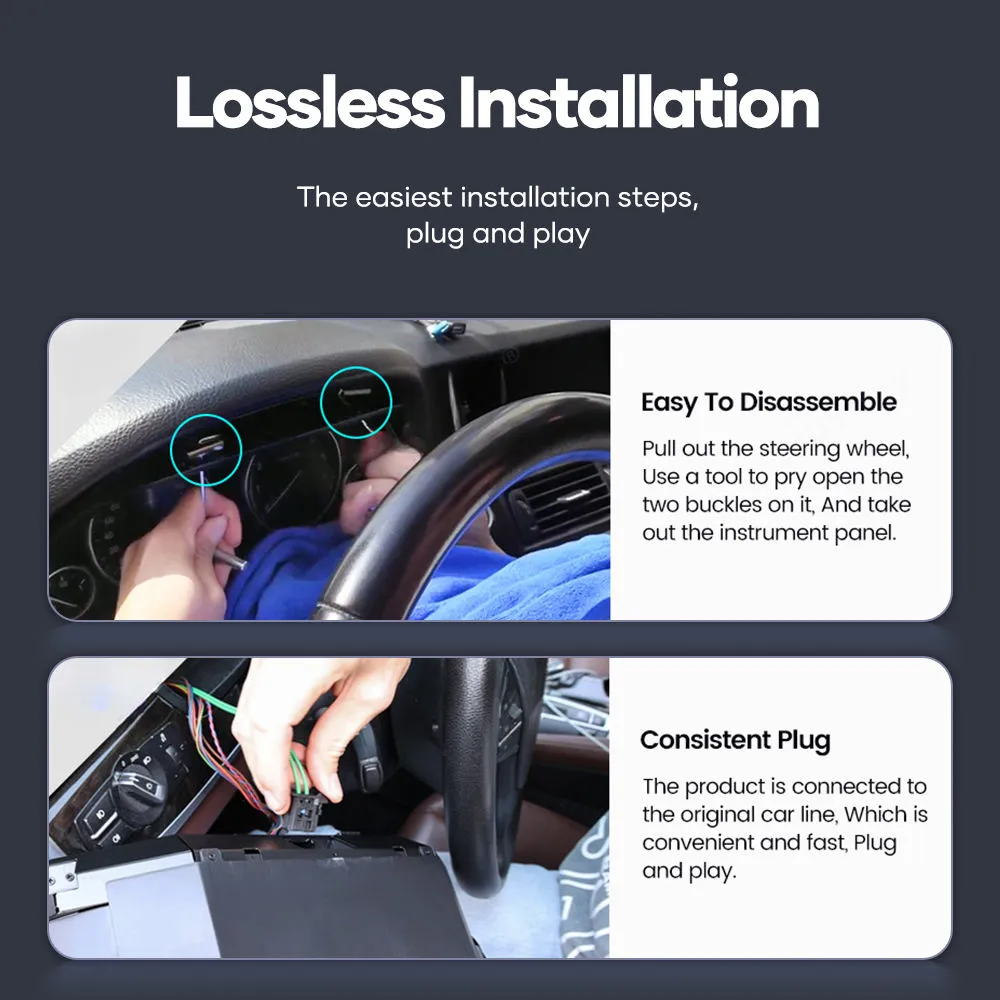
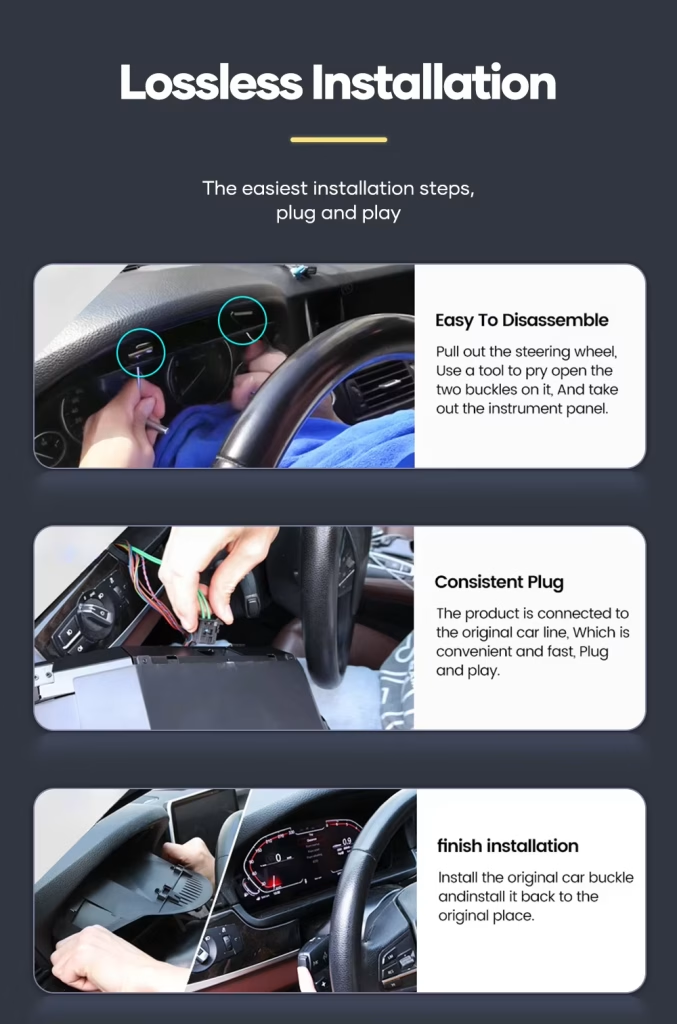
  • Careful removal of the original instrument cluster area and related trim.
  • Connection of the matched harness and vehicle interface.
  • Cluster power-on and display testing before final reassembly.
  • Checking speed, RPM, fuel level, temperature, warning information and steering-wheel cluster controls.
  • Confirming mileage, trip behavior and sleep/power behavior after installation.

Who should install it?

This product is suitable for experienced DIY installers or an automotive electronics installer. The matched harness route helps reduce wiring modification, but correct disassembly, connector identification and function testing are still required.

Do not force connectors. Do not cut the factory main harness unless iKAGOO has provided a specific instruction for your confirmed vehicle route.

Stop installation and contact iKAGOO if any of these happen

  • The connector shape or pin layout clearly does not match.
  • A connector pin is bent, loose or damaged.
  • The supplied harness does not match the installation instruction for your vehicle.
  • You smell abnormal heat, burning odor or see smoke.
  • The fuse repeatedly blows.
  • Power or ground cannot be confirmed.
  • The installation would require cutting the original main vehicle harness.
  • Vehicle data, warning behavior or power behavior is abnormal after temporary testing.
Why Buy from iKAGOO

Prepared for your vehicle, supported after delivery

Vehicle-specific configuration

iKAGOO checks your vehicle details before preparing the order so the screen, harness and interface route match your Alphard as closely as possible.

Factory wiring protection

The matched harness route is designed to connect to supported factory wiring without intentional wire cutting under normal matched conditions.

Original function support

We help you focus on the functions that matter after installation: driving data, warning information, mileage behavior and steering-wheel cluster controls.

Installation and configuration guidance

After delivery, iKAGOO can provide practical connection and configuration help for the supplied product route.

12-month hardware warranty

Eligible manufacturing defects are covered by iKAGOO’s 12-month limited hardware warranty under the applicable policy.

Better than guessing from a low-price listing

A cheaper listing is not useful if the harness, vehicle interface or cluster route is wrong. iKAGOO prepares the order around your actual vehicle information.

Warranty & After-Sales Support

Support that matters after your Alphard cluster arrives

12-month hardware warranty

This product is covered by iKAGOO’s 12-month limited hardware warranty under the applicable policy. Keep your order details, vehicle photos and installation photos so support can review the situation clearly.

Configuration support after delivery

Vehicle-specific electronics need correct setup. If you meet a connection, display or vehicle-data issue during installation, contact iKAGOO with photos and a clear description before forcing any wiring change.

FAQ

Toyota Alphard Digital Cluster 2015-2019 FAQ

Is this Toyota Alphard Digital Cluster compatible with 2015–2019 models?

Yes, this Toyota Alphard Digital Cluster is prepared for Toyota Alphard 2015–2019. Before shipment, provide your vehicle year, dashboard photo and original cluster photo so iKAGOO can prepare the correct version.

Is this an Android head unit?

No, this is not an Android head unit. It runs on Linux as a dedicated instrument cluster system and is not designed for installing Android apps.

Does it support original steering wheel controls?

Yes, factory steering-wheel buttons related to cluster display switching and menu control are supported in most cases after correct installation and configuration.

Will the cluster show speed, RPM and vehicle warnings?

Yes, the cluster displays real-time vehicle information such as speed, RPM, fuel level, coolant temperature, key warning indicators and vehicle status information.

Will mileage and trip data sync after installation?

Yes, the Alphard Digital Cluster is designed to sync mileage and trip information with the vehicle system. Actual behavior can depend on the exact vehicle configuration, so provide your vehicle details before ordering.

Can it show navigation directions on the cluster?

Yes, navigation prompts can be shown when the cluster is paired with a compatible navigation source, such as an aftermarket head unit or CarPlay system route that supports cluster guidance output.

Does installation require cutting wires?

No, the matched harness is designed to connect through OEM-style connectors for supported vehicles, typically without intentional wire cutting. Stop installation and contact iKAGOO if the connectors do not match.

Can a first-time owner install it?

No, first-time installers should use an experienced automotive electronics installer. This product is Level 3 — Advanced DIY, which means it needs careful dashboard disassembly, connector identification and full function testing before final reassembly.

Is warranty included?

Yes, eligible hardware is covered by iKAGOO’s 12-month limited warranty under the applicable policy. Keep your order details, vehicle photos and installation photos for faster support.

5.00

Based on 1 reviews
1
0
0
0
0

1 review for Toyota Alphard Digital Cluster 2015-2019 12.3″ 1920×720 Linux

  1. Sébastien Mercier

    Total rating
    Value for money

    J’utilise mon Alphard pour le transport de personnes (VTC) à Paris. L’ancien compteur à aiguilles faisait un peu ‘vieillot’ pour un véhicule de ce standing. Ce compteur numérique change radicalement l’ambiance du poste de conduite. L’affichage est très fluide et les menus sont clairs. Ça donne vraiment l’impression d’être aux commandes d’un vaisseau spatial. Installation rapide et sans erreur au tableau de bord.

    Is it helpful?
Add a review

Your email address will not be published. Required fields are marked

You have to be logged in to be able to add photos to your review.

iKAGOO shipping, warranty, returns and customer support
iKAGOO Customer Support

Shipping, Warranty & Returns

Clear information about order processing, international delivery, vehicle-specific products, warranty support, returns and damaged shipments.

Order processing Normally 1–3 business days before dispatch.
International delivery Normally 5–20 business days after dispatch, depending on destination.
Hardware warranty 12-month limited warranty for eligible manufacturing defects.
Vehicle-specific support Compatibility, wiring and configuration assistance are available.

Frequently Asked Questions

These answers provide a practical summary. The complete policy pages linked below apply to all orders.

01

Where are orders shipped from, and how long does delivery take?

Most iKAGOO orders are dispatched from our fulfillment location in China after the product configuration and vehicle information have been checked. Normal order processing takes approximately 1–3 business days.

Estimated delivery times after dispatch are:

  • USA and Canada: approximately 5–9 business days
  • European Union: approximately 7–15 business days
  • United Kingdom and Australia: approximately 7–10 business days
  • Other supported regions: approximately 7–20 business days

Delivery estimates may be affected by customs clearance, local holidays, remote-area delivery, weather or carrier delays.

02

Will I need to pay import tax, VAT or customs charges?

Standard international shipping normally does not include destination-country VAT, import duties, brokerage charges or customs clearance fees.

For eligible European Union destinations, an optional DDP shipping service may be available. Import-related charges are included only when DDP is selected at checkout or confirmed by iKAGOO in writing before shipment.

When DDP is not selected, the recipient is responsible for any charges collected by local customs or the delivery carrier.

03

Can I request express shipping?

Express or expedited shipping may be available for selected products and destinations. Availability, carrier and additional cost are confirmed before shipment.

Depending on the destination and product type, iKAGOO may use carriers such as DHL, FedEx, UPS, EMS, 4PX or another tracked logistics provider.

04

How can I track my shipment?

After the order has been dispatched, the tracking number or tracking link will normally be sent to the email address used for the order.

Tracking updates may take several business days to appear while a parcel is transferred between international and local carriers.

05

What is the iKAGOO return and refund policy?

Return eligibility depends on the reason for the return, the product condition, installation status, evidence provided and whether the return has been approved by iKAGOO.

For a non-defective return, the product must normally be unused, uninstalled, complete and suitable for resale. The customer is generally responsible for approved return shipping costs.

Original shipping charges, DDP charges, VAT, customs duties and other logistics costs are generally non-refundable unless required by applicable law or confirmed otherwise by iKAGOO.

Do not send a product back without receiving an approved return address and return instructions from iKAGOO.

06

What happens if iKAGOO confirmed compatibility but the product cannot be installed?

Additional protection may apply when iKAGOO confirmed compatibility before purchase, the customer supplied accurate vehicle information, and the customer cooperated with reasonable installation and diagnostic steps.

If iKAGOO confirms that no reasonable technical solution is available, and the issue is reported within 7 calendar days after delivery, the customer may be eligible for a refund of the product price without being required to return the product.

Original shipping, DDP, VAT, customs duties and other third-party charges are not included in this product-price refund.

07

What warranty does iKAGOO provide?

Eligible iKAGOO products include a 12-month limited hardware warranty covering verified manufacturing defects and eligible hardware failures under normal use.

Depending on the issue, the solution may include remote diagnosis, configuration assistance, replacement parts, repair, product replacement, partial refund or full refund.

The warranty does not normally cover damage caused by incorrect wiring, unauthorized modification, accidental damage, water ingress, impact, misuse, improper voltage, installation error or incompatible third-party equipment.

08

Does opening the product automatically cancel the warranty?

Inspection or third-party examination does not automatically cancel the entire warranty. However, damage caused by unauthorized repair, component replacement, incorrect modification, broken circuits or improper reassembly is not covered.

Contact iKAGOO before dismantling or repairing the product so that the correct diagnostic procedure can be provided.

09

What if my order arrives damaged or has missing parts?

Contact iKAGOO within 7 calendar days after delivery and keep the original packaging, shipping label, accessories and product.

Please provide clear photos or video showing:

  • The external shipping carton and shipping label
  • Any visible packaging damage
  • The product and affected area
  • All received accessories and wiring

After verification, iKAGOO may arrange a missing-part shipment, replacement, repair, refund or another reasonable solution based on the specific case.

10

What should I do if I ordered the wrong product?

Contact iKAGOO before installing or using the product. An exchange or return may be approved when the product remains unused, uninstalled, complete and suitable for resale.

Customers are normally responsible for shipping costs and any price difference when the wrong product, vehicle model, year or factory configuration was selected.

A free prepaid return label is not automatically provided.

11

Can I modify or cancel my order after payment?

Contact iKAGOO as soon as possible, preferably within 12 hours after placing the order, when requesting an address, vehicle configuration or product change.

A modification or cancellation is not effective until confirmed by iKAGOO. Vehicle-specific products may enter procurement, programming, testing, configuration or custom preparation shortly after payment.

Once preparation or shipment has started, cancellation may not be possible, or reasonable costs already incurred may be deducted.

12

What is included in the package?

Package contents vary by product, vehicle model, factory system and selected configuration.

Depending on the product, the package may include the main device, vehicle-specific wiring harnesses, CANBUS interface, adapters, USB cables, antennas, microphones, mounting hardware and other installation accessories.

Refer to the relevant product page, package photos and order confirmation for the exact included components.

13

How do I contact iKAGOO support?

You can contact iKAGOO through the contact form, email, WhatsApp or the available website support channels. Typical response time is within 24 business hours.

For faster technical support, include your order number, vehicle model and year, factory system photos, product photos and a clear video showing the issue.

Visit: iKAGOO Contact and Support

14

Is payment secure, and are installment options available?

Payments are processed through the secure payment methods displayed during checkout. Available card, wallet and installment options may vary by country, currency, payment provider and customer eligibility.

Any installment service, including options offered by PayPal or another provider, is subject to that provider’s regional availability and approval rules.

Read the Complete iKAGOO Policies

Review the full policy pages before ordering, especially for vehicle-specific products, international tax arrangements and installation-related returns.

This FAQ is a simplified customer guide. The complete published policy pages, order confirmation and applicable consumer law take priority if any wording differs.

1 5 Toyota Alphard Digital Cluster...

Original price was: $999.00.Current price is: $568.00.

Add to cart