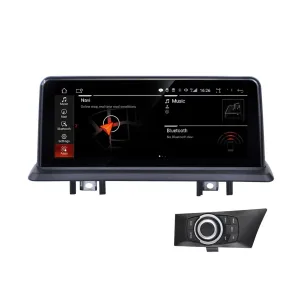
12.3-Inch Ultra-Clear Blue Light Screen for the BMW 6 F13 Coupe
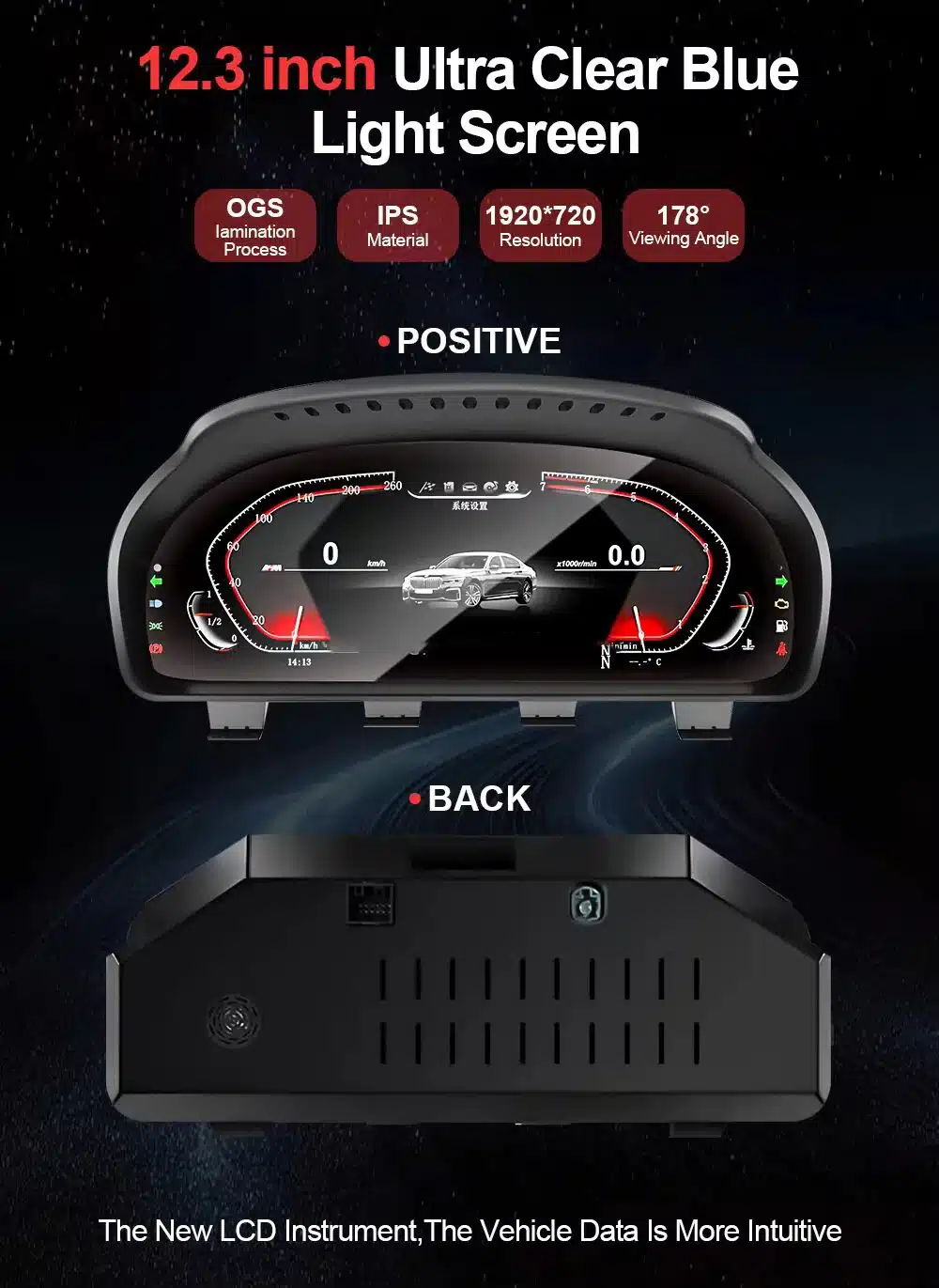
This is the strongest first image for the product description because it immediately explains the real buying value: 12.3-inch display size, IPS material, 1920×720 resolution, 178° viewing angle and both front and rear product appearance.
This iKAGOO BMW 6 F13 Digital Instrument Cluster upgrades the 2011–2018 BMW 6 Series F13 Coupe with a 12.3-inch 1920×720 LCD digital dashboard while keeping the driver-focused BMW grand tourer interior style.
Choose this upgrade if your F13 still feels good to drive but the original analog-style cluster makes the cabin look older than the rest of the car. iKAGOO checks your model year, original 8.8-inch screen setup, iDrive generation, LHD/RHD position and dashboard photos before shipment so the correct version can be prepared for your order.
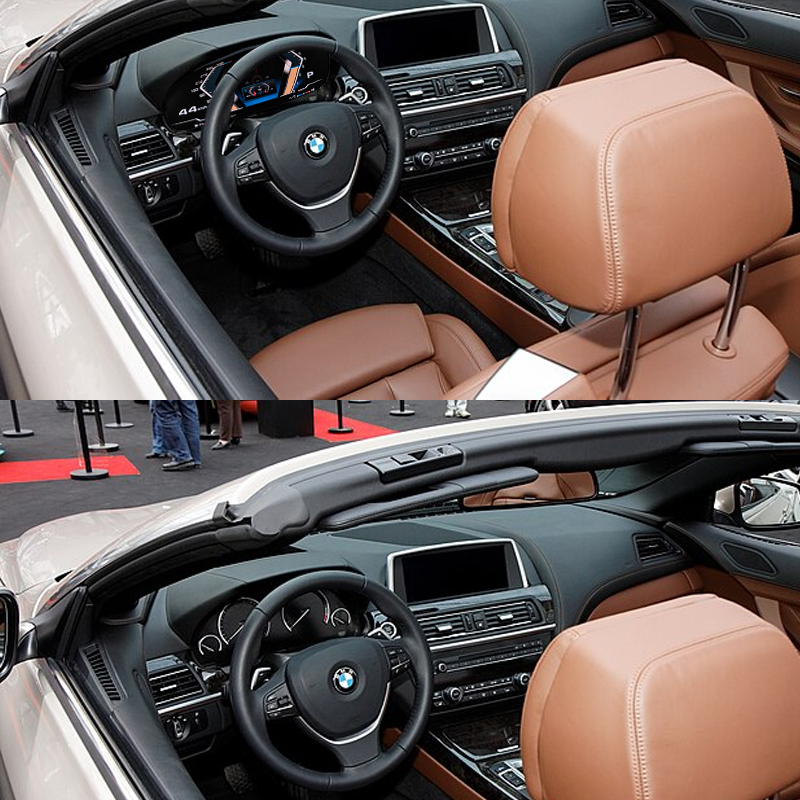
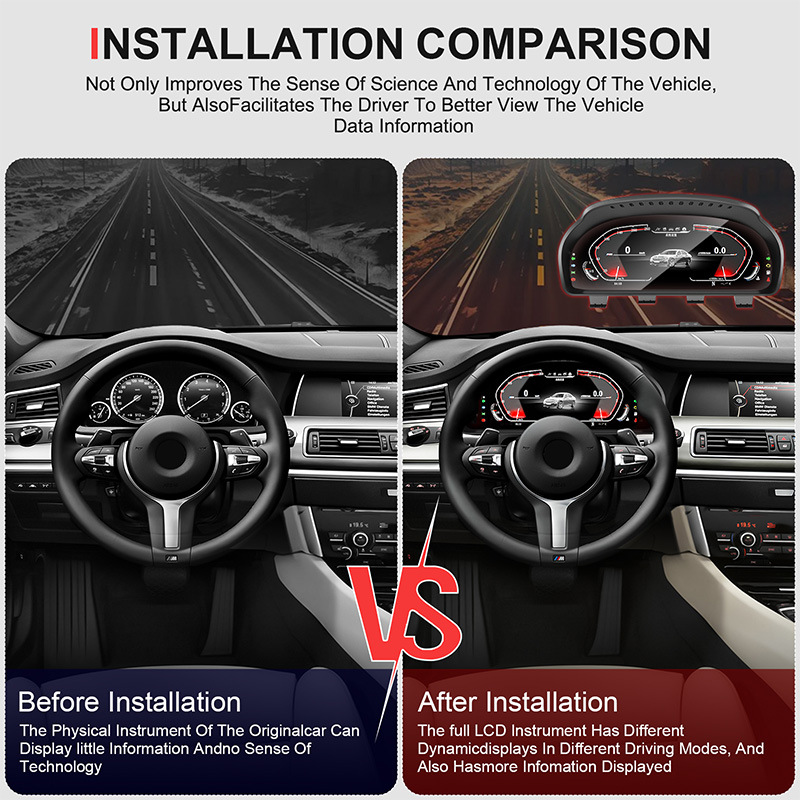
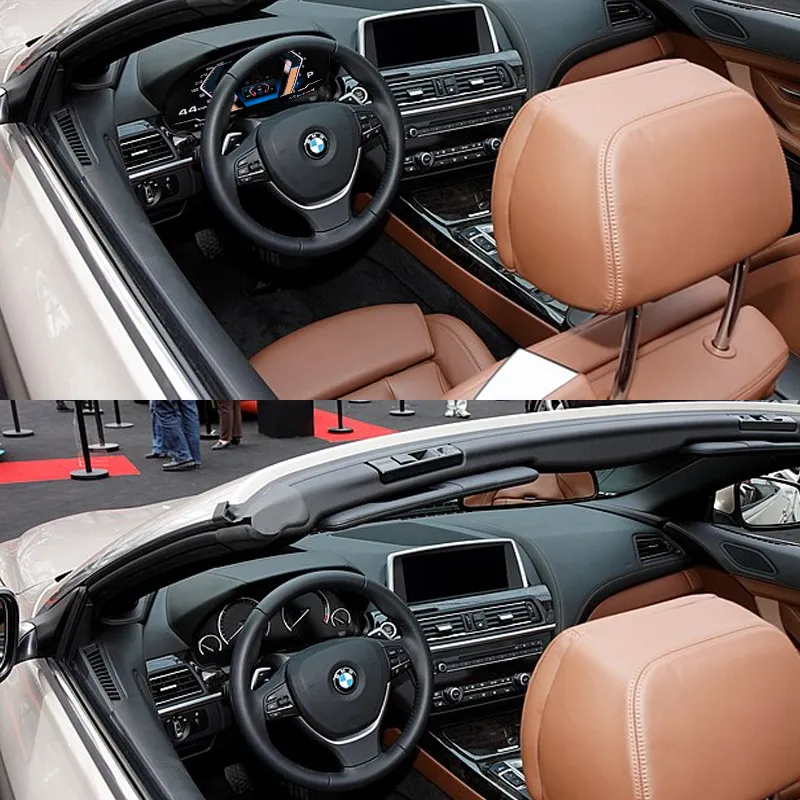
See the F13 Coupe Cabin Before and After the Digital Cluster Upgrade
The upgrade changes the driver’s view every time the car starts, giving the 6 Series Coupe a more current digital dashboard without turning the interior into a generic tablet-style cockpit.
Quick Answer
This iKAGOO upgrade is a vehicle-specific BMW 6 F13 Digital Instrument Cluster for 2011–2018 BMW 6 Series F13 Coupe models. It upgrades the original instrument area with a 12.3-inch 1920×720 IPS LCD digital dashboard based on BMW-style driving information display logic. Supported original functions such as speed, RPM, gear position, fuel level, trip data, warning prompts, door status and steering-wheel-related cluster control continue to work after correct installation and configuration on supported cars. Before shipment, iKAGOO checks your vehicle year, F13 Coupe body style, original 8.8-inch screen setup, iDrive version, dashboard layout and connector photos. It is suitable for owners who want a cleaner BMW virtual cockpit-style upgrade instead of only repairing or continuing to use the older factory cluster.
Why This Upgrade Makes Sense for a BMW 6 Series F13 Coupe
Modern Driver View
The 12.3-inch digital display gives your BMW 6 Series Coupe a cleaner instrument layout that feels closer to newer BMW interiors during every drive.
Built Around the F13 Coupe
This page is focused on the F13 Coupe body style. F12 Convertible and F06 Gran Coupe are related BMW 6 Series models, but they should not be treated as the same order without confirmation.
Original Information Logic
The upgrade is not just a screen decoration. It is built around the driving information you actually check: speed, RPM, gear, fuel, warning prompts and trip data.
Original Vehicle Functions Supported
Driving Information Retained
- Digital speedometer and tachometer display continue to work after correct installation.
- Gear position, fuel level, mileage and trip data remain available through the upgraded cluster interface.
- Turn signals, high beam, door-open prompts, seatbelt prompts and common warning indicators are supported on matched vehicle configurations.
- Selected original vehicle-status data can be displayed in a cleaner digital layout where the vehicle provides the data route.
BMW Control and Interface Logic
- BC button and steering-wheel-related control logic are supported for switching display functions or confirming interface selections where configured.
- Factory-style information layout helps the F13 cockpit stay familiar instead of looking like a universal aftermarket screen.
- HUD, tyre-pressure display, oil or temperature-related information and special prompts depend on the original vehicle configuration and selected product route.
- Special audio systems, previous retrofits or uncommon regional configurations may require additional connection guidance before final setup.
BMW F13 Fitment and Regional Name Check
This product page is focused on the BMW 6 Series F13 Coupe. In different markets, owners may search by model names such as BMW 640i Coupe, 650i Coupe, 640d Coupe, 650i xDrive Coupe or M6 F13 Coupe. iKAGOO prepares the correct version according to the body style, model year, original screen setup, iDrive generation, dashboard layout, LHD/RHD position and connector configuration—not only the badge name.
Help iKAGOO Prepare the Correct Version Before Shipment
Vehicle Information Needed
- BMW 6 Series model name and model year.
- Confirm F13 Coupe body style, not only “BMW 6 Series.”
- Left-hand drive or right-hand drive.
- Original iDrive system photo, especially CIC / NBT / EVO route if visible.
- Original instrument cluster photo with the vehicle powered on.
- Original center screen and dashboard photo, especially the 8.8-inch factory screen setup.
- Connector or dashboard photos if the car has previous aftermarket work.
Why These Details Matter
These details help iKAGOO prepare the correct screen, wiring harness and vehicle interface for your order. They also reduce the risk of ordering the wrong F12/F13/F06 route, choosing the wrong iDrive match or discovering connector differences during installation.
Key Product Specifications
Why Owners Choose iKAGOO
Vehicle-Specific Preparation
iKAGOO checks your BMW year, F13 Coupe body style, steering position, dashboard layout and original system before shipment so the order is prepared around your vehicle.
Screen and Harness Matching
The goal is to match the correct cluster screen, harness and vehicle interface instead of sending a generic BMW display and leaving the installer to solve fitment alone.
Original Function Integration
The product is selected around supported BMW driving data, warnings and control logic because a digital cluster must still behave like a useful instrument panel.
Factory Wiring Protection
The matched wiring route is designed to connect without intentionally cutting the supported factory wiring on the correct vehicle configuration.
Installation and Setup Support
If the installer needs help with connector matching, power-on testing or configuration, iKAGOO can provide practical order-based support.
12-Month Hardware Warranty
Eligible hardware issues are covered under the iKAGOO 12-month limited warranty, with after-sales support for diagnosis and suitable solutions.
iKAGOO Purchase Assessment for This BMW F13 Cluster
iKAGOO Upgrade Necessity
87/100Strong Upgrade Case. The F13 Coupe is a premium grand tourer, and a modern digital cluster gives a visible daily-use improvement without replacing the entire center infotainment system.
- Clearer 12.3-inch display
- More modern driver view
- High value for owners keeping the car
Original Vehicle Compatibility
88/100Strong factory-function retention route when the vehicle is the correct F13 Coupe configuration and the cluster is installed with the matched harness and vehicle interface.
A score of 88/100 does not mean that 12% of factory functions are lost. It means the result is judged against function continuity, controls, vehicle data, physical fit and integration quality.
Based on the Factory Function Retention StandardInstallation Difficulty
Level 3Advanced DIY. Suitable for experienced DIY installers or an automotive electronics installer. It requires careful cluster removal, connector matching, configuration and full function testing before reassembly.
Based on the Car Electronics Installation Difficulty GuideRepair, Used 6WB Route or iKAGOO Digital Cluster?
Continue Using the Old Cluster
Best only if your original cluster is clear, reliable and you do not care about a modern dashboard look.
- No upgrade cost
- No new visual experience
- Older cabin feeling remains
Repair the Factory Cluster
Reasonable when you only need to restore a fault. It does not make the F13 cockpit feel closer to newer BMW interiors.
- Good for localized faults
- No modern UI gain
- Still depends on aging factory parts
Used 6WB-Style Retrofit
Can be attractive, but buyers often need to consider VIN, mileage, coding, used-part condition and whether the part is truly clean for retrofit.
- OEM-style route
- Can involve coding
- Used-part history matters
iKAGOO BMW 6 F13 Digital Instrument Cluster
Best for owners who want a visible dashboard modernization, vehicle-specific order preparation and support without replacing the full center system.
- 12.3-inch 1920×720 IPS LCD
- 178° viewing angle
- Prepared for F13 Coupe configuration
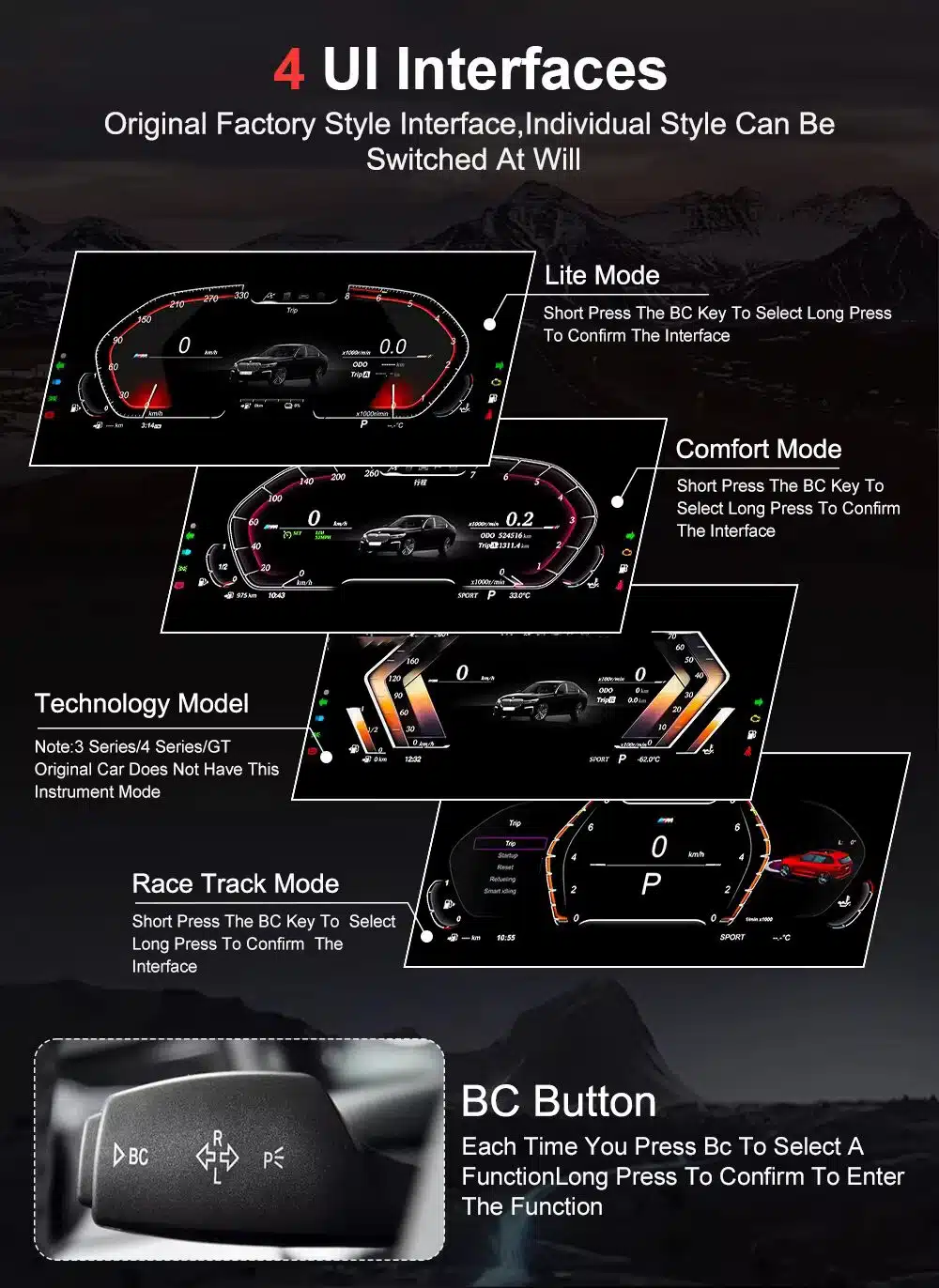
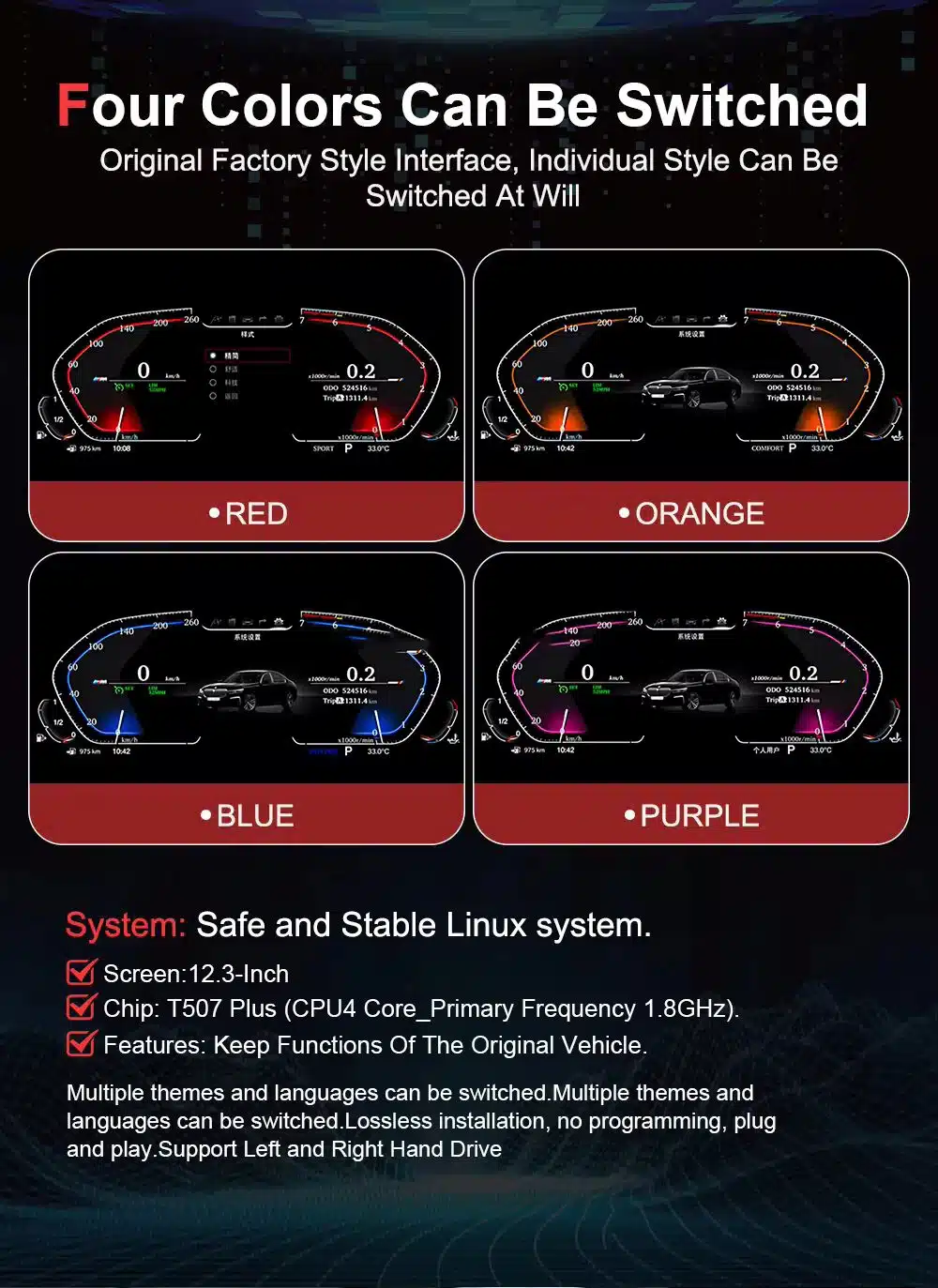
- Four UI interfaces and color themes
- Installation and after-sales support
Purchase Conclusion
If your BMW 6 Series F13 Coupe still deserves to be kept and driven, the iKAGOO digital instrument cluster is the stronger upgrade route than only repairing the old cluster for the same aging dashboard experience.
Product Photos and What They Help You Decide
Confirm the Digital Cluster Shape Before Ordering
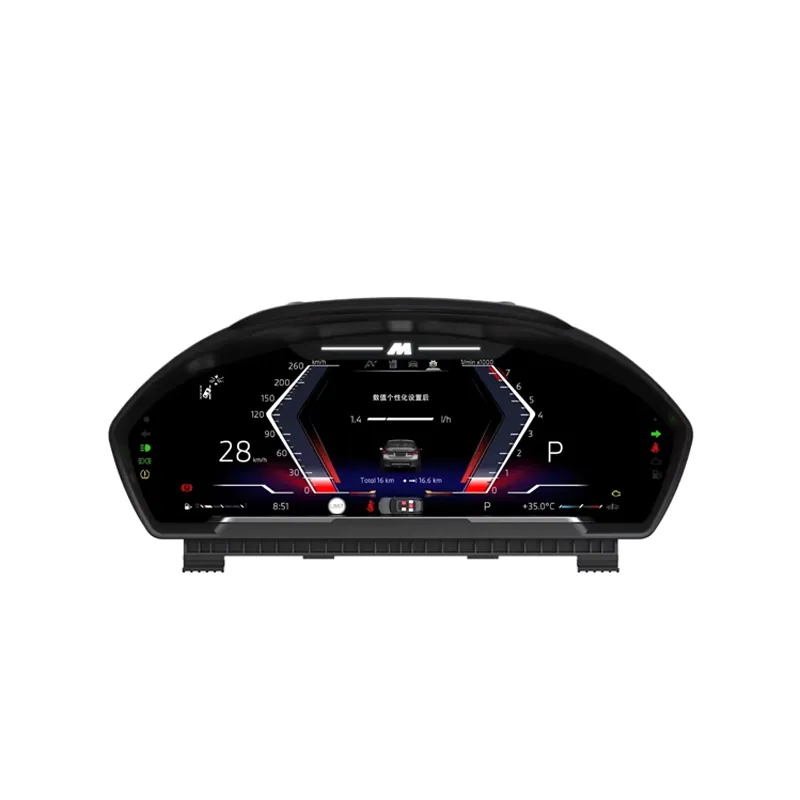
The front product view helps you compare the screen shape and housing style with your original BMW 6 Series F13 cluster area before placing the order.
Keep the Upgrade Visually Close to the BMW Coupe Interior
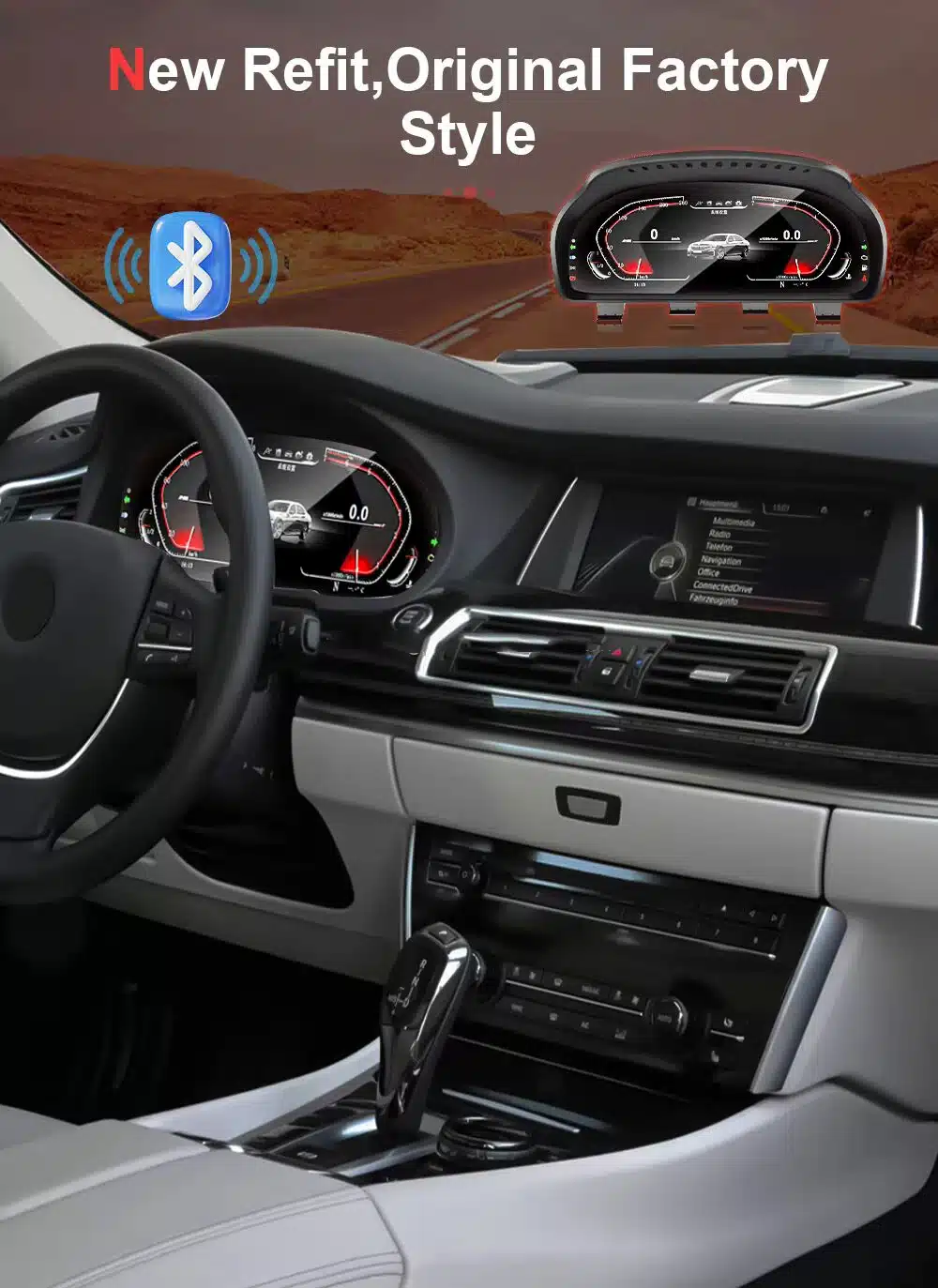
This installed cabin view helps you judge whether the upgraded digital instrument cluster still fits the F13 Coupe’s luxury grand tourer interior style.
Understand Why BMW Chassis Matching Matters
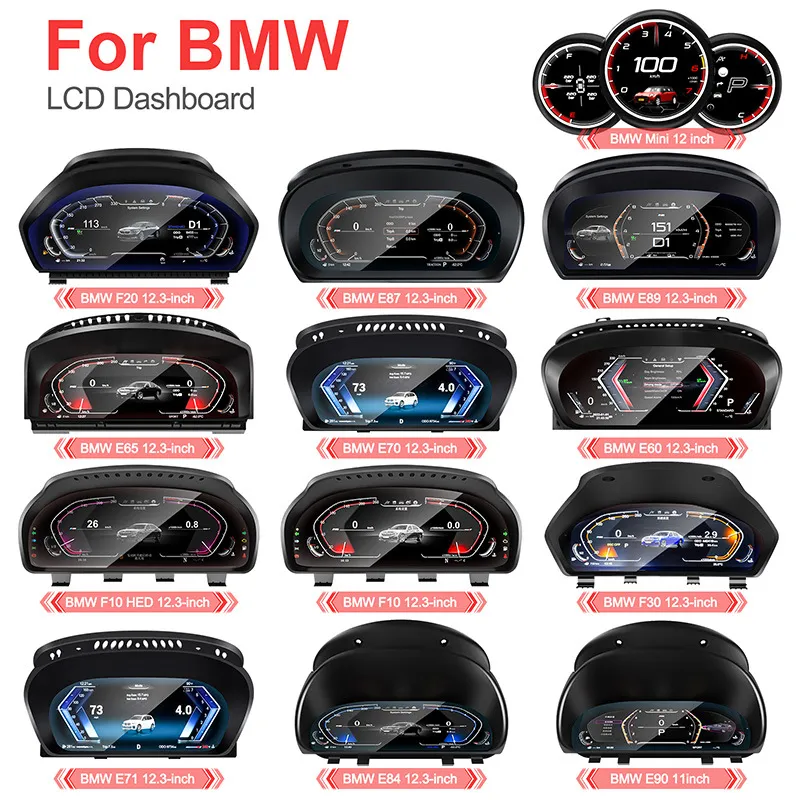
This BMW LCD dashboard family view shows that different BMW generations use different cluster housings. For this page, the order must stay focused on the F13 Coupe route.
Review the Screen, System and Vehicle-Specific Direction
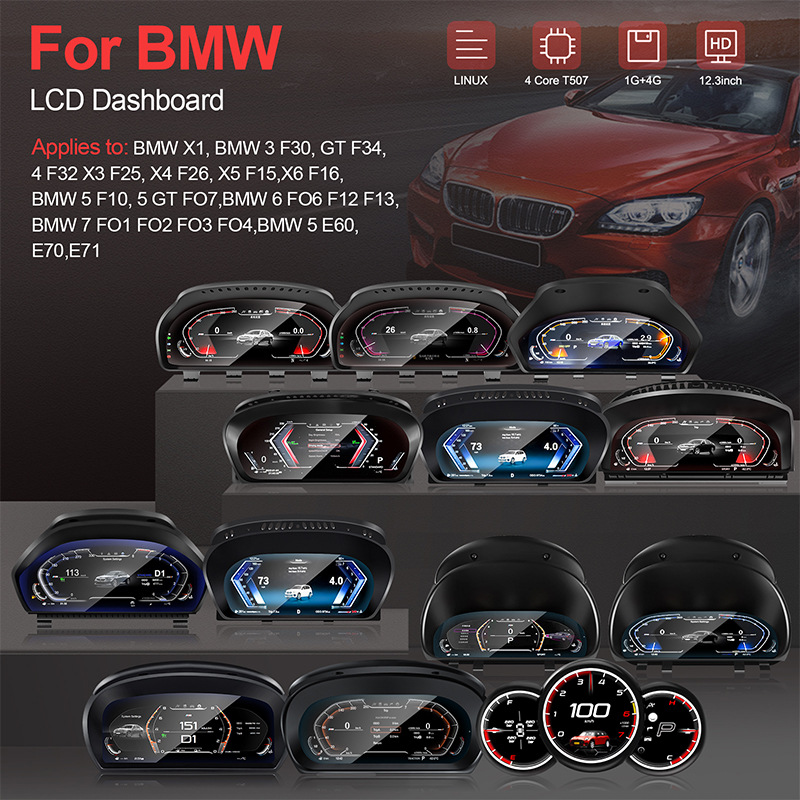
The product technology panel helps you understand the 12.3-inch Linux digital cluster direction and why screen size, chassis and original system must be checked together.
See the Difference From the Driver’s Seat
The installation comparison explains the core buying reason: the driver gets a cleaner digital information view instead of the older analog-style gauge layout.
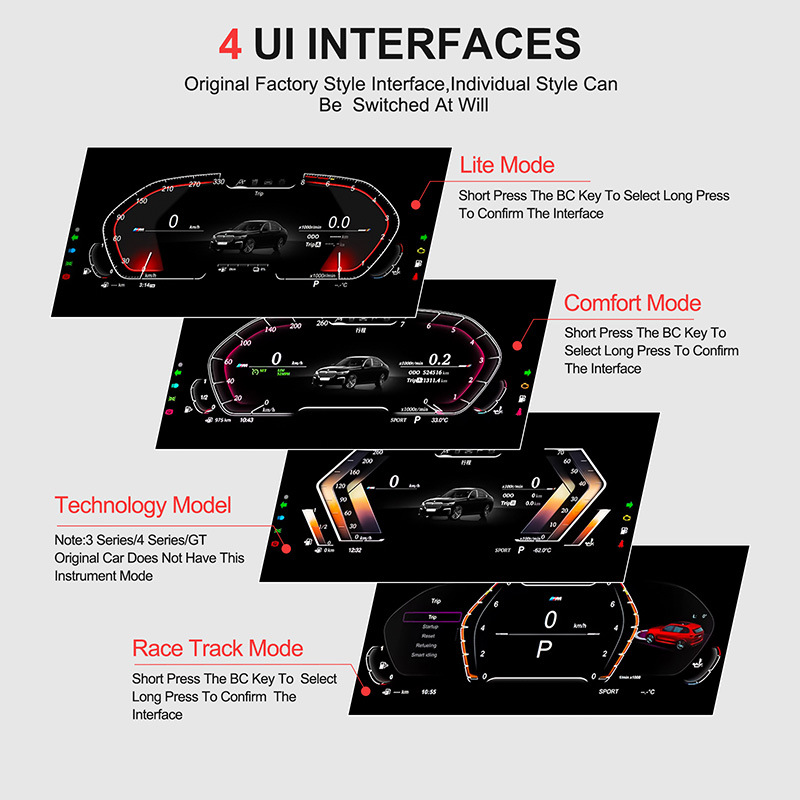
Switch Between Four BMW-Style UI Interfaces
The four interface modes let you choose a display style that fits daily driving, comfort use, technology-style driving or a more dynamic race-track look.
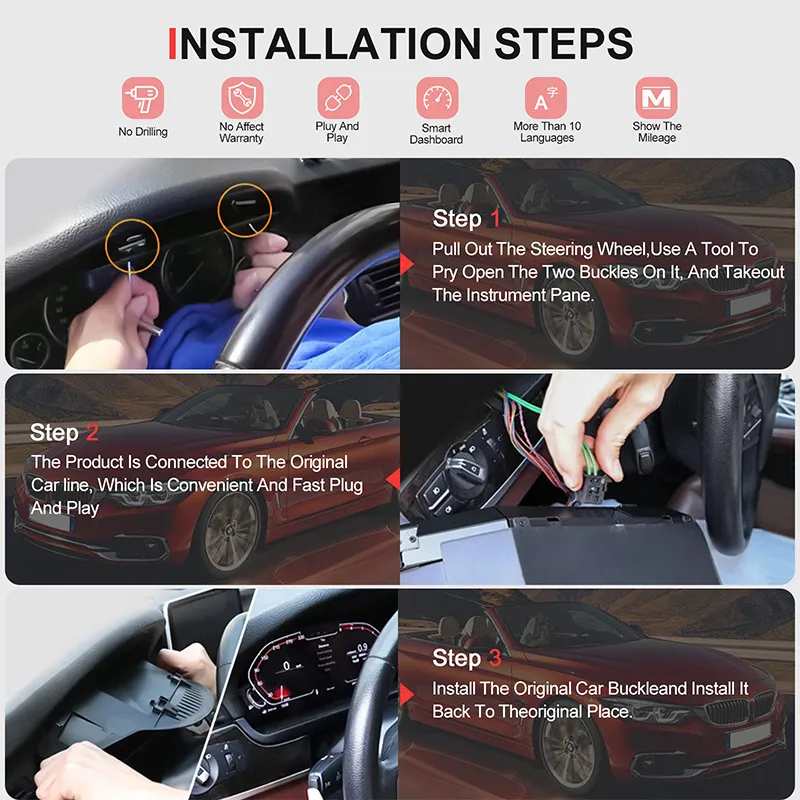
Plan the Installation Before Final Reassembly
The installation steps help your installer understand the general route: remove the original cluster, connect the matched harness, test the display and then reassemble carefully.
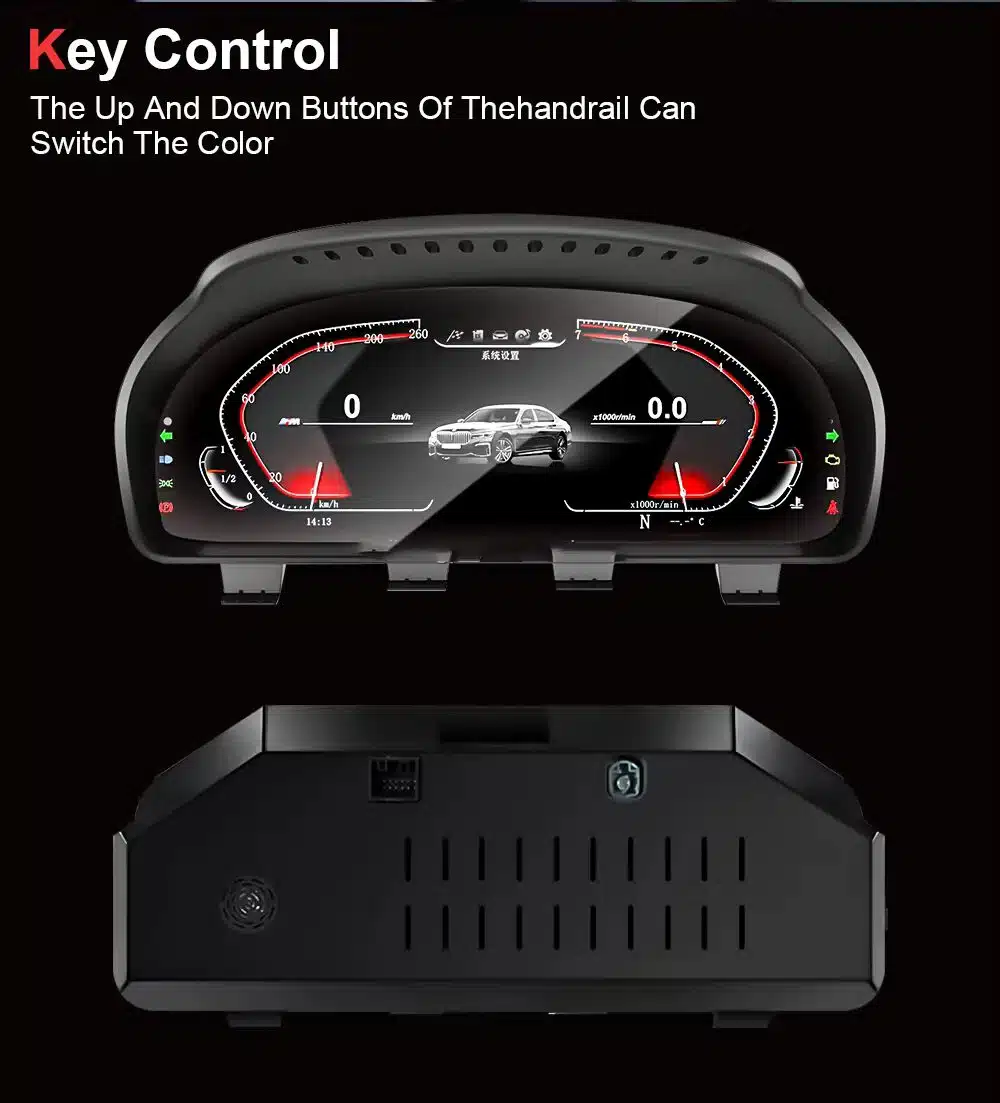
Use the BC Button to Select and Confirm Interfaces
The BC button control route lets you move through the available interfaces and confirm the display style without making the dashboard feel overly modified.
Choose a Color Theme That Fits Your Driving Style
Four color styles help the digital dashboard feel more personal while keeping the overall BMW-style display clean and readable.
Keep a Factory-Style Cabin Look After the Refit
The cockpit effect focuses on a newer BMW-style driver display while keeping the center dashboard and original interior layout visually coherent.
Check the Product Housing and Rear Connection Area
The front and rear product view helps your installer understand the physical housing and connection area before the original cluster is removed.
Review the Ultra-Clear Screen Detail Again Before Ordering
The 12.3-inch ultra-clear screen image reinforces the main purchase facts: IPS material, 1920×720 resolution, wide viewing angle and complete front/back product appearance.
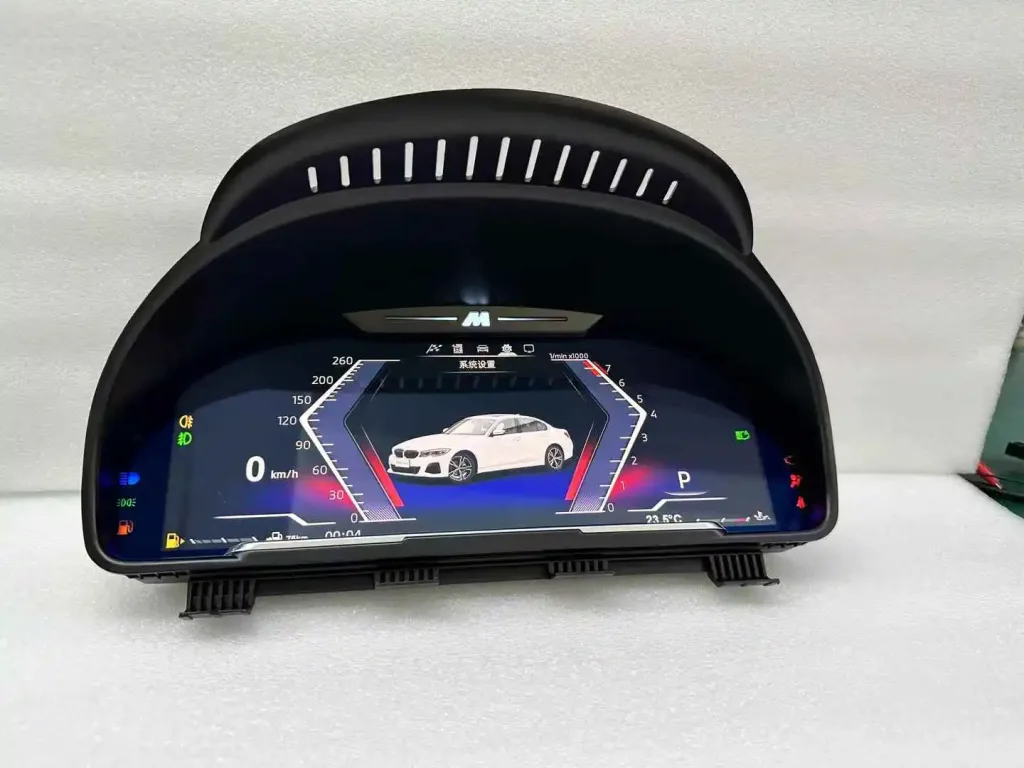
Check the Real Product Screen Before Installation
The powered product view helps you see the actual digital display appearance, warning-light area and cluster housing before installation.
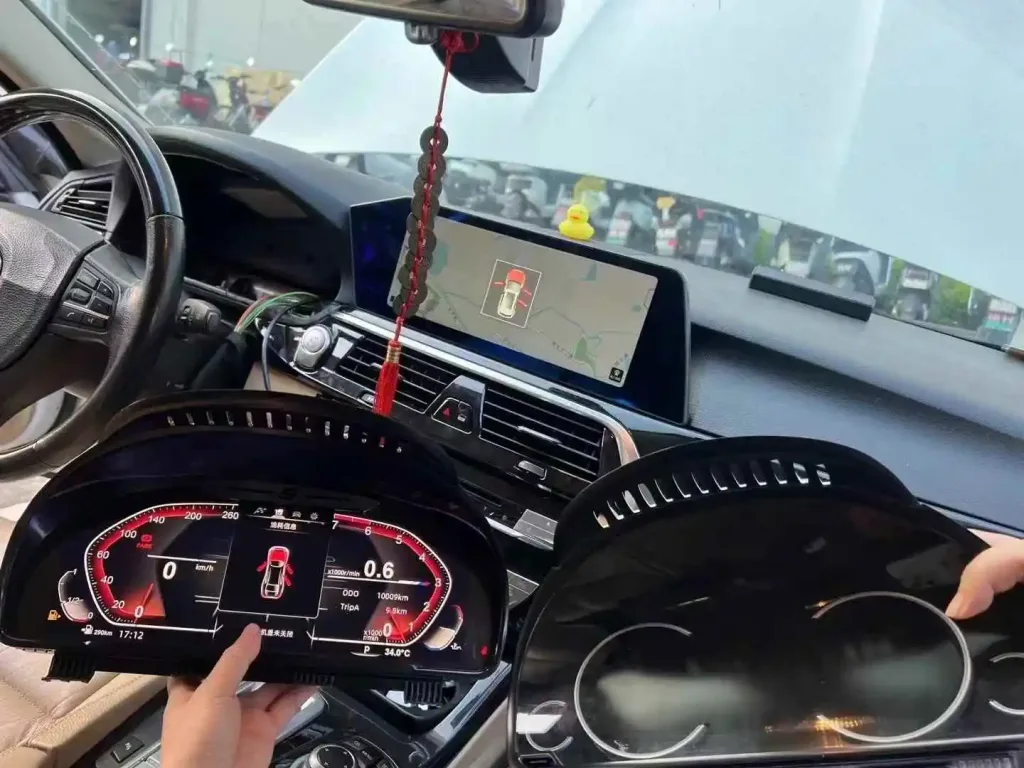
Compare the New Cluster With the Original Unit During Installation
Comparing the new digital unit with the original cluster helps the installer confirm dashboard position, connector route and final fit before reassembly.
Installation Route for the BMW 6 F13 Digital Cluster
Main Work Required
- Carefully remove the original instrument cluster area and surrounding trim.
- Disconnect the original cluster connector and any applicable vehicle-specific cable.
- Connect the matched iKAGOO harness and vehicle interface.
- Power on the cluster before final reassembly.
- Check speed, RPM, gear, fuel, trip data, warning indicators, turn signals and BC button control.
- Reassemble only after the temporary function test is complete.
Recommended Installer
This is Level 3 — Advanced DIY. It is suitable for an experienced DIY installer or an automotive electronics installer who can remove BMW trim carefully, identify connectors correctly and complete a structured function test.
Do not treat “plug-and-play” as “no dashboard work.” The original instrument cluster still needs to be removed and tested correctly.
Stop Installation and Contact iKAGOO If This Happens
- The connector shape or pin layout clearly does not match the supplied harness.
- A connector pin is bent, loose or damaged.
- The harness route does not match the supplied guidance.
- You smell abnormal heat, burning or smoke.
- A fuse blows repeatedly.
- Power or ground cannot be confirmed safely.
- The installation would require cutting the main factory wiring harness.
- Vehicle data, warning lights, HUD behavior, audio or center-screen behavior becomes abnormal and cannot be explained during testing.
Shipping, Warranty and After-Sales Support
Order Preparation
Normal order preparation is usually 1–3 business days after your vehicle configuration has been checked.
Tracked Global Shipping
International delivery is tracked. Estimated delivery time depends on destination, customs clearance and the shipping method selected at checkout.
12-Month Hardware Warranty
Eligible hardware issues are handled under the iKAGOO limited warranty. Damage from incorrect wiring, misuse, water ingress or unauthorized modification is not normally covered.
Vehicle-specific products require correct information before shipment. If iKAGOO confirmed compatibility before purchase, your information was accurate, and no reasonable installation solution is available after supported troubleshooting, the current published return and refund policy applies.
BMW 6 F13 Digital Instrument Cluster FAQ
Is this BMW 6 F13 Digital Instrument Cluster for the Coupe?
Yes, this product page is focused on the BMW 6 Series F13 Coupe, model years 2011–2018. F12 Convertible and F06 Gran Coupe should be checked separately before ordering.
Does it fit BMW 640i, 650i or M6 F13 Coupe?
Yes, those names can fall under the F13 Coupe family where the dashboard architecture and original system match. iKAGOO still checks the model year, original screen setup, iDrive version and connector photos before shipment.
Does installation require coding?
No, this product route is described as no coding and plug-and-play on supported vehicles. The car still needs correct installation, connector matching and full function testing before reassembly.
Does it require cutting the factory wiring?
No, the supported route is designed for no wire cutting. If the installer believes the main factory wiring must be cut, stop installation and contact iKAGOO first.
Will steering-wheel or BC button controls still work?
Yes, supported BC button and steering-wheel-related cluster control logic continues to work after correct installation and configuration on matched F13 Coupe vehicles.
Will the original BMW warning lights and vehicle data still display?
Yes, supported vehicle information such as speed, RPM, fuel level, gear position, turn signals, door status, trip data and common warning prompts remains part of the digital cluster function.
Does this product replace the BMW iDrive center screen?
No, this is a digital instrument cluster upgrade. It focuses on the driver’s dashboard display, while the original center iDrive system normally remains on its existing route.
Can I switch UI styles and colors?
Yes, the product description images show four UI interfaces and four color styles. These are used to make the display feel more personal while keeping the BMW-style dashboard readable.
Is installation easy?
Yes, it is designed as a plug-and-play style route for supported vehicles, but the installation level is still Level 3 — Advanced DIY because the original instrument cluster must be removed, connected, configured and tested.
What should I send before ordering?
Yes, send your vehicle year, F13 Coupe confirmation, LHD/RHD position, original cluster photo, original center screen photo, iDrive system photo and connector or dashboard photos if requested by iKAGOO.
Make Your BMW 6 Series F13 Coupe Feel Modern Again
Choose the BMW 6 F13 Digital Instrument Cluster if you want a cleaner 12.3-inch LCD dashboard upgrade prepared around your Coupe configuration, original screen setup and iDrive route.
Klaus Zimmermann –
Ich fahre ein 650i Cabrio und hatte Bedenken, ob das Display bei Sonneneinstrahlung spiegelt. Ich bin positiv überrascht: Das matte Display ist hell genug und auch bei offenem Dach gut ablesbar. Die Installation war einfach, keine Fehlermeldungen im iDrive. Es wertet das Fahrzeug enorm auf und passt perfekt zur luxuriösen Ausstattung des 6er.