


BMW F10 Dashboard Upgrade: Digital Cluster, Android Screen or Both?
Make the cockpit worth looking at again.
Your BMW 5 Series may still be the car you enjoy driving most. The seat feels right, the cabin remains comfortable and the design has aged well. But the original instrument panel and infotainment screen can make an otherwise satisfying BMW feel older than it needs to.
An iKAGOO digital cluster gives you a more contemporary driver's display. An 8-core Android head unit changes how you use apps, maps, music and audio settings. Choosing both can bring those two experiences together in one carefully planned upgrade.

BMW F10 Dashboard Upgrade: Keep Your 5 Series, Modernize the Experience
Replacing a car you still enjoy is a big decision. Updating the displays you see and use every day is a much more focused change.

What if the best upgrade is inside the car you already own?
A well-kept F10 still has the proportions and presence of a modern executive sedan. You may have no reason to replace the whole vehicle simply to enjoy newer display technology.
Picture your next morning drive: familiar steering and seating, but a digital instrument panel in front of you and a more useful multimedia system beside it. The difference becomes part of every trip—not something you admire once and forget.
This is why iKAGOO offers separate vehicle-specific instruments and Android screens. You can choose the exact improvement that matters to you.

The dashboard is where the car's age becomes visible.
In the original F10 cockpit, your driving information and center controls are placed exactly where BMW intended. The layout is familiar, but the display experience is from an earlier generation.
A digital cluster updates the driver's view. A modern Android screen updates the center interface and gives you more practical choices for everyday apps and sound.
iKAGOO's value begins before the parcel ships: matching the new equipment to the original BMW system instead of asking you to choose from photographs alone.
Should You Buy a Digital Cluster, an Android Screen, or Both?
The right upgrade is the one that improves the part of your F10 you use most. Here is how to make that choice without paying for features you do not need.
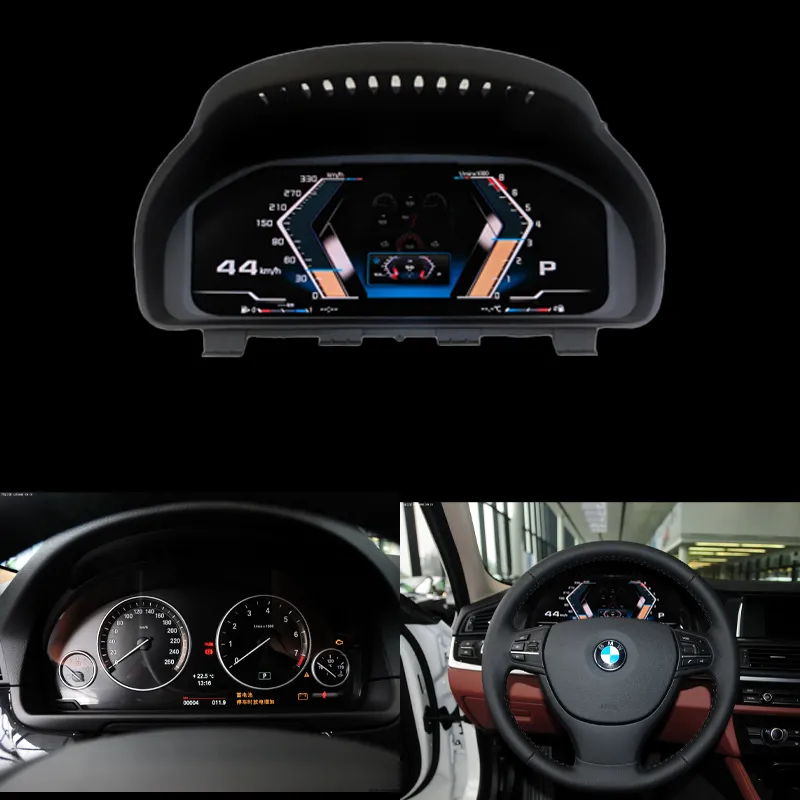
01. Make the Driver's View Feel New
Your gauges are visible on every drive. Replacing their older appearance with a 12.3-inch digital display gives your F10 a more contemporary driving environment.
Why iKAGOO: Product preparation focuses on the original instrument type and relevant vehicle interface, not just the advertised screen size.

02. Enjoy a More Capable Android System
Better navigation, more room for applications, wireless phone features and adjustable DSP sound make the center display more useful every day.
Why iKAGOO: Choose the applicable CPU, RAM and storage configuration while matching CIC/NBT, audio and vehicle controls.

03. Create a More Ambitious Cockpit
When both the driver display and the center interface feel outdated, consider upgrading both. For compatible NBT vehicles, iKAGOO also offers a wider center-screen option.
Why iKAGOO: The team can review the requirements for each selected product rather than assuming every part in the same BMW family fits.
Already know which result you want? The product links above lead directly to the relevant iKAGOO listings, where you can check the current price and options.
BMW F10 Digital Cluster Upgrade: The Part You See on Every Journey
If your original instruments make the car feel dated, this is the most direct visual improvement to the driver's cockpit.
A modern cockpit can make familiar driving feel fresh again.
The 12.3-inch LCD display is designed to replace the original instrument presentation with a modern digital layout. Supported speed, RPM, gear and vehicle status information remain central to the experience.
It gives your daily journeys a different visual character while keeping the BMW instrument location and familiar driving perspective.
The current iKAGOO product is listed for BMW F10 sedan, 2010–2016, using a 12.3-inch 1920×720 Linux digital instrument system.
What about the BMW 6WA and 6WB retrofit options?
Many F10 owners first encounter the 6WA extended instrument cluster or the 6WB digital multifunction display when researching a retrofit. They are BMW original-equipment approaches, whereas the iKAGOO 12.3-inch product is an aftermarket digital instrument solution.
The useful question is not simply which display looks newer. It is which installation route suits your current vehicle equipment and the way you want your instrument panel to look.
iKAGOO reviews the original cluster photographs, dashboard layout, NBT/EVO information, relevant OEM screen reference and MOST-fiber configuration before preparing the applicable product route.
BMW F10 Android Screen Upgrade: CPU, RAM, Storage and DSP Matter More Than a CarPlay Logo
CarPlay is useful, but it is only one part of an Android head unit. The real value becomes apparent when navigation, apps, music and sound adjustment are part of your daily routine.
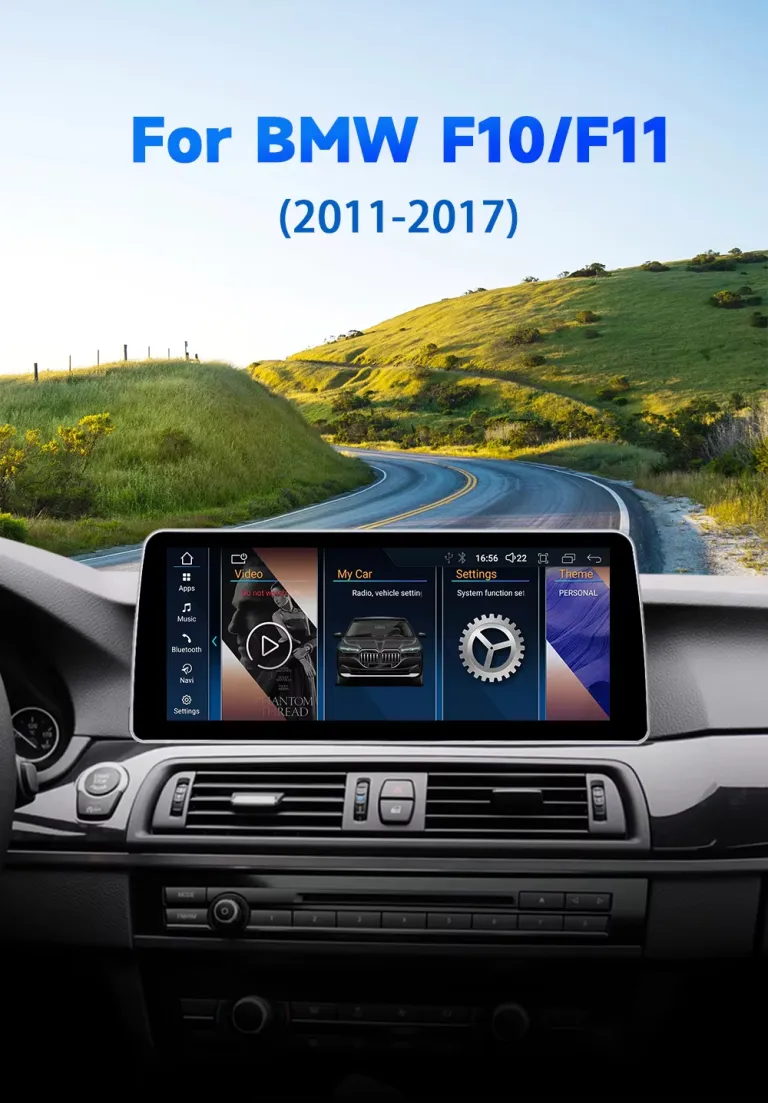
Imagine your next long drive with a screen built around your habits.
You open a navigation app, choose a playlist and follow your route. At the next stop, you may want a different app, local media or music settings.
A dedicated Android platform gives you more ways to use the center display than smartphone projection alone. The available memory, processing hardware and audio system become relevant every time you interact with it.
iKAGOO's F10/F11 CIC/NBT Android head-unit range includes 10.25-inch and 12.3-inch screen choices, an 8-core platform and selectable memory configurations.
More importantly, the order is reviewed against the factory BMW infotainment generation and relevant wiring. That helps turn the specifications into an upgrade intended for your car.
More room for everyday computing tasks.
If you use the Android interface for navigation, media and standalone apps, processor performance becomes part of your everyday experience. The listed eight-core platform is designed for supported multimedia workloads.
iKAGOO can help you select the applicable product configuration. Real speed also depends on the chip architecture, software and workload, not core count alone.
Choose how much multitasking headroom you want.
For routine maps, music and phone projection, 4GB RAM may suit your driving habits.
If you regularly use native Android apps, switch between tasks or intend to keep the system for several years, 8GB offers more memory capacity for supported workloads.
iKAGOO offers both configurations so the choice can match how you actually use your BMW.
Give your apps and offline maps space to grow.
Internal storage is where your Android apps, downloaded content and offline map data may live.
A 64GB configuration is a practical option for lighter use. Choosing 128GB gives you more local storage for apps and media you plan to keep on the head unit.
iKAGOO lets you choose the appropriate capacity alongside the correct vehicle interface.
Make the music part of the upgrade.
Not every drive needs directions. Sometimes you simply want your favorite music to sound right.
Supported DSP functions allow adjustment of available sound parameters, including equalization and tonal balance where the selected audio path permits.
iKAGOO also reviews original amplifier information and special audio equipment, including Harman Kardon where fitted. This helps establish how the selected player will connect to the BMW's audio system.
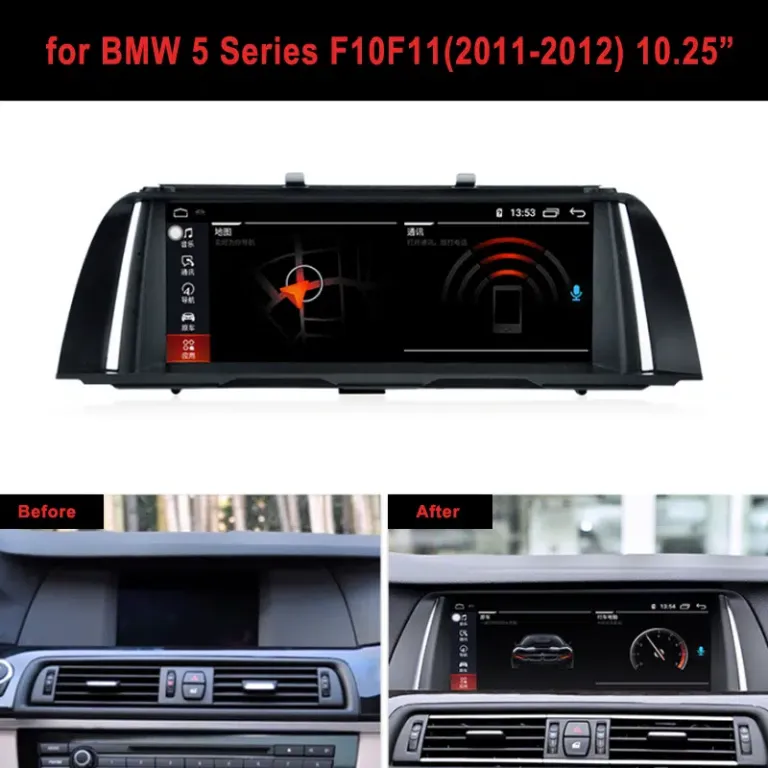
A larger screen makes the improvement visible.
The 10.25-inch option offers a restrained, factory-style appearance. The 12.3-inch option gives supported maps and apps more visual space.
Both are intended to update the center infotainment experience. Neither is the same product as the digital instrument cluster.
Choose the size you will enjoy every day. iKAGOO checks your original dashboard and CIC/NBT connection route when preparing the correct screen version.

Wireless CarPlay is convenient. A capable Android system adds more choice.
When you want to use your iPhone or Android phone, wireless projection can provide supported navigation, calls and music access.
When you prefer standalone Android apps, the unit's own CPU, RAM and storage become more important. These are different ways of using the same display.
iKAGOO can help you choose the configuration that suits both your driving habits and original BMW system. That is why this upgrade is about more than adding a CarPlay icon.
Want More Visual Impact? The BMW F10 NBT Wide Android Screen
If your priority is a more dramatic center-display transformation, there is another iKAGOO route worth considering.
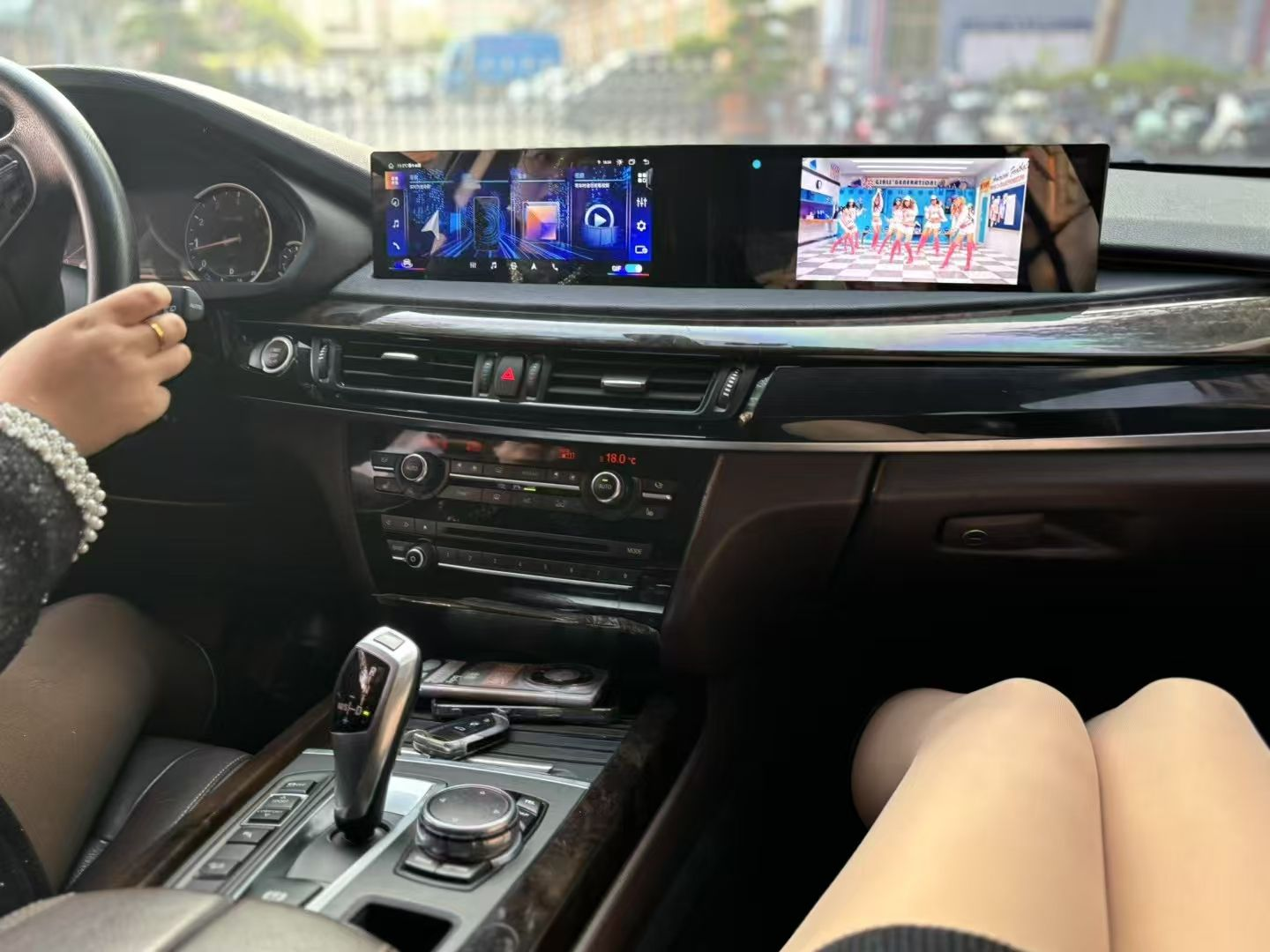
For drivers who want a noticeably different center dashboard.
The iKAGOO 21-inch wide-display option creates a much more expansive infotainment area than the original center screen.
Its listed configurations include an 8-core Android platform, 4GB+64GB or 8GB+128GB memory, supported DSP audio, wireless CarPlay and Android Auto.
This product route is listed for BMW F10/F11 2013–2017 with the relevant NBT 6-pin LVDS connection.
iKAGOO checks the factory NBT system, screen connector, dashboard arrangement, steering position and relevant audio and camera information before shipment.
View 21″ Wide Android Display →
Make the center display feel like part of a newer generation.
The appeal of the wide display is not just screen size. It changes the visual balance of the center dashboard and provides more space for compatible Android content.
If this is the kind of cabin you want, choose the product specifically designed for the matching NBT vehicle architecture.
Unlike buying a universal widescreen, the iKAGOO route considers the original LVDS interface, factory controls and installation requirements.
BMW F10 Dashboard Upgrade: Why Consider Both Displays Together?
The cluster changes what you see while driving. The Android head unit changes what you use for navigation, multimedia and connected functions. Together, they can give an older F10 a far more modern cabin experience.
Imagine starting the car with a contemporary digital driver display, then selecting music or navigation on a larger Android screen. The two improvements have different purposes, but they contribute to the same feeling: a BMW you still love with technology that suits your current life.
Why is iKAGOO a useful place to plan both upgrades?
When you shop for a digital cluster and Android player from different sellers, you may need to explain the same vehicle configuration separately to each one.
At iKAGOO, both products can be associated with your order and vehicle information. The cluster route focuses on the original instrument, driving data and relevant electronics. The Android route focuses on CIC/NBT, LVDS, audio, cameras and original controls.
That gives you one merchant relationship for the equipment, installation-support requests and later order-based identification.
BMW F10 Dashboard Upgrade Compatibility: Years, Chassis Codes and Market Names
BMW 5 Series names vary between countries. The chassis generation, original dashboard and factory equipment matter more than the sales badge alone.
| BMW chassis | Common vehicle name | iKAGOO product direction |
|---|---|---|
| F10 | 5 Series Sedan / Saloon / Limousine | Digital cluster listed for 2010–2016 sedans. Android screens follow their own listed year and system requirements. |
| F11 | 5 Series Touring / Estate | Relevant Android product listings include F11 Touring. The F10 sedan cluster is not automatically an F11 fitment. |
| F18 | 5 Series Long-Wheelbase Sedan | Separate digital cluster product route. Dashboard architecture must be verified. |
| F07 | 5 Series Gran Turismo / GT | Different dashboard route. Do not choose the F10 products from the badge alone. |
| G30 / G31 | Later 5 Series Generation | Not interchangeable with F10/F11 solely because of model-year overlap. |
BMW 5 Series names you may encounter by country
Do 520i, 520d, 528i, 530d and 535i use the same upgrade?
The engine badge does not establish screen or cluster compatibility. A 520d and a 535i may share the F10 generation, but their original equipment can differ by year, market and options.
The same applies to 525d, 535d, 550i and other 5 Series variants. Previous retrofits, special trim and M5 configurations require separate review.
What years do the actual products support?
| Product | Listed years | Important requirement |
|---|---|---|
| F10 12.3″ Digital Cluster | 2010–2016 | F10 sedan, original instrument, applicable NBT/EVO, OEM screen reference and MOST configuration. |
| F10/F11 CIC/NBT Android Screen | 2011–2017 | Matching factory CIC or NBT system, relevant dashboard, connectors and original equipment. |
| F10/F11 NBT Wide Android Display | 2013–2017 | Relevant NBT 6-pin LVDS configuration. |
| F18 Long-Wheelbase Digital Cluster | 2010–2016 | F18-specific vehicle configuration and hardware matching. |

Right-hand drive is part of the buying decision.
BMW F10 owners in the UK, Australia and other right-hand-drive markets may have a different dashboard and steering-side layout.
Do not select a standalone left-hand-drive cluster purely because the vehicle is called BMW F10. iKAGOO's compatible right-hand-drive direction requires review of the applicable complete head-unit and cluster solution.
Some individual Android-screen products also have selected RHD configurations. The correct route must be identified for the exact vehicle and product.
This is why the order review includes steering position instead of relying on the model badge.
Why Buy a BMW F10 Dashboard Upgrade from iKAGOO?
You can find large Android screens and aftermarket digital clusters from many sellers. The hardware photograph alone does not explain how the correct version will reach your BMW—or who will help if installation raises a question later.
Your BMW, not just a model name.
iKAGOO reviews the chassis, model year, original equipment and product-specific information before preparing the order.
The relevant hardware and connections.
Cluster and Android systems need different checks. The supplied product route is prepared around the applicable interface, wiring and configuration.
A support relationship beyond delivery.
The original order helps identify the product version for future installation, troubleshooting, software and compatible-parts support.
Before shipment, the questions are practical.
For a digital cluster, iKAGOO needs relevant information about the existing instrument, vehicle data system, dashboard and applicable connection.
For an Android player, the review focuses on the original CIC/NBT interface, center display, audio system, steering controls, camera and related connectors.
If you plan to buy both, these are two separate compatibility checks associated with the same vehicle. That is more useful than assuming one BMW model year answers every technical question.
What happens after you place an order?
Select the relevant cluster or Android screen product.
Supply the requested dashboard and original equipment photographs.
iKAGOO checks the relevant version and prepares the applicable product route.
Receive shipment tracking and use the supported installation assistance route.
Learn more about what happens after you pay and how iKAGOO checks compatibility .
The part competitors' product photos cannot show: long-term support.
Once the upgrade is installed, your original purchase remains relevant. Software recovery, product identification and compatible replacement parts can matter long after the first drive.
Limited Hardware Warranty
Commercial hardware coverage for eligible manufacturing defects, under the published warranty terms.
Free Remote Software Support
For eligible original purchasers, including troubleshooting, system recovery guidance and compatible available updates when applicable.
Parts and Upgrade Support
Assistance identifying compatible parts, repair routes and upgrade options. Physical parts and repair costs may be charged separately.
These are separate support commitments, not a five-year free hardware warranty or a promise of every future Android update. Applicable conditions are published in the iKAGOO warranty policy.
BMW F10 Dashboard Upgrade Cost: What Are You Really Paying For?
A good buying decision accounts for the result you want, the correct hardware, installation and support—not only the price shown in a product thumbnail.
| Your priority | What to budget for | iKAGOO purchase path |
|---|---|---|
| Modern digital gauges | F10 instrument unit, shipping, installation and relevant configuration work. | Current cluster price → |
| Android apps and DSP sound | Screen size, RAM/storage choice, shipping, installation and applicable audio interface. | Current Android price → |
| More dramatic NBT display | Wide Android unit, installation, connector matching and audio/camera setup. | Current wide-display price → |
| Full cockpit modernization | Two compatible products and their individual installation requirements. | Choose both product routes → |
International shipping depends on the destination and available service. Some regions offer DDP tax-included delivery options when selected. Installation labour is a separate matter to discuss with your chosen installer.
If you plan to keep the car for years, choosing adequate RAM, storage and the correct connection route is often more useful than selecting a unit by screen size alone.
Review iKAGOO international shipping and the return and refund terms before checkout.
BMW F10 Dashboard Upgrade: Real Buying Questions Answered
These are the decisions worth resolving before ordering your upgrade. Each answer starts with the practical conclusion, then explains what matters for your BMW.
Should I buy a BMW F10 digital cluster or Android screen first?
Choose the digital cluster first if the outdated gauges are what you notice most. Choose Android first if your daily priorities are navigation, music, apps and phone integration. iKAGOO offers separate product routes for each result.
Is a BMW F10 6WB retrofit better than an aftermarket 12.3-inch cluster?
They are different upgrade approaches. BMW 6WB is an OEM multifunction instrument option; the iKAGOO 12.3-inch cluster is an aftermarket digital display solution. The right choice depends on the desired appearance, original system and installation route.
Is 8GB RAM worth it for a BMW F10 Android head unit?
Yes, if you plan to use several native Android apps or want greater multitasking headroom. For lighter use centered on phone projection and routine navigation, 4GB may be enough. iKAGOO offers both 4GB and 8GB configurations.
Should I choose 64GB or 128GB storage?
Choose 128GB if you expect to install more Android apps, store offline maps or keep local media. Choose 64GB for a simpler setup with modest local storage needs. Both are listed choices on the applicable iKAGOO Android product routes.
Does an 8-core CPU make the BMW F10 Android screen faster?
It provides an eight-core processing configuration, but actual speed depends on more than core count. Software optimization, chip architecture and RAM also matter. Choose the overall configuration for your intended Android workload.
Can DSP improve the music experience in my BMW F10?
DSP can provide useful sound adjustment when supported by the selected player and connection. The result depends on the factory amplifier and audio path. iKAGOO reviews relevant original audio equipment, including premium systems where fitted.
Will my original iDrive controls and steering-wheel buttons work?
Supported controls can remain available after the correct Android-screen connection and setup. Function retention depends on the factory CIC/NBT system, vehicle interface and original equipment. These are part of the iKAGOO configuration review.
Can I use Apple CarPlay and Android Auto without losing the BMW interface?
Supported iKAGOO Android configurations provide wireless smartphone integration while retaining access to supported original BMW system functions after correct setup. The screen and connection version must match the original car.
Is the 21-inch NBT Android screen suitable for a 2012 CIC BMW F10?
Do not select the 21-inch NBT product on that basis. Its listed route targets applicable 2013–2017 NBT 6-pin LVDS vehicles. A CIC car should be evaluated through the separate CIC/NBT Android-screen product route.
Can I buy a digital cluster and Android screen together?
A two-product upgrade can be planned when each unit is suitable for the vehicle. iKAGOO can review the relevant product information together. Direct map sharing or other cross-screen functions require separate confirmation for the exact hardware combination.
Will my BMW F10 retain speed, fuel, mileage and warning information?
The listed digital cluster is designed to show supported original driving information after correct installation. Actual retention depends on the vehicle and supplied hardware route. Safety-critical indicators must be tested before normal driving.
Does BMW F11 Touring or F18 use the same cluster as F10?
Do not assume so. F10 sedan, F11 Touring and F18 long-wheelbase are distinct body configurations. iKAGOO lists a separate F18 cluster and provides F10/F11 Android screen routes. Match the actual chassis and dashboard first.
Why buy my BMW F10 upgrade from iKAGOO?
You receive a vehicle-specific product selection and preparation process, defined installation-support routes and published long-term support terms. Your order remains a reference for future technical assistance and version identification.
What happens if I need support two years after installation?
Eligible original iKAGOO customers can use the published three-year remote software-support route, while five-year parts and upgrade assistance may apply to compatible hardware. These are separate commitments from the 12-month limited hardware warranty.
Make the Next Drive Feel Different. Choose Your iKAGOO Upgrade.
You do not need to change everything you love about the F10. Start with what you want to enjoy more.
Choose a digital driver display if the instrument panel needs an update. Choose an 8-core Android player if you want more capable apps, memory options, DSP sound and everyday infotainment. Consider both if your goal is a more complete cockpit change.
iKAGOO gives you the product choices, vehicle-specific preparation process and published support routes to make that decision with greater confidence.
BMW F10 Digital Cluster
12.3-inch LCD digital instrument route for matching 2010–2016 F10 sedans.
BMW F10/F11 Android Player
8-core system, selectable RAM and storage, DSP and wireless phone integration.
BMW F10/F11 NBT Wide Display
A wider center display route for matching 2013–2017 NBT 6-pin LVDS vehicles.
iKAGOO — Precision Fit. Premium Design. Professional Upgrades.








Add comment
You must be logged in to post a comment.