


Audi A4 B8 Virtual Cockpit Retrofit: MMI, OEM Feel, Fitment, and Buyer Questions
Audi digital cluster buyer guide
Audi A4 B8 Virtual Cockpit Retrofit: a buyer-first guide to OEM feel, MMI behavior, and correct fitment
Audi A4 B8 virtual cockpit retrofit is rarely just a screen upgrade in a buyer's mind. The real question is whether the car will still feel right after the change: original MMI flow, steering wheel controls, OEM cabin balance, startup behavior, and the risk of buying the wrong year version.
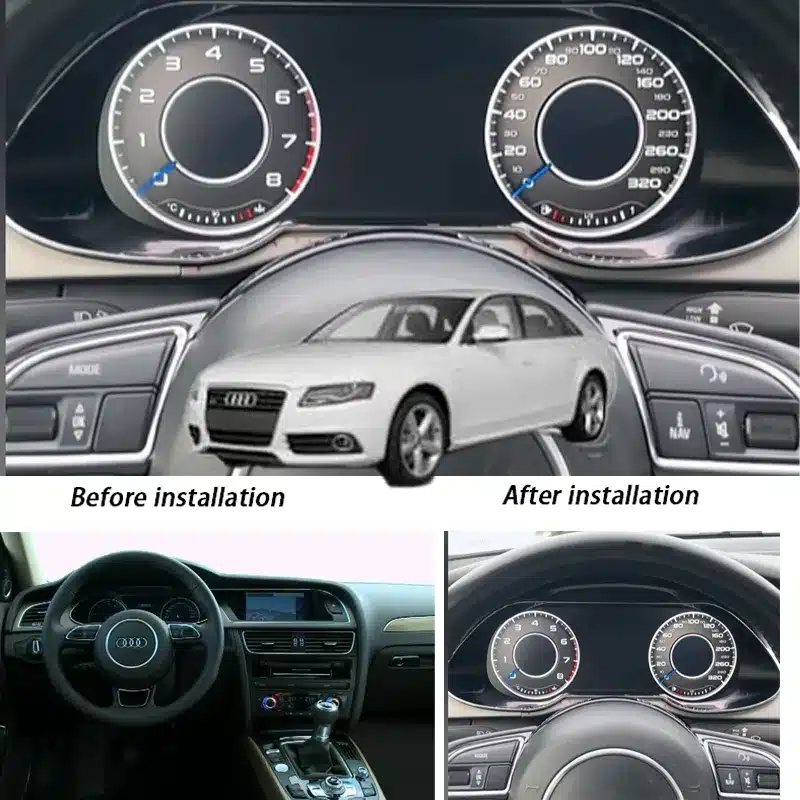
Select your B8 platform architecture
Audi B8 electrical systems changed significantly across the model cycle. Select the correct chassis generation below to keep fitment, gateway communication, and dashboard behavior aligned with the original vehicle architecture.
B8 pre-facelift (2009-2012)
Best for owners solving the limits of the original analog cluster while keeping the dashboard aligned with the earlier B8 electrical layout.
B8.5 facelift (2013-2016)
Built for later B8 owners who want a more advanced LCD cluster route with stronger visual integration inside the facelift-era cabin.
Researching A5 or Q5 variants? See the complete B8 cross-platform collection.
This guide focuses on the questions buyers actually type into search and AI tools before they buy. Instead of repeating generic retrofit promises, it looks at the pain points that slow down real purchase decisions for Audi A4 B8, A5, and Q5 owners. The most relevant iKagoo product entries are the Audi B8 virtual cockpit retrofit kit for A4 A5 Q5, the Audi A4 B8 digital instrument cluster 2009-2012, the Audi A4 B8 virtual cockpit 2013-2016, and the broader Audi digital instrument cluster collection.
Why retrofit the Audi B8 cluster at all?
A full LCD cluster is necessary when the original analog cluster no longer matches how the owner uses the car. The strongest reasons are not cosmetic alone. They are about clearer information, better interior modernization, stronger perceived vehicle value, and a dashboard that feels more current without replacing the car itself.
| Buyer problem | Why it matters | How a virtual cockpit retrofit helps |
|---|---|---|
| The original cluster feels dated | The car may still drive well, but the cabin feels older than the owner's expectations. | A full LCD display modernizes the driver's view while keeping the upgrade focused on the cockpit. |
| Information is split across too many places | Drivers want speed, driving information, media, and possible navigation display to feel easier to scan. | The digital cluster can create a more complete driver-facing information center. |
| The owner wants an OEM-style upgrade | Audi buyers often reject upgrades that look universal, flashy, or obviously aftermarket. | The right kit should look visually integrated and avoid changing the car's core character. |
| Resale and perceived value matter | A well-executed cabin upgrade can make an older B8 platform feel more premium again. | A clean virtual cockpit retrofit can make the interior feel newer without a full vehicle change. |
The decision matrix: analog cluster vs cheap retrofit vs iKagoo fitment-first route
| Option | What buyers gain | Main risk | Best for |
|---|---|---|---|
| Keep the original analog cluster | No installation risk and the car remains familiar. | The cabin keeps feeling old, and the driver information experience does not improve. | Owners who are very conservative about electronics changes. |
| Buy a generic retrofit without fitment confirmation | Lower initial friction and fast purchase decision. | Wrong version, weak interface match, installation uncertainty, or poor support after purchase. | Buyers willing to accept higher risk for speed or price. |
| Use a fitment-first iKagoo route | Model-year guidance, real product pages, and a clearer pre-order confirmation process. | The buyer must spend a little time confirming year, drive orientation, and dashboard photos. | Buyers who want the upgrade to feel deliberate, compatible, and OEM-style. |
Before choosing a product page, confirm compatibility. iKagoo's Volkswagen Jetta digital instrument cluster installation guide shows the right checking logic: verify the exact year group, inspect the original cluster style, confirm left-hand drive or right-hand drive, and send a dashboard photo before ordering. The example is Jetta, but the buying discipline applies very well to Audi B8 decisions.
Will my original MMI still work after an Audi A4 B8 virtual cockpit retrofit?
Yes. The original MMI will still work after the retrofit.
That means when the owner starts the car, turns through menus, and checks vehicle information, the cabin still feels like one Audi system instead of two disconnected screens.
- MMI flow: the upgrade should preserve a familiar interaction pattern instead of forcing the cabin into two disconnected systems.
- Steering wheel control: drivers expect menu navigation and information switching to remain natural during everyday use.
- Vehicle data rendering: fuel, service, warning, and driving information should feel integrated rather than layered on top of the original system.
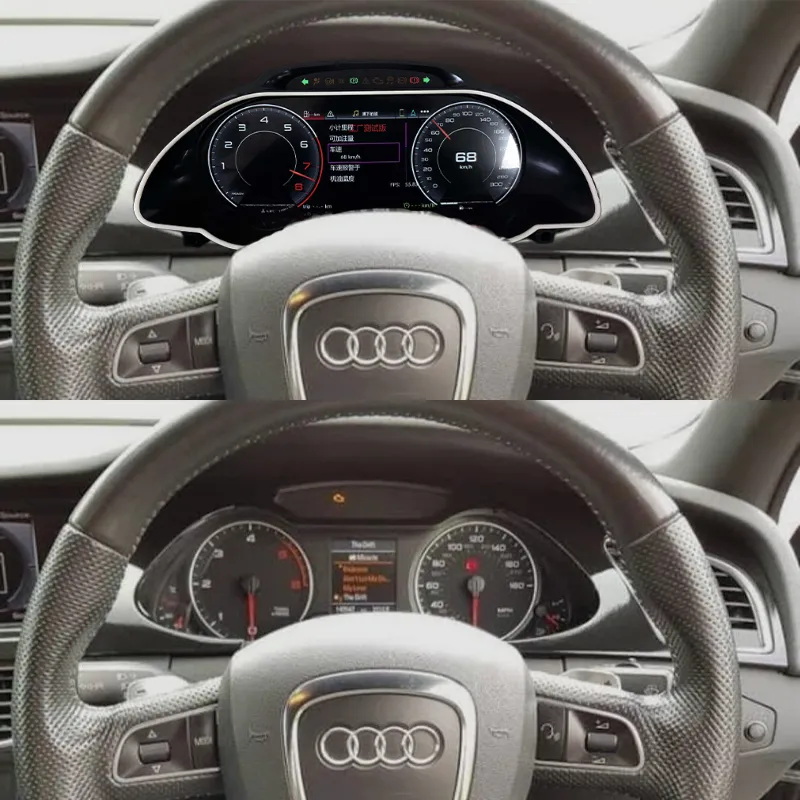
Will it still look OEM, or will it make the interior feel aftermarket?
Yes. It can still look OEM when the correct B8 kit is matched to the car.
That means the finished cabin feels like a proper Audi upgrade instead of an aftermarket screen forced into the dashboard.
This is where the thinking behind iKagoo's Android car stereo philosophy page matters. The strongest idea is not chasing features for their own sake. It is making an upgrade feel like a natural extension of the original car. A virtual cockpit retrofit should support OEM-style integration, practical everyday use, and visual balance inside the cabin.
The missing link: unifying the Audi cockpit
Upgrading to a virtual cockpit while keeping an older low-resolution center screen can leave the cabin visually split. Buyers chasing a true OEM-style transformation often want both displays to feel like one system, not two generations living side by side.
For owners pursuing that fully modernized cabin effect, iKagoo's OEM-style Audi center console upgrades extend the same design logic into the center stack. Dual screens, stronger harmony, and a cleaner factory-style result.
| OEM-feel checkpoint | What the buyer is afraid of | What the article should make clear |
|---|---|---|
| Bezel and physical fit | The cluster looks inserted afterward. | Confirm model-year fitment and original dashboard shape before purchase. |
| Interface style | The screen looks too universal or too flashy for an Audi cabin. | The goal is an integrated cockpit feel, not a loud aftermarket display. |
| Daily display comfort | Glare, harsh brightness, black-screen delay, or unstable startup becomes annoying. | Ask about brightness, startup, and long-term support before ordering. |
| Control retention | MMI and steering wheel controls technically work but feel awkward. | Real usability matters more than a short support claim. |
Which pain points make Audi B8 buyers hesitate the longest?
When you break down real search intent, Audi A4 B8, A5, and Q5 buyers usually move through a chain of doubts. Each one affects trust, price tolerance, and buying speed.
- Will my original MMI menus and core settings stay usable after the upgrade?
- Will the steering wheel buttons work naturally, not just partially?
- Will the retrofit trigger fault codes, communication errors, or hidden warning issues?
- Will coding, component protection, or extra matching work be required later?
- Are 2009-2012 and 2013-2016 really the same buying decision, or not?
- Can one Audi B8 retrofit page honestly cover A4, A5, and Q5 without oversimplifying?
- Will the display stay readable in bright daylight and comfortable at night?
- Will startup be quick and stable, or will there be black screens and lag?
- Will local installers feel comfortable taking the job, or hesitate because of electronics risk?
I do not want a dashboard that only looks impressive on a product page. I want one that still feels right after months of normal driving.
Pre-purchase checklist: what buyers should confirm before ordering
This is the practical checkpoint section many buyers want before they pay. If any of these details are unclear, it is better to confirm them first than to rush into the wrong Audi digital dashboard upgrade.
1. Confirm the exact model and year range
Do not treat Audi A4 B8 2009-2012 and 2013-2016 as the same route. The correct product page depends on the exact year group.
2. Send a clear photo of the original cluster
A current dashboard photo helps confirm the original cluster style and avoids buying the wrong screen layout or trim match.
3. Confirm left-hand-drive or right-hand-drive layout
This matters for fitment, visual alignment, and making sure the final Audi cockpit screen conversion feels natural in the car.
4. Ask about coding or setup expectations
Even if a kit sounds simple, experienced buyers know the real risk often appears after power-on, not before installation starts.
5. Decide whether OEM feel matters more than novelty
If the goal is an OEM-style cluster upgrade, avoid options that look universal, flashy, or too far removed from the original cabin character.
6. Check whether your installer is comfortable with the job
Many installers can handle the physical work, but they will be more confident if fitment and product direction are already confirmed before the appointment.
Does the retrofit require coding, component protection work, or other electronic setup?
No. Customers do not need to handle the programming themselves.
That means the box arrives as a prepared retrofit instead of a project the owner has to figure out alone.
If a setup mistake appears later or the installer needs help during initialization, iKagoo can provide remote guidance. If your local installer is cautious about coding or initialization, use iKagoo support before ordering to confirm the cleanest route.
Will the car lock, fail to start, or be disabled after the digital cluster retrofit?
No. This will not cause the car to lock, and it is not related to engine starting.
That means the owner can unlock, start, and use the car normally after the cluster upgrade.
Will the mileage or odometer change after replacing the Audi instrument cluster?
No. The mileage will not change.
That means the owner will see the original vehicle mileage carried over to the new digital cluster instead of a random or reset reading.
iKagoo sets or synchronizes the new digital cluster according to the vehicle's original odometer value.
Is this Audi A4 B8 digital instrument cluster based on Android?
No. This Audi A4 B8 digital instrument cluster is not based on Android.
That means the finished cabin feels like a proper Audi instrument system instead of a tablet screen placed behind the steering wheel.
Can the virtual cockpit freeze, reboot, or go black while driving?
No. Under normal daily use, it will not freeze, reboot, or go black while driving.
That means the driver can start the car at night, glance at speed and warnings, and trust the display to stay stable on the road.
What if the virtual cockpit screen fails later?
Contact iKagoo support for diagnosis and the next service step.
That gives the owner a clear after-sales route if the screen ever needs service instead of being left to guess what to remove, ship, or reinstall.
Keep the original instrument cluster
iKagoo recommends keeping the original factory cluster after the retrofit. If the LCD cluster ever needs inspection, diagnosis, repair, or replacement, the original cluster gives the owner a practical fallback route and can reduce downtime during after-sales handling.
If the screen fails later, can I reinstall the original Audi instrument cluster?
Yes. You can reinstall the original Audi instrument cluster if the screen needs service later.
That means the owner keeps a working fallback dashboard ready if the LCD unit ever needs inspection or repair.
Which iKagoo product page should Audi B8 buyers open first?
Start with the correct year-specific Audi A4 B8 product page if your model year is already confirmed.
That gives the owner the fastest path from browsing to fitment confirmation before ordering.
| Buyer situation | Best next page | Why this route is cleaner |
|---|---|---|
| Audi A4 B8 2009-2012 | Audi A4 B8 digital instrument cluster 2009-2012 | It sends the buyer directly to the more specific year-group product page. |
| Audi A4 B8 2013-2016 | Audi A4 B8 virtual cockpit 2013-2016 | It reduces confusion between older and later B8 buying paths. |
| A4, A5, or Q5 B8 research | Audi B8 virtual cockpit retrofit kit for A4 A5 Q5 | It fits broader research intent when the buyer is still comparing platforms. |
| Still comparing Audi digital clusters | Audi digital instrument cluster collection | It gives the buyer a category-level view before choosing a specific kit. |
FAQ: buyer questions that keep appearing in AI and search
These are the questions buyers repeatedly ask in Google, AI search, forums, and pre-sale messages before they feel confident enough to order an Audi B8 digital instrument cluster.
Will original MMI still work after an Audi A4 B8 virtual cockpit retrofit?
Yes. The original MMI will still work after the retrofit. That means when the owner starts the car, turns through menus, and checks vehicle information, the cabin still feels like one Audi system instead of two disconnected screens.
Will steering wheel controls still work after an Audi A4 B8 virtual cockpit upgrade?
Yes. Steering wheel controls will still work after the upgrade. That means the driver can change menus and check information from the wheel without breaking the original Audi control rhythm.
Will an Audi A4 B8 virtual cockpit retrofit throw fault codes?
No. This retrofit will not cause fault codes when installed correctly. That means the owner can drive, scan, and service the car without adding new warning anxiety after the upgrade.
Will an Audi A4 B8 virtual cockpit retrofit still look OEM?
Yes. It can still look OEM when the correct B8 kit is matched to the car. That means the finished cabin feels like a proper Audi upgrade instead of an aftermarket screen forced into the dashboard.
Which Audi A4 B8 years and models are compatible with virtual cockpit retrofit?
Audi A4 B8 2009-2016 models can be covered, but 2009-2012 and 2013-2016 must be treated as different fitment routes. That means owners should choose the correct year-specific product page instead of ordering from one broad listing alone.
Is Audi A4 B8 2009-2012 the same as Audi A4 B8 2013-2016?
No. Audi A4 B8 2009-2012 and 2013-2016 are not the same buying route. That means the owner should confirm the exact year first so the cluster, trim, and fitment path are matched correctly.
Does Audi A4 B8 virtual cockpit retrofit need coding or setup support?
No. Customers do not need to handle the programming themselves. That means the box arrives as a prepared retrofit instead of a project the owner has to figure out alone.
Will the car lock, fail to start, or be disabled after the digital cluster retrofit?
No. This will not cause the car to lock, and it is not related to engine starting. That means the owner can unlock, start, and use the car normally after the cluster upgrade.
Will the mileage or odometer change after replacing the Audi instrument cluster?
No. The mileage will not change. That means the owner will see the original vehicle mileage carried over to the new digital cluster instead of a random or reset reading.
Is this Audi A4 B8 digital instrument cluster based on Android?
No. This Audi A4 B8 digital instrument cluster is not based on Android. That means the finished cabin feels like a proper Audi instrument system instead of a tablet screen placed behind the steering wheel.
Can the virtual cockpit freeze, reboot, or go black while driving?
No. Under normal daily use, it will not freeze, reboot, or go black while driving. That means the driver can start the car at night, glance at speed and warnings, and trust the display to stay stable on the road.
What if the virtual cockpit screen fails later?
Contact iKagoo support for diagnosis and the next service step. That gives the owner a clear after-sales route if the screen ever needs service instead of being left to guess what to remove, ship, or reinstall.
If the screen fails later, can I reinstall the original Audi instrument cluster?
Yes. You can reinstall the original Audi instrument cluster if the screen needs service later. That means the owner keeps a working fallback dashboard ready if the LCD unit ever needs inspection or repair.
Do I need to upgrade the center screen with the virtual cockpit?
Not always. A center-screen upgrade is optional. That means owners can keep the factory center screen if they only want the digital cluster, or build a more unified dual-screen cabin if they want the whole dashboard to feel visually modern together.
Which Audi A4 B8 product page should I open first?
Start with the correct year-specific Audi A4 B8 product page if your model year is already confirmed. That gives the owner the fastest path from browsing to fitment confirmation before ordering.
Ready to choose the right Audi B8 virtual cockpit kit?
If compatibility is your main concern, do not guess from the model name alone. Send your vehicle year, left-hand-drive or right-hand-drive layout, and a clear photo of your original instrument cluster to iKagoo support before ordering. Once the fitment path is clear, open the product page that matches your car and choose with more confidence.








Add comment
You must be logged in to post a comment.