XStore theme

No products in the cart.

Up to 16%
  • Audi A4 A5 Android Car Player
  • 2434
  • 23
  • Audi A5 Android Car Stereo
  • Audi A5 Android Car Stereo
  • Audi A5 Android Car Stereo
  • Audi A5 Android Car Stereo

Audi A4 A5 Android Radio 2009–2016 8.8″ Display 8+128GB DSP

Brand:
(1 customer review)

From: $272.00

Duty-Free EU & USA Only
Details
Secure by PayPal
DDP Tax-Prepaid Service

We handle all VAT and duties. Estimated savings: $120–$280.

USA (48 States)AustriaBelgiumBulgariaCroatiaCyprusCzechiaDenmarkEstoniaFinlandFranceGermanyGreeceHungaryIrelandItalyLatviaLithuaniaLuxembourgMaltaNetherlandsPolandPortugalRomaniaSlovakiaSloveniaSpainSweden
or

Have any Questions?

Feel free to Get in touch

Pay safely with Paypal Pay safely with Visa Pay safely with Master Card Pay safely with JCB Pay safely with American Express Pay safely with Alipay Pay safely with Google pay Pay safely with Klarna Pay safely with DISCOVER Pay safely with  Apple Pay
Guarantee Safe and Secure Payment Checkout
iKAGOO Buyer Protection

Purchase Protection for This Product

Compatibility review, secure checkout, tracked delivery and practical after-sales support.

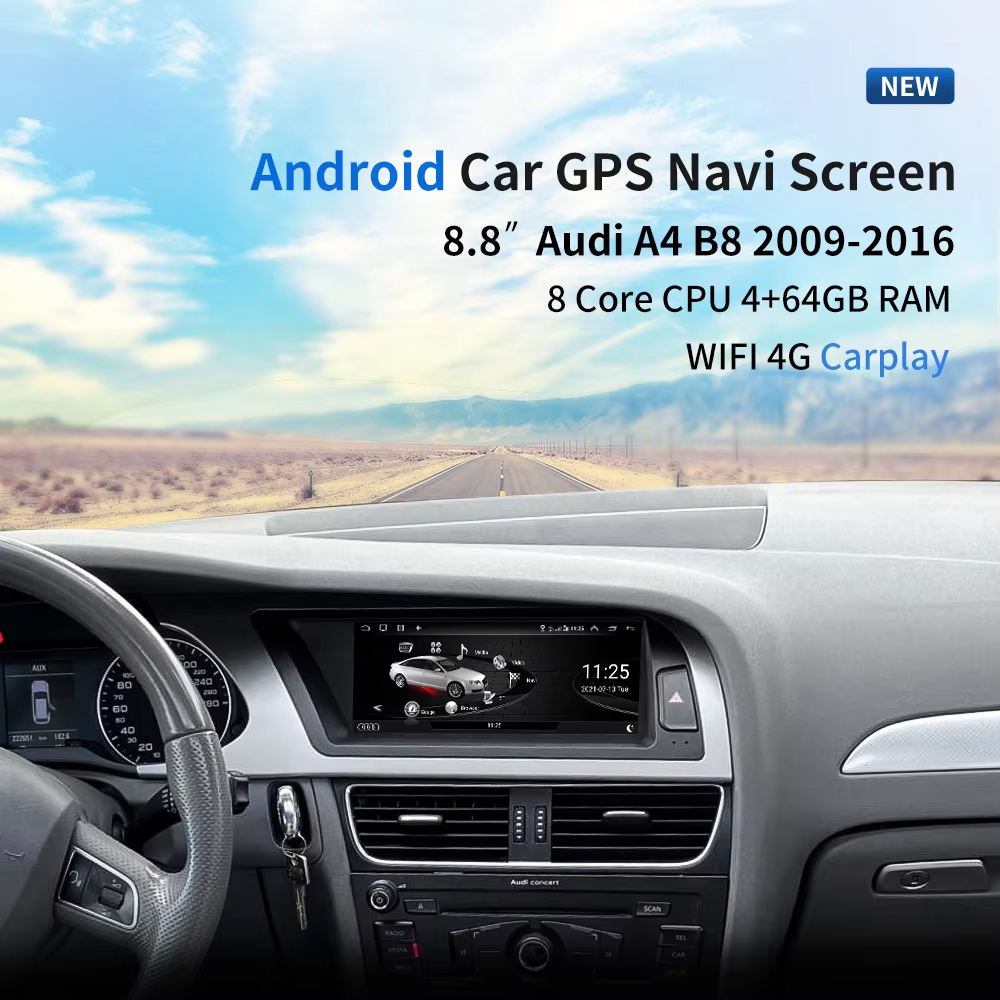
Installed Result First: 8.8-Inch Audi A4 A5 Android Radio Upgrade

This should be the first image because it shows the real value immediately: the 8.8-inch screen installed inside an Audi dashboard, with the original cockpit shape still looking clean and integrated.

Audi A4 A5 Android Radio 8.8 inch installed dashboard view

Choose Year, High / Low Configuration and LHD / RHD Before Ordering

This product is not selected by “Audi A4” or “Audi A5” name alone. Your year range, factory head unit type, AUX/AMI condition, airbag button position, LHD/RHD layout and memory version must be checked before shipment.

Three Checks That Prevent Wrong Orders

  • Year: choose 2009–2012 or 2013–2016 according to your dashboard and product option.
  • Factory system: choose high configuration or low configuration according to your original MMI / Concert / Symphony / Multimedia setup.
  • Steering side: confirm left-hand drive or right-hand drive before shipment.
  • AUX / AMI: confirm whether your vehicle has AUX or AMI. Some setups may require the correct AMI cable route.

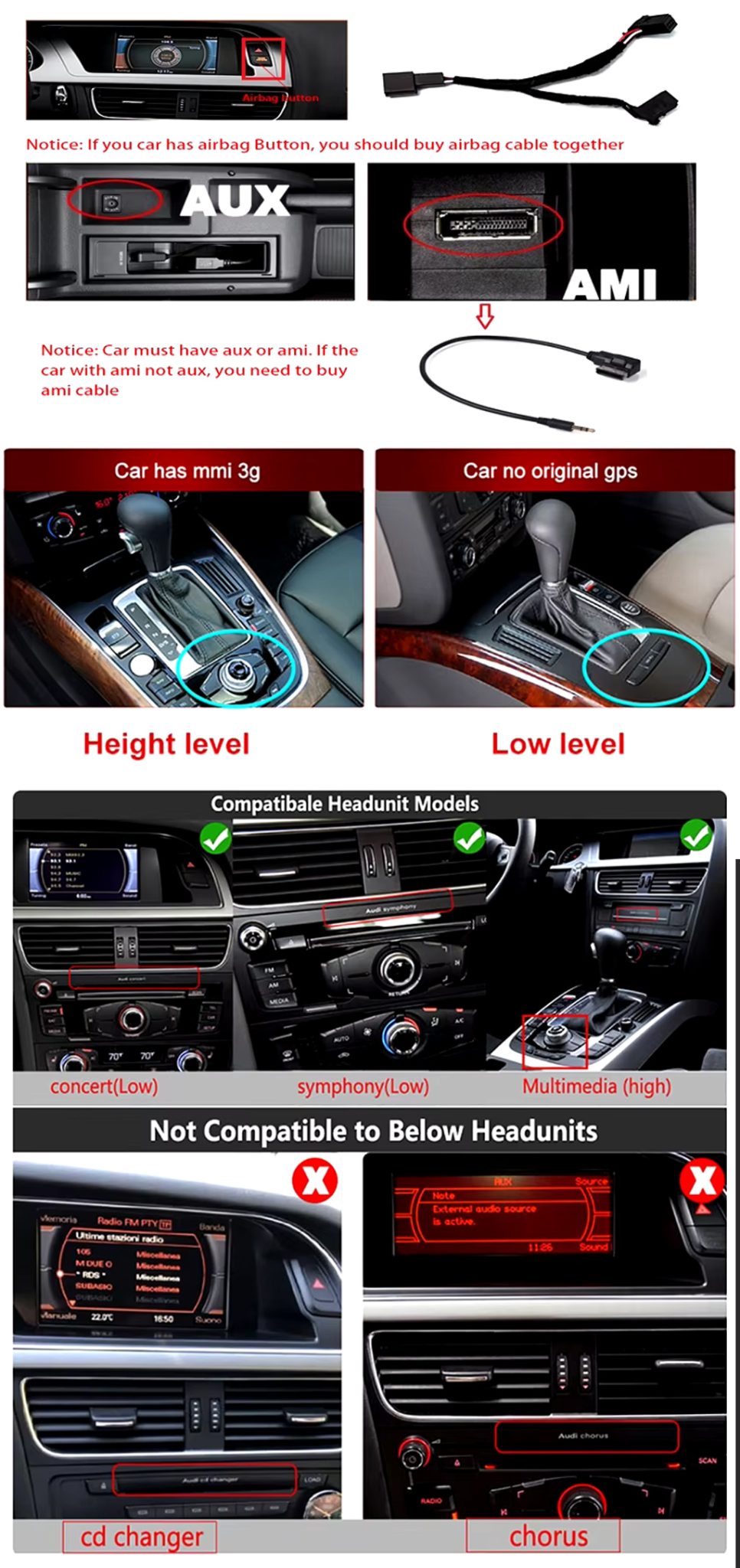
High / Low System and Cable Compatibility Check

This visual helps the buyer understand that the original Audi head unit and connector route matter. It should appear early because it reduces wrong orders and installation confusion.

Audi A4 A5 Android radio high low configuration AUX AMI airbag cable compatibility check
Audi A4 · A4L · A5 · 2009–2016 · 8.8-inch Android
Audi A4 A5 Android Radio for a Factory-Style 8.8-Inch CarPlay and DSP Upgrade

This iKAGOO Audi A4 A5 Android Radio upgrades selected 2009–2016 Audi A4, A4L and A5 vehicles with an 8.8-inch Android 13 display, wireless CarPlay, Android Auto, WiFi / 4G, GPS navigation, DSP audio and original-system switching.

8.8-inch display Android 13 Wireless CarPlay Android Auto DSP 32-band EQ WiFi / 4G

Choose this upgrade if your original Audi screen feels small, dated or limited, but you still want the dashboard to look like it belongs in the car. iKAGOO checks your year, factory head unit, high/low configuration, LHD/RHD position and connector route before shipment.

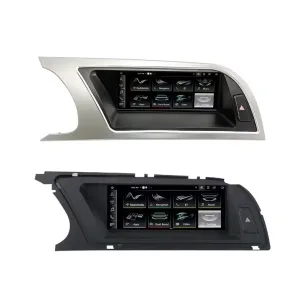
See the Two Main Panel Directions

The LHD/RHD visual helps you compare dashboard trim shape and screen position before choosing the correct version.

Audi A4 A4L A5 Android radio LHD RHD panel product view

Quick Answer

This iKAGOO upgrade is a vehicle-specific Audi A4 A5 Android Radio for selected 2009–2016 Audi A4, A4L and A5 vehicles. It upgrades the original screen area with an 8.8-inch Android 13 display while keeping an Audi-style dashboard fit. Supported functions can include wireless CarPlay, Android Auto, GPS navigation, WiFi / 4G, Bluetooth, DSP 32-band EQ, original-system switching, rear camera input, 360 panorama route and original control retention where the matched version supports it. Before shipment, iKAGOO checks your model year, high or low factory configuration, steering side, AUX/AMI condition, original head unit and connector photos. It is suitable for owners who want a cleaner factory-style upgrade instead of a universal floating screen.

Why This Upgrade Makes Sense for Audi A4, A4L and A5 Owners

Factory-Style 8.8-Inch Fit

The screen sits inside the original Audi dashboard area, giving the car a more modern interface without making the cabin look like a universal aftermarket tablet install.

Wireless CarPlay and Android Auto

Use phone maps, calls, music and supported apps through a larger in-dash screen instead of relying on the older factory interface.

DSP Audio and Navigation Value

DSP 32-band EQ, GPS / Glonass navigation, Bluetooth and WiFi / 4G make this a daily-use upgrade, not only a visual change.

Original Vehicle Functions Supported

Original Audi System Retention

  • Original / Android system switching is supported through the matched route.
  • Supported original radio, Bluetooth, radar reversing and vehicle settings can continue to work where the factory system and selected version support them.
  • Original sound route can be retained when the correct AUX / AMI / wiring path is prepared.
  • Steering-wheel controls and MMI-related interaction depend on the matched factory configuration and harness route.

Android Daily-Use Functions

  • Wireless CarPlay and Android Auto support phone maps, calls, music and voice control.
  • WiFi and 4G support app use and online navigation where the selected hardware and SIM/network conditions allow it.
  • Rear camera, AHD / CVBS and 360 panorama routes are supported where the selected version and vehicle setup match.
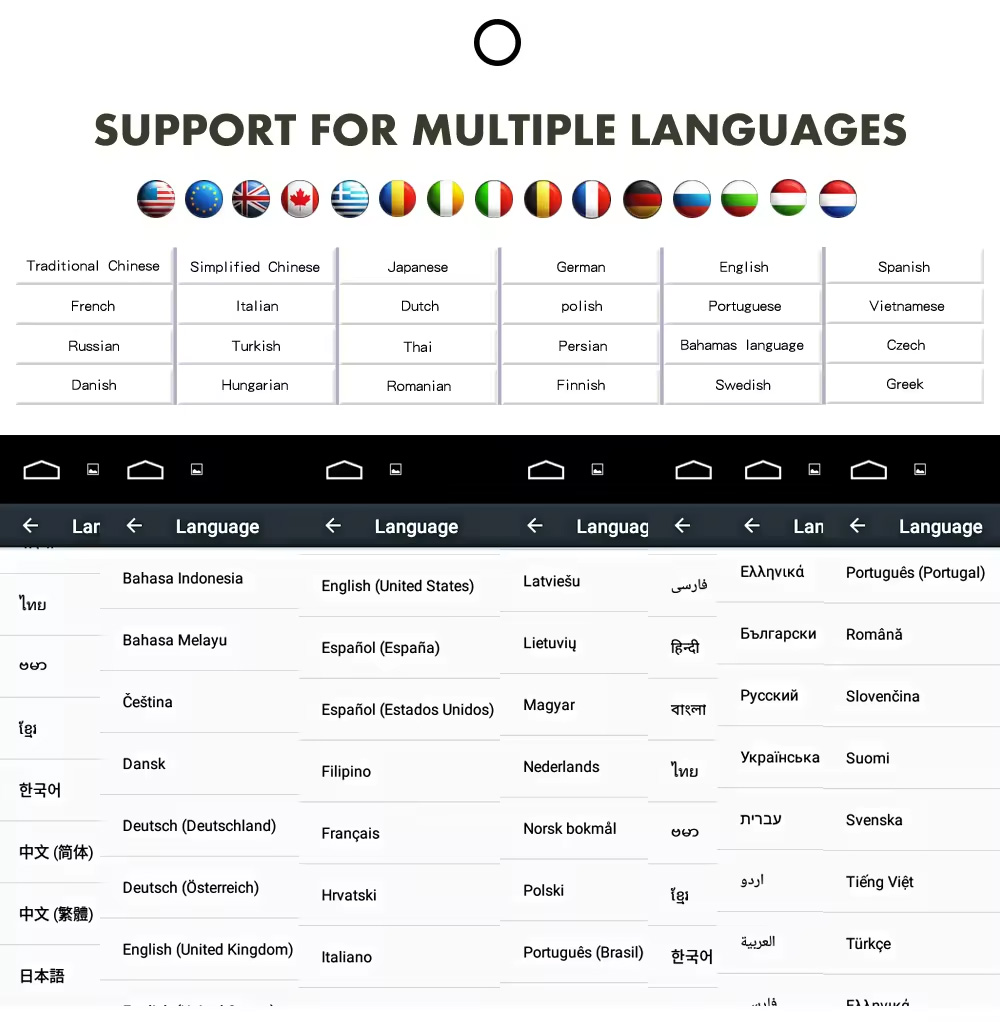
  • Multiple language interface support helps international buyers use the system in their preferred language.

Audi Fitment and Configuration Check

This product is mainly positioned for Audi A4, Audi A4L and Audi A5 2009–2016. The correct version is selected by vehicle year, dashboard layout, factory head unit type, high or low configuration, LHD/RHD position, AUX/AMI condition and connector photos—not only the model badge.

Main modelsAudi A4, Audi A4L and Audi A5.
Year choices2009–2012 / 2013–2016.
Factory system choiceHigh configuration / low configuration.
Steering positionLHD and RHD routes should be confirmed before shipment.
Important audio checkConfirm AUX or AMI availability because some cars need the correct AMI cable route.
Not compatible routeSome CD changer / Chorus style systems may not match this product route.

Help iKAGOO Prepare the Correct Version Before Shipment

Vehicle Information Needed

  • Exact vehicle: Audi A4, A4L or A5.
  • Model year: 2009–2012 or 2013–2016.
  • Left-hand drive or right-hand drive.
  • Factory head unit photo: Concert, Symphony, Multimedia, high or low configuration.
  • Original screen and dashboard photo.
  • AUX / AMI condition and whether an AMI cable is needed.
  • Whether rear camera, 360 panorama, DVR, DSP or CarPlay is important for your setup.

Why These Details Matter

These details help iKAGOO prepare the correct Audi panel, Android unit, wiring harness, AMI/AUX route, CANBUS interface and camera/audio route. They reduce the risk of choosing the wrong year version or ordering a product that does not match your factory head unit.

Key Product Specifications

Product typeOEM-style Android radio / Android head unit / Android car stereo.
Main fitmentAudi A4, A4L and A5 2009–2016.
Screen size8.8 inch.
SystemAndroid 13 system.
Motherboard routeTSK / TSK8259 / TSK8667 depending on selected version.
Memory options2GB+32GB / 4GB+64GB / 6GB+128GB / 8GB+128GB DSP CarPlay routes may be available according to product option.
CPU8-core CPU route.
AudioDSP 32-band EQ where selected version supports it.
BluetoothBT 4.0 / BT 5.0 according to selected motherboard route.
NavigationGPS / Glonass navigation support.
NetworkWiFi / 4G support where selected version and SIM/network conditions allow it.
Camera360 Panorama, AHD rear camera and CVBS rear camera routes where supported by selected version and vehicle setup.
RadioFM / AM / RDS or FM / RDS depending on selected version.
Package dataListed weight 4.2 kg; listed dimensions 40 × 24 × 20 cm.

Choose the Right Version

2GB + 32GB

Suitable for basic CarPlay, Android Auto, Bluetooth and navigation use. Choose this only if your expectations are simple.

  • Basic daily use
  • Lower cost route
  • Good for light apps

4GB + 64GB

A more balanced choice for buyers who want smoother app switching, navigation and media playback.

  • Better daily usability
  • More storage
  • Good for normal app use

8GB + 128GB DSP CarPlay

Recommended for buyers who want stronger performance, more storage, DSP audio and the best long-term experience from this product page.

  • Best performance route
  • DSP audio advantage
  • Wireless CarPlay focus
  • Recommended for long-term owners

Why Owners Choose iKAGOO

Vehicle-Specific Preparation

iKAGOO checks your Audi model, year, high/low configuration, steering side and dashboard photos before shipment so the product is prepared around your vehicle.

Harness and System Matching

The correct wiring harness, AMI/AUX route, CANBUS and factory-system match matter more than simply buying an 8.8-inch screen.

Original Function Integration

The upgrade is prepared to retain supported original audio, radio, Bluetooth, vehicle settings and reversing function where the matched version allows it.

Factory Wiring Protection

The matched connection route is designed to avoid intentionally cutting the main factory wiring when the vehicle and harness match.

Installation and Setup Support

If your installer needs help identifying the factory head unit, cable route or function test result, iKAGOO can provide order-based support.

12-Month Hardware Warranty

Eligible hardware issues are handled under the iKAGOO 12-month limited warranty, with after-sales support for diagnosis and suitable solutions.

iKAGOO Purchase Assessment for This Audi Android Radio

iKAGOO Upgrade Necessity

88/100

Strong Upgrade Case. The Audi A4/A5 2009–2016 cabin benefits clearly from a modern Android screen, wireless phone projection, navigation and DSP audio.

  • Visible dashboard modernization
  • Wireless phone integration
  • Better navigation and app use
Based on the iKAGOO Upgrade Necessity Standard

Original Vehicle Compatibility

86/100

Strong compatibility route when the correct year, high/low configuration, AUX/AMI route, harness and CANBUS setup are prepared before shipment.

A score of 86/100 does not mean that 14% of factory functions are lost. It means the result is judged against function continuity, controls, vehicle data, physical fit and installation integration.

Based on the Factory Function Retention Standard

Installation Difficulty

Level 3

Advanced DIY. Suitable for experienced DIY installers or an automotive electronics installer. It requires dashboard trim removal, matched harness connection, CANBUS setup, AUX/AMI route checking and full function testing.

Based on the Car Electronics Installation Difficulty Guide

Keep the Old Screen, Add a Box or Upgrade with iKAGOO?

Keep Original

Factory Screen Only

Best only if you are satisfied with the old screen size, old interface and limited phone integration.

  • No upgrade cost
  • Old interface remains
  • Limited app experience
Basic Add-On

CarPlay-Only Box

Useful if you only need phone projection, but it does not give the dashboard a new Android system or new display hardware.

  • Limited display change
  • No full Android system
  • Depends on factory screen condition
Generic Screen

Universal Android Screen

May be cheaper, but dashboard fit, high/low configuration and AUX/AMI route can become the real risk.

  • Fitment uncertainty
  • May look aftermarket
  • More wiring risk
Recommended Upgrade

iKAGOO Audi A4 A5 Android Radio

Best for owners who want an 8.8-inch factory-style display, Android system, wireless phone projection, DSP audio and version checking before shipment.

  • 8.8-inch Audi-style fit
  • Android 13 route
  • Wireless CarPlay / Android Auto
  • DSP 32-band EQ
  • Vehicle-specific preparation

Purchase Conclusion

If you want your Audi A4, A4L or A5 to feel modern without making the dashboard look cheap, this iKAGOO Android radio is the stronger route than a generic screen or a small CarPlay-only box.

Product Photos and What They Help You Decide

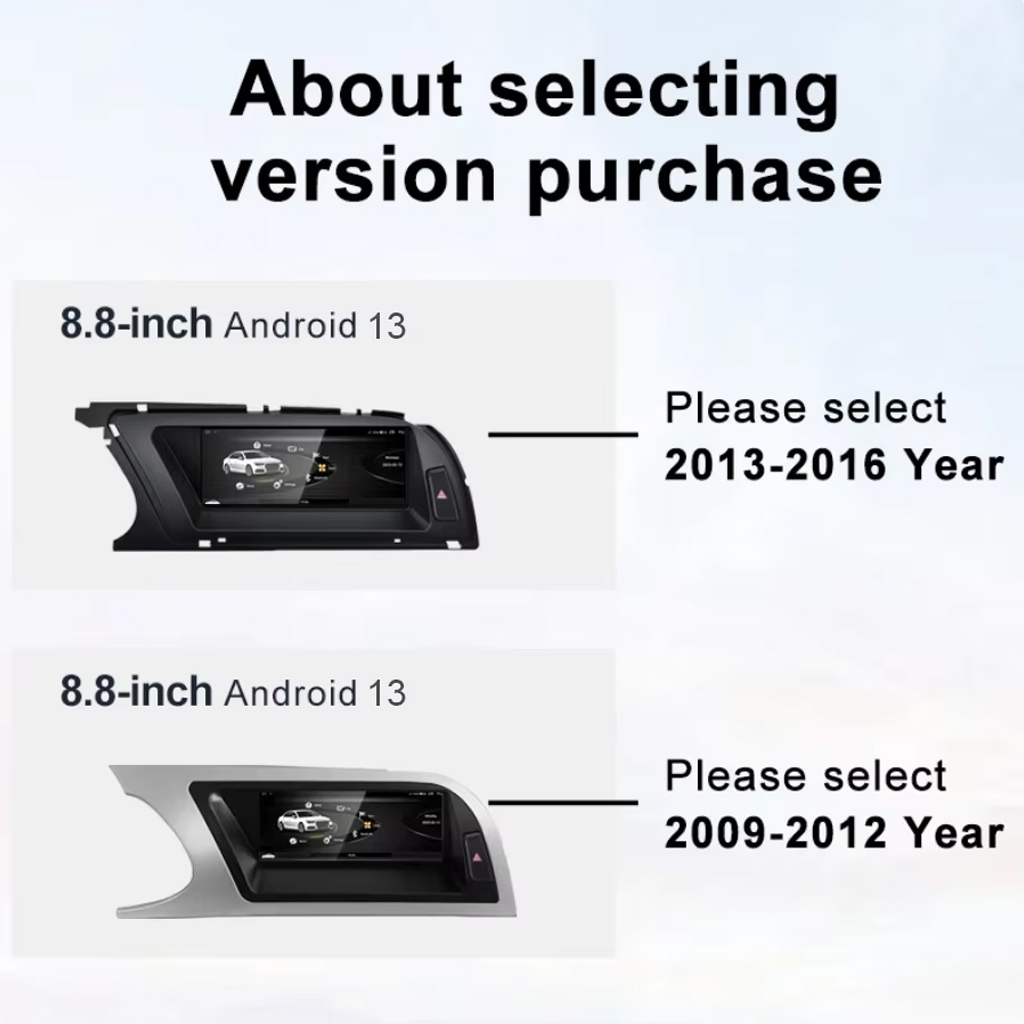
Compare the 2009–2012 and 2013–2016 Version Route

This version-selection image helps you choose the correct year range before ordering. It should be checked before you select memory or optional features.

Audi A4 A5 Android radio version selection 2009 2012 2013 2016

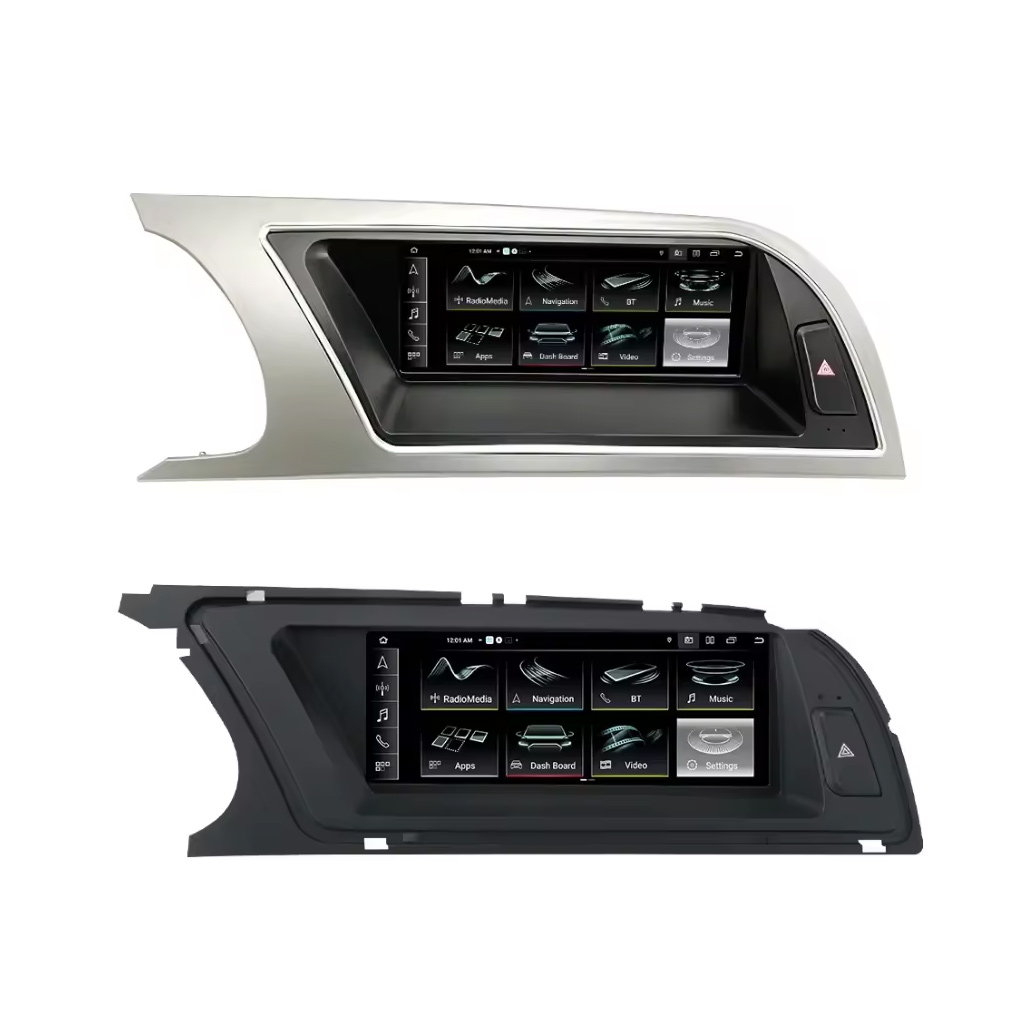
Review Both Dashboard Trim Directions

This second trim view helps confirm whether your dashboard matches the silver or black panel direction before shipment.

Audi A4 A4L A5 Android head unit silver black dashboard trim directions

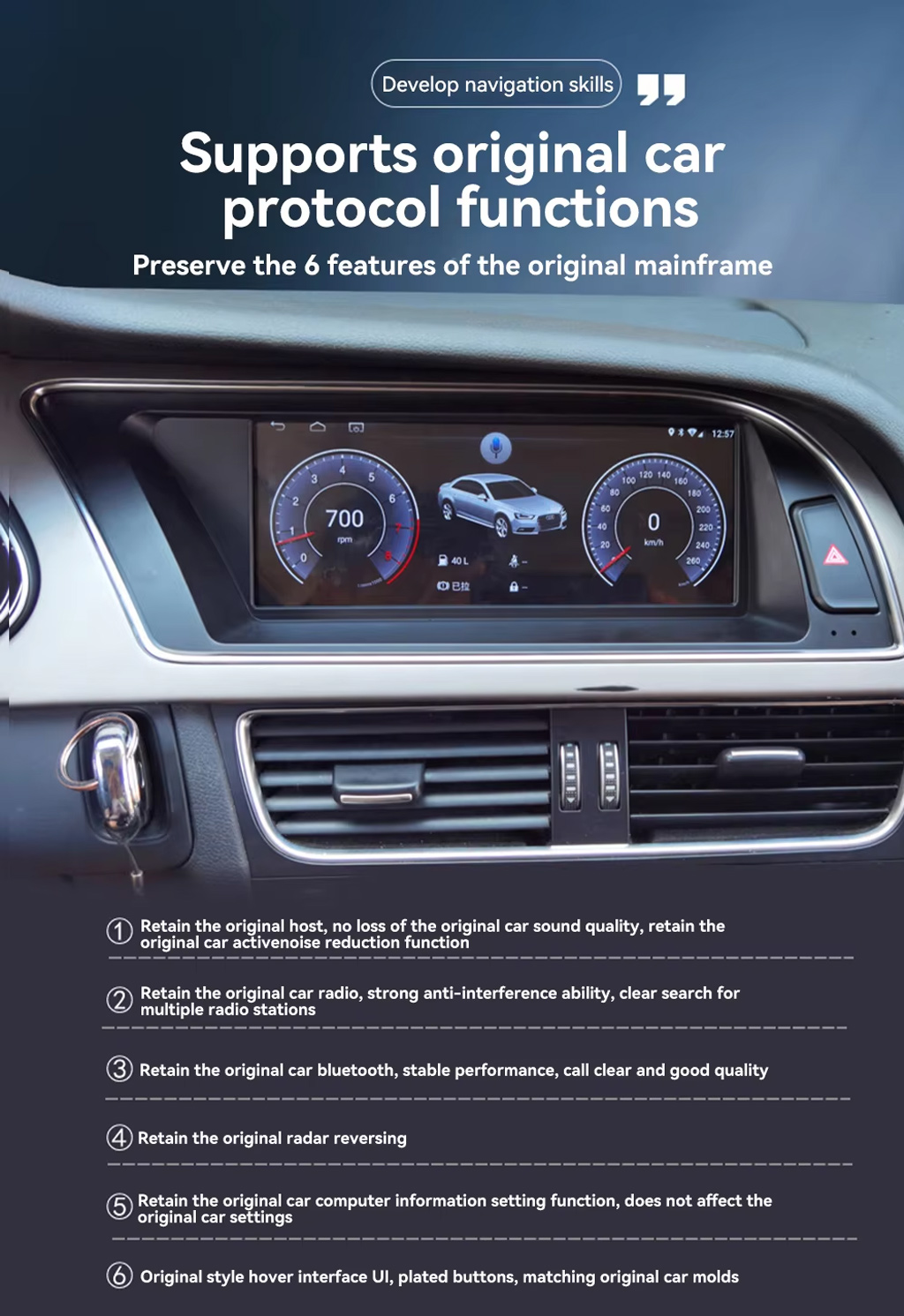
Preserve Original Audi Protocol Functions

This product route is valuable because it does not only add Android. It is designed to retain supported original host, radio, Bluetooth, reversing radar, vehicle settings and original-style interface behavior where matched correctly.

Audi A4 A5 Android radio supports original car protocol functions

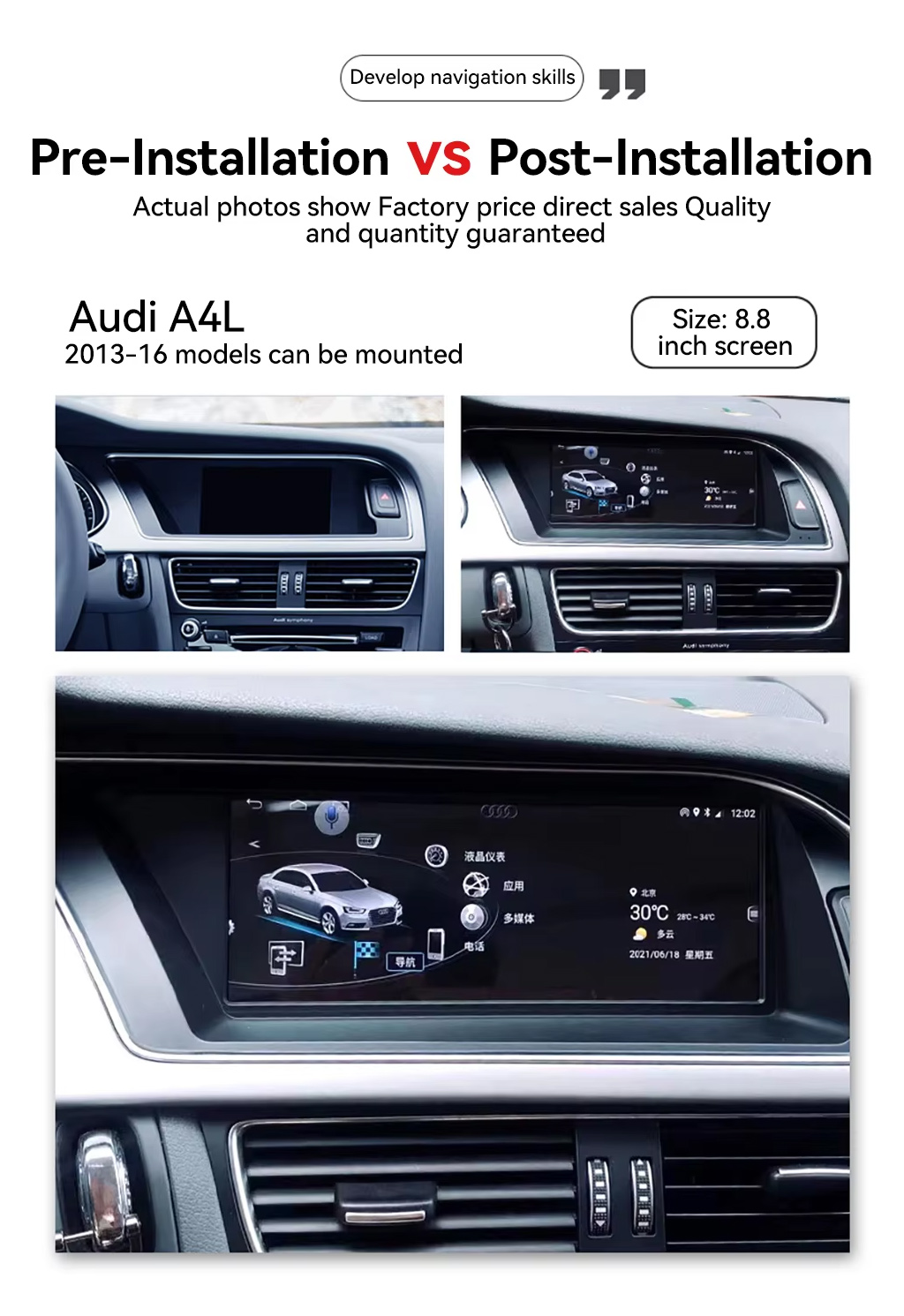
See the Before and After Upgrade Result

The before-and-after view shows the main daily-use improvement: the old blank or small-screen area becomes a wider Android display with a more modern interface.

Audi A4 A4L Android radio pre installation and post installation comparison

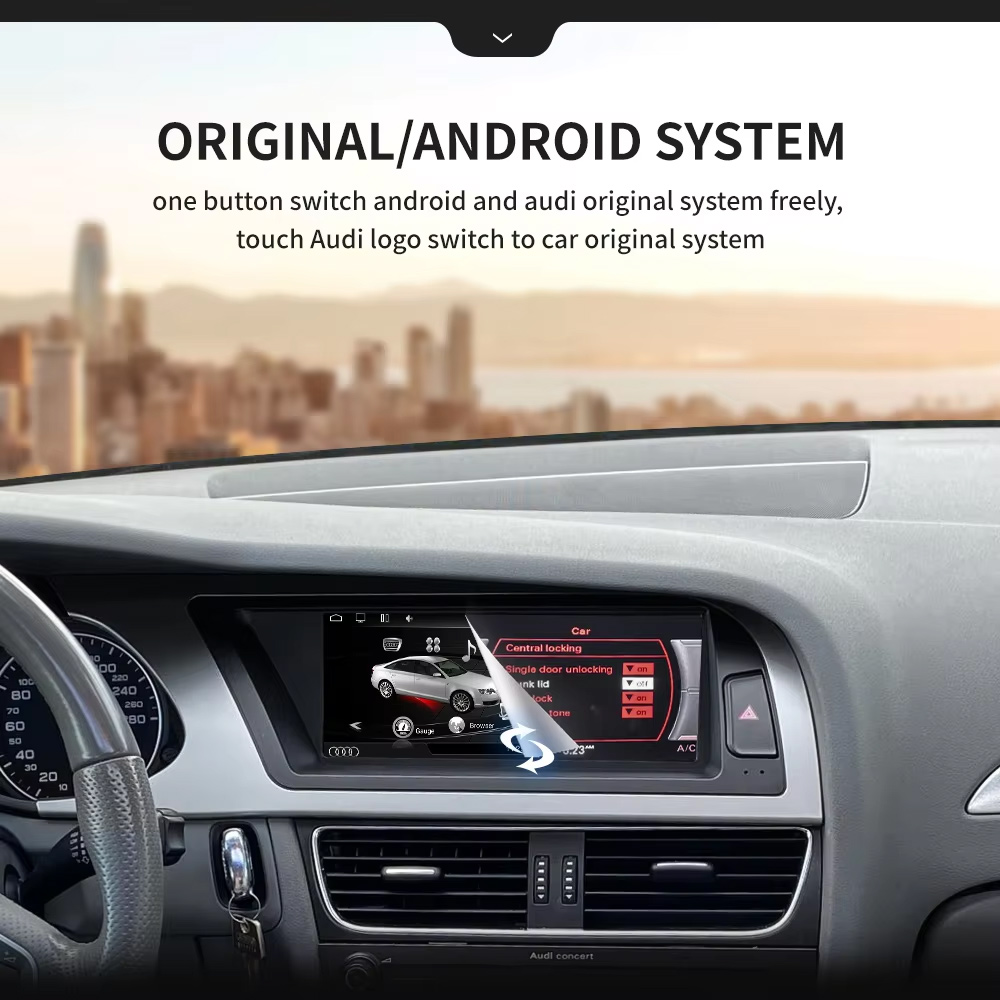
Use Original and Android System Switching

One-button switching between Android and the Audi original system helps you keep familiar factory settings while adding modern app and phone functions.

Audi A4 A5 Android radio original system and Android system switching

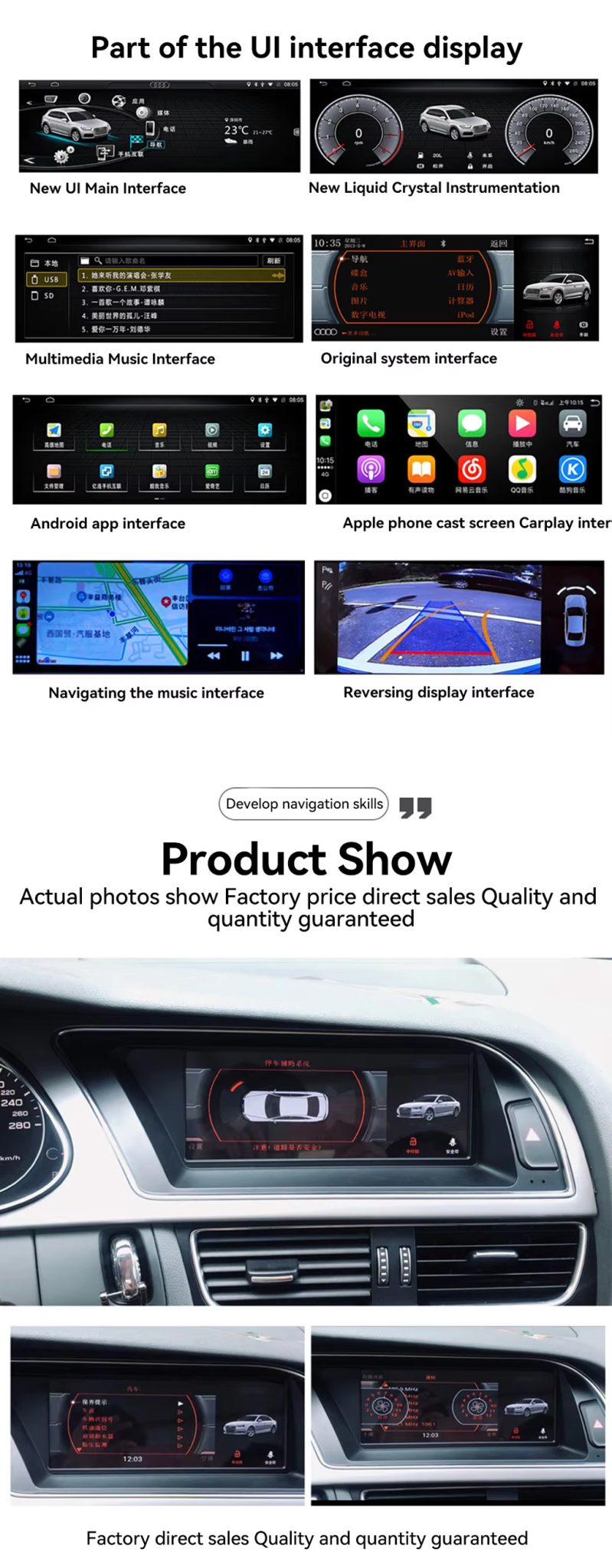
Check the UI, CarPlay, Navigation and Reversing Display

The UI display panel shows the key buyer benefits together: Android home interface, factory system interface, CarPlay screen, navigation and reversing display route.

Audi A4 A5 Android radio UI CarPlay navigation reverse display product show

Use WiFi and 4G for Online Apps

WiFi and 4G support make the Android radio more useful for online maps, music apps and Google Play app downloads where local network conditions allow it.

Audi A4 A5 Android radio WiFi 4G network Google Play apps

Confirm Multilingual Interface Support

Multiple language support is useful for international buyers and installers who need the system interface in English, German, French, Spanish, Arabic and other supported languages.

Audi Android radio multiple language interface support

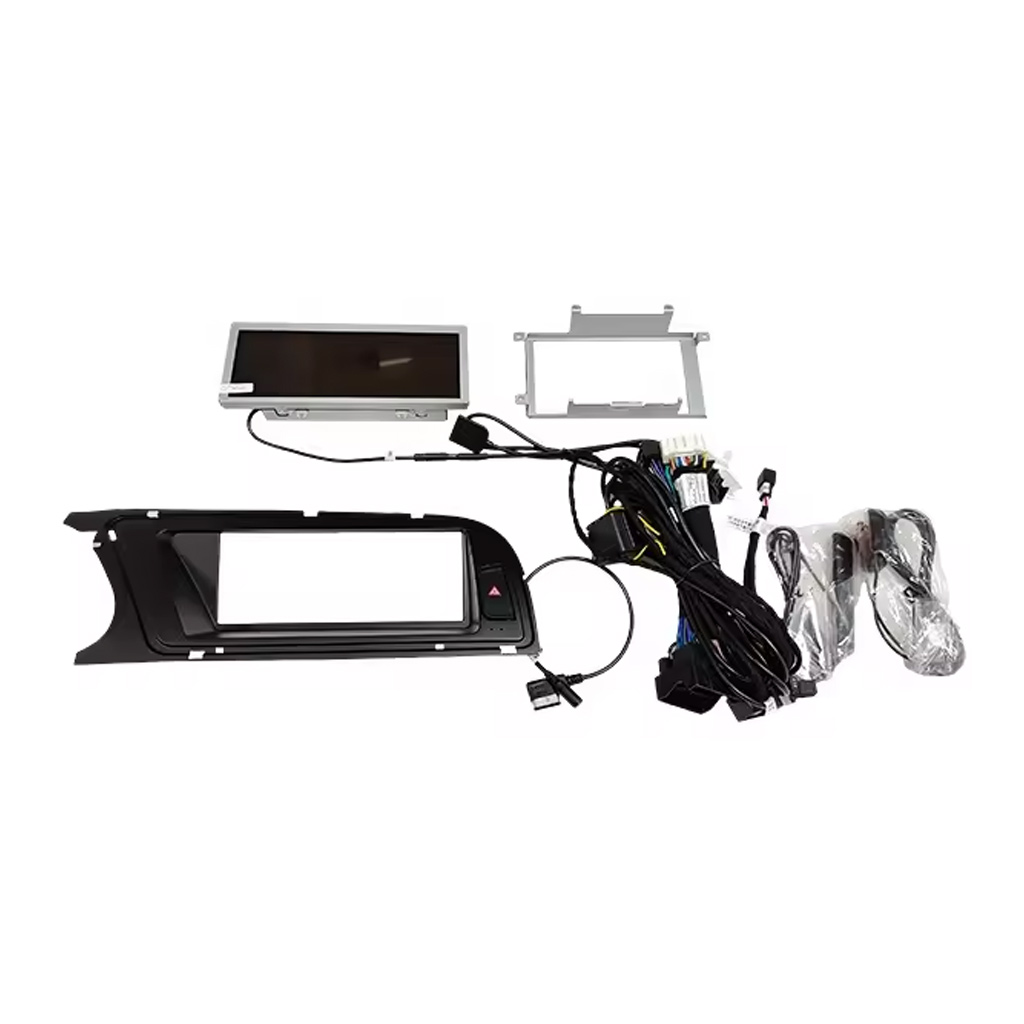
Check the Device, Frame, Harness and Accessories

The accessory image matters because correct wiring and included cables decide whether the installation can preserve the original vehicle functions cleanly.

Audi A4 A5 Android radio device frame wiring harness accessories

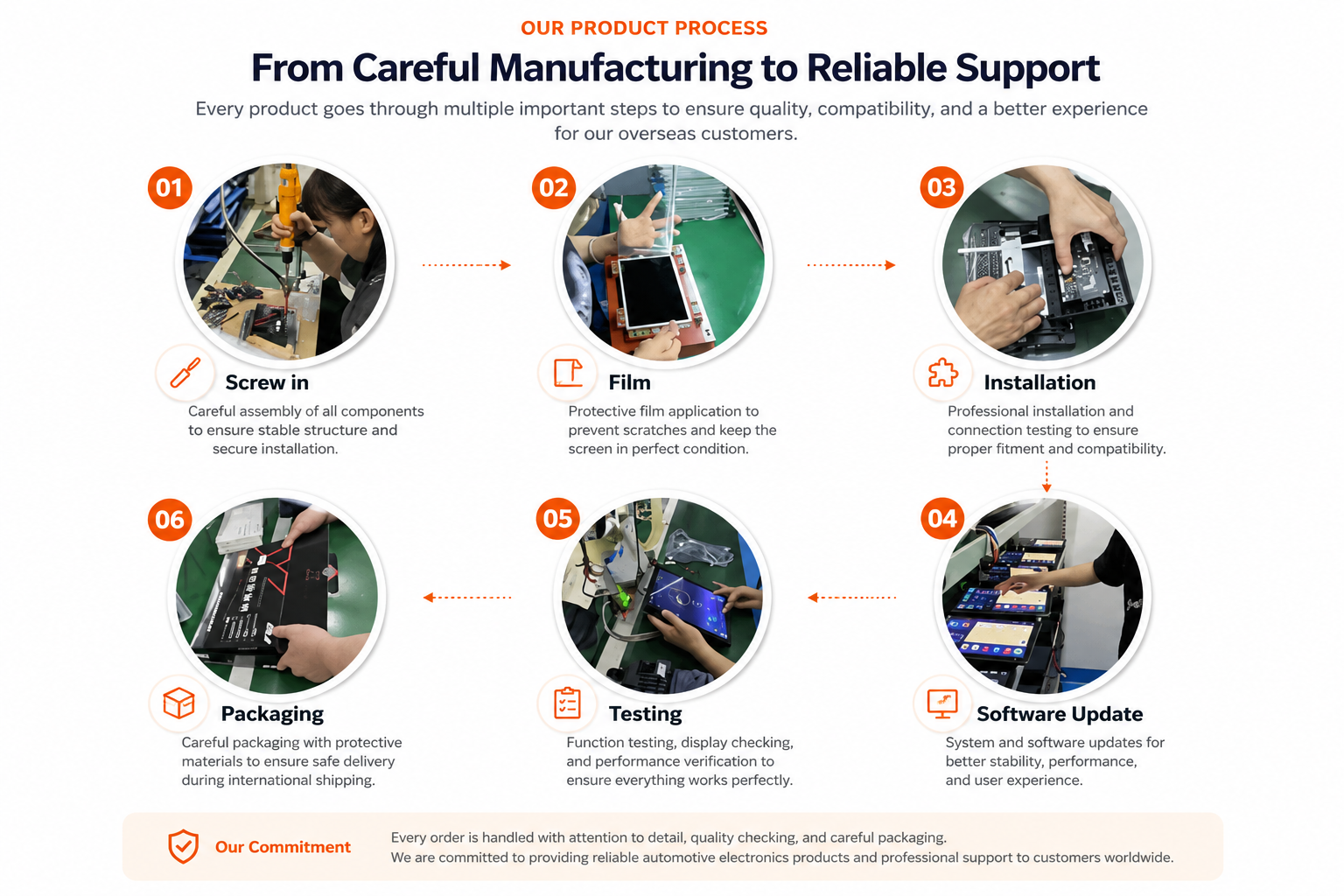
Understand iKAGOO Preparation Before Shipment

Vehicle-specific Android units need careful assembly, screen protection, function testing, software update checks and safe packaging before international delivery.

iKAGOO Android head unit manufacturing testing software update packaging process

Installation Route for the Audi A4 A5 Android Radio

Main Work Required

  • Confirm 2009–2012 or 2013–2016 version before shipment.
  • Confirm high or low factory configuration and original head unit type.
  • Remove the original screen area and required dashboard trim carefully.
  • Connect the matched power harness, CANBUS interface and AUX / AMI route.
  • Connect USB, GPS, camera, 4G antenna and audio routes according to selected configuration.
  • Power on the unit before final reassembly.
  • Test original system switching, CarPlay, Android Auto, audio, radio, Bluetooth, camera input and sleep/wake behavior.

Recommended Installer

This is Level 3 — Advanced DIY. It is suitable for experienced DIY installers or an automotive electronics installer who can remove Audi dashboard trim carefully, identify factory connectors correctly and complete a structured function test.

Do not treat “plug-and-play” as “no dashboard work.” The original screen and trim still need to be removed, connected, configured and tested correctly.

Stop Installation and Contact iKAGOO If This Happens

  • The connector shape or pin layout clearly does not match the supplied harness.
  • The car has a factory head unit route listed as not compatible.
  • AUX / AMI audio route cannot be identified.
  • A connector pin is bent, loose or damaged.
  • The harness route does not match the supplied guidance.
  • You smell abnormal heat, burning or smoke.
  • A fuse blows repeatedly.
  • Power or ground cannot be confirmed safely.
  • The installation would require cutting the main factory wiring harness.
  • Camera, audio, steering-wheel control, CANBUS or sleep/wake behavior is abnormal and cannot be explained during testing.

Shipping, Warranty and After-Sales Support

Order Preparation

Normal order preparation is usually 1–3 business days after your vehicle configuration has been checked.

Tracked Global Shipping

International delivery is tracked. Estimated delivery time depends on destination, customs clearance and the shipping method selected at checkout.

12-Month Hardware Warranty

Eligible hardware issues are handled under the iKAGOO limited warranty. Damage from incorrect wiring, misuse, water ingress or unauthorized modification is not normally covered.

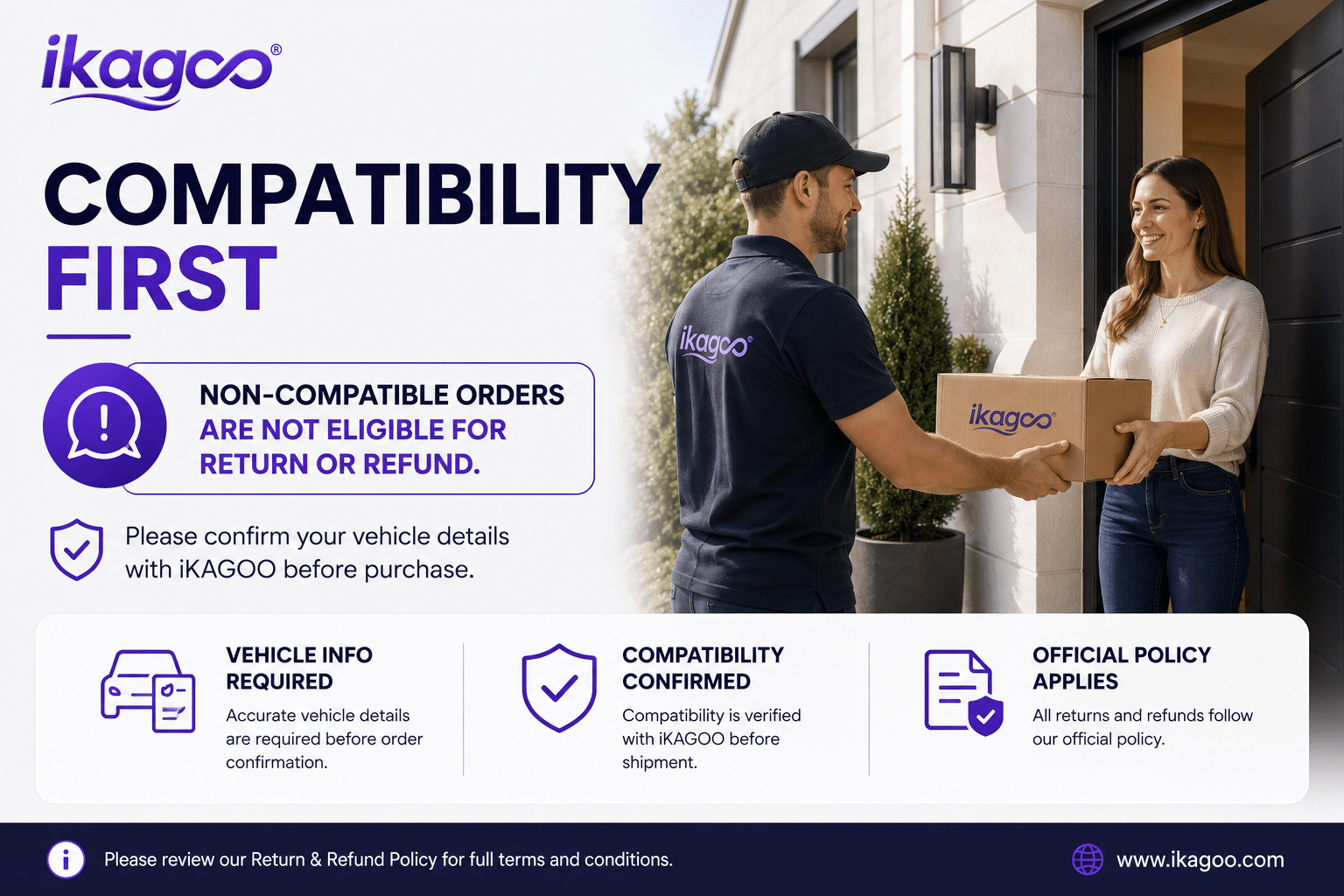
Vehicle-specific products require correct information before shipment. If iKAGOO confirmed compatibility before purchase, your information was accurate, and no reasonable installation solution is available after supported troubleshooting, the current published return and refund policy applies.

Audi A4 A5 Android Radio FAQ

Is this Audi A4 A5 Android Radio for 2009–2016 vehicles?

Yes, this product is positioned for selected Audi A4, A4L and A5 2009–2016 vehicles. Please choose the correct 2009–2012 or 2013–2016 version before shipment.

Do I need to choose high configuration or low configuration?

Yes, this is required. Your original Audi head unit type, dashboard layout, AUX/AMI condition and factory system decide which configuration route should be prepared.

Does it support wireless CarPlay and Android Auto?

Yes, wireless CarPlay and Android Auto are supported where the selected version and phone setup support the function.

Does it keep the original Audi system?

Yes, supported original-system switching is available where the correct version and wiring route are prepared. You can use Android functions and return to the Audi original system interface.

Does it support DSP audio?

Yes, DSP 32-band EQ is supported on the DSP version. Choose the DSP CarPlay route if audio tuning is important to you.

Does it support rear camera or 360 camera?

Yes, rear camera AHD/CVBS and 360 panorama routes are supported where the selected version, camera hardware and vehicle wiring support them.

Does it work with LHD and RHD vehicles?

Yes, LHD and RHD routes can be prepared, but you must provide your steering position and dashboard photos before shipment.

Is installation plug-and-play?

Yes, the matched route is designed for clean connection, but installation is still Level 3 — Advanced DIY because dashboard trim, wiring, CANBUS, AUX/AMI and full function testing must be handled carefully.

What should I send before ordering?

Yes, send your vehicle model, year, steering side, original dashboard photo, factory head unit photo, AUX/AMI condition, and whether you need CarPlay, DSP, rear camera, 360 panorama or DVR functions.

Make Your Audi A4, A4L or A5 Feel Modern Again

Choose the Audi A4 A5 Android Radio if you want an 8.8-inch factory-style screen, wireless CarPlay, Android Auto, DSP audio, navigation, WiFi / 4G and version-specific preparation for your vehicle.

5.00

Based on 1 reviews
1
0
0
0
0

1 review for Audi A4 A5 Android Radio 2009–2016 8.8″ Display 8+128GB DSP

  1. Jordan Miles

    Total rating
    Value for money

    Installed on my 2013 A4. The 8.8″ screen drops right in and looks factory. Wireless CarPlay connects in seconds and the MMI controls still work. Packaging from Sky Universe was solid.

    Is it helpful?
Add a review

Your email address will not be published. Required fields are marked

You have to be logged in to be able to add photos to your review.

iKAGOO shipping, warranty, returns and customer support
iKAGOO Customer Support

Shipping, Warranty & Returns

Clear information about order processing, international delivery, vehicle-specific products, warranty support, returns and damaged shipments.

Order processing Normally 1–3 business days before dispatch.
International delivery Normally 5–20 business days after dispatch, depending on destination.
Hardware warranty 12-month limited warranty for eligible manufacturing defects.
Vehicle-specific support Compatibility, wiring and configuration assistance are available.

Frequently Asked Questions

These answers provide a practical summary. The complete policy pages linked below apply to all orders.

01

Where are orders shipped from, and how long does delivery take?

Most iKAGOO orders are dispatched from our fulfillment location in China after the product configuration and vehicle information have been checked. Normal order processing takes approximately 1–3 business days.

Estimated delivery times after dispatch are:

  • USA and Canada: approximately 5–9 business days
  • European Union: approximately 7–15 business days
  • United Kingdom and Australia: approximately 7–10 business days
  • Other supported regions: approximately 7–20 business days

Delivery estimates may be affected by customs clearance, local holidays, remote-area delivery, weather or carrier delays.

02

Will I need to pay import tax, VAT or customs charges?

Standard international shipping normally does not include destination-country VAT, import duties, brokerage charges or customs clearance fees.

For eligible European Union destinations, an optional DDP shipping service may be available. Import-related charges are included only when DDP is selected at checkout or confirmed by iKAGOO in writing before shipment.

When DDP is not selected, the recipient is responsible for any charges collected by local customs or the delivery carrier.

03

Can I request express shipping?

Express or expedited shipping may be available for selected products and destinations. Availability, carrier and additional cost are confirmed before shipment.

Depending on the destination and product type, iKAGOO may use carriers such as DHL, FedEx, UPS, EMS, 4PX or another tracked logistics provider.

04

How can I track my shipment?

After the order has been dispatched, the tracking number or tracking link will normally be sent to the email address used for the order.

Tracking updates may take several business days to appear while a parcel is transferred between international and local carriers.

05

What is the iKAGOO return and refund policy?

Return eligibility depends on the reason for the return, the product condition, installation status, evidence provided and whether the return has been approved by iKAGOO.

For a non-defective return, the product must normally be unused, uninstalled, complete and suitable for resale. The customer is generally responsible for approved return shipping costs.

Original shipping charges, DDP charges, VAT, customs duties and other logistics costs are generally non-refundable unless required by applicable law or confirmed otherwise by iKAGOO.

Do not send a product back without receiving an approved return address and return instructions from iKAGOO.

06

What happens if iKAGOO confirmed compatibility but the product cannot be installed?

Additional protection may apply when iKAGOO confirmed compatibility before purchase, the customer supplied accurate vehicle information, and the customer cooperated with reasonable installation and diagnostic steps.

If iKAGOO confirms that no reasonable technical solution is available, and the issue is reported within 7 calendar days after delivery, the customer may be eligible for a refund of the product price without being required to return the product.

Original shipping, DDP, VAT, customs duties and other third-party charges are not included in this product-price refund.

07

What warranty does iKAGOO provide?

Eligible iKAGOO products include a 12-month limited hardware warranty covering verified manufacturing defects and eligible hardware failures under normal use.

Depending on the issue, the solution may include remote diagnosis, configuration assistance, replacement parts, repair, product replacement, partial refund or full refund.

The warranty does not normally cover damage caused by incorrect wiring, unauthorized modification, accidental damage, water ingress, impact, misuse, improper voltage, installation error or incompatible third-party equipment.

08

Does opening the product automatically cancel the warranty?

Inspection or third-party examination does not automatically cancel the entire warranty. However, damage caused by unauthorized repair, component replacement, incorrect modification, broken circuits or improper reassembly is not covered.

Contact iKAGOO before dismantling or repairing the product so that the correct diagnostic procedure can be provided.

09

What if my order arrives damaged or has missing parts?

Contact iKAGOO within 7 calendar days after delivery and keep the original packaging, shipping label, accessories and product.

Please provide clear photos or video showing:

  • The external shipping carton and shipping label
  • Any visible packaging damage
  • The product and affected area
  • All received accessories and wiring

After verification, iKAGOO may arrange a missing-part shipment, replacement, repair, refund or another reasonable solution based on the specific case.

10

What should I do if I ordered the wrong product?

Contact iKAGOO before installing or using the product. An exchange or return may be approved when the product remains unused, uninstalled, complete and suitable for resale.

Customers are normally responsible for shipping costs and any price difference when the wrong product, vehicle model, year or factory configuration was selected.

A free prepaid return label is not automatically provided.

11

Can I modify or cancel my order after payment?

Contact iKAGOO as soon as possible, preferably within 12 hours after placing the order, when requesting an address, vehicle configuration or product change.

A modification or cancellation is not effective until confirmed by iKAGOO. Vehicle-specific products may enter procurement, programming, testing, configuration or custom preparation shortly after payment.

Once preparation or shipment has started, cancellation may not be possible, or reasonable costs already incurred may be deducted.

12

What is included in the package?

Package contents vary by product, vehicle model, factory system and selected configuration.

Depending on the product, the package may include the main device, vehicle-specific wiring harnesses, CANBUS interface, adapters, USB cables, antennas, microphones, mounting hardware and other installation accessories.

Refer to the relevant product page, package photos and order confirmation for the exact included components.

13

How do I contact iKAGOO support?

You can contact iKAGOO through the contact form, email, WhatsApp or the available website support channels. Typical response time is within 24 business hours.

For faster technical support, include your order number, vehicle model and year, factory system photos, product photos and a clear video showing the issue.

Visit: iKAGOO Contact and Support

14

Is payment secure, and are installment options available?

Payments are processed through the secure payment methods displayed during checkout. Available card, wallet and installment options may vary by country, currency, payment provider and customer eligibility.

Any installment service, including options offered by PayPal or another provider, is subject to that provider’s regional availability and approval rules.

Read the Complete iKAGOO Policies

Review the full policy pages before ordering, especially for vehicle-specific products, international tax arrangements and installation-related returns.

This FAQ is a simplified customer guide. The complete published policy pages, order confirmation and applicable consumer law take priority if any wording differs.

Audi A4 A5 Android Car Player Audi A4 A5 Android Radio 2009–...
From: $272.00

Select options