













Audi A5 B8 Virtual Cockpit Buying Guide: Compatibility, Cost & What to Check Before Buying
Audi A5 B8 Virtual Cockpit Buying Guide
A digital cluster can make an Audi A5 B8 or B8.5 feel years newer, but this is not a universal screen upgrade. The correct result depends on the original Audi instrument PCB, the correct vehicle configuration, the installation route and whether support still exists after the dashboard has been opened.

Installed result: a vehicle-specific digital cluster in the original Audi B8 instrument position—not a screen added on top of the dashboard.
High daily-use value for an owner who still likes the B8 platform but wants the driver area to feel substantially newer.
A5, S5 and RS5 B8/B8.5 are supported through the correct route, but original cluster type and PCB condition still matter.
The original cluster is removed and its PCB transferred. No additional coding, soldering or original-wire cutting is required.
Why Does a Digital Cluster Change the Audi A5 B8 Cabin So Much?
Because the instrument cluster is part of almost every minute you spend driving. Speed, RPM, warnings, fuel status and navigation all sit directly in front of the driver, so modernizing this area changes the way the entire cabin feels.
The Audi A5 B8 has aged well in areas that matter: proportions, cabin structure and driving feel. Many owners do not want to replace the car simply because newer vehicles have a better digital cockpit.
The original mechanical-style gauge area is often the part that makes the interior look older than the car feels.
A digital cluster addresses exactly that point without requiring the entire dashboard or vehicle to be replaced.
The vehicle is worth keeping, but the instrument area feels dated every time you drive.
Restoring the old display solves a fault. A digital cockpit changes the everyday driving environment.
CarPlay and Android Auto navigation can move into the driver's primary display instead of remaining only on a center screen.
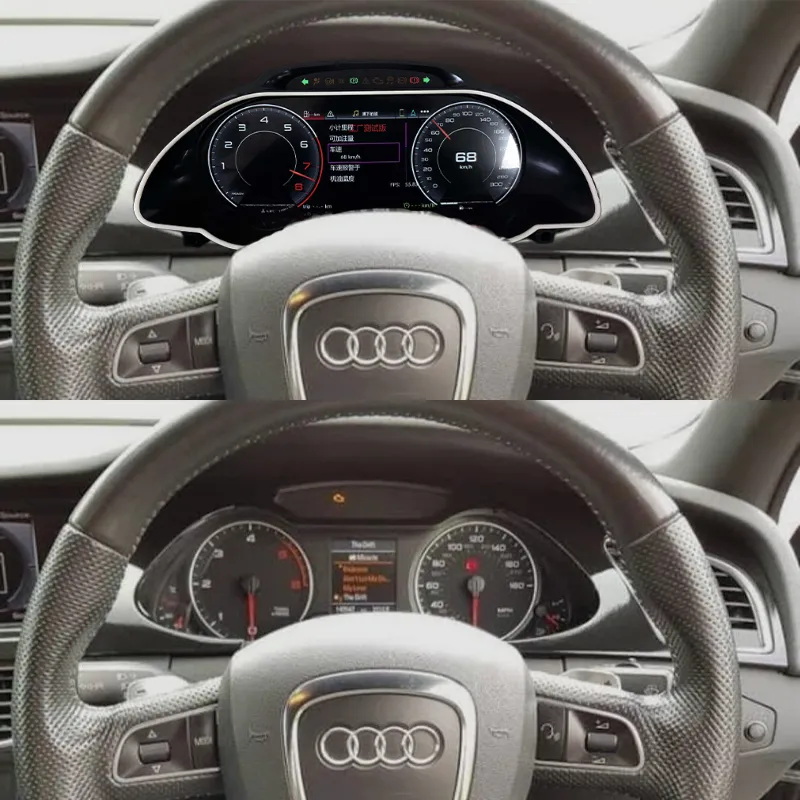
Before and after: this comparison shows why the upgrade affects the perceived age of the complete cabin, not only the instrument screen.
Can You Retrofit a Virtual Cockpit to an Audi A5 B8 or B8.5?
Yes. The supported iKAGOO route covers Audi A5, S5 and RS5 B8/B8.5 vehicles from 2008–2016 with an original mechanical or semi-digital instrument cluster and a functioning original instrument PCB.
The important buying rule is simple: do not order only because the vehicle badge and model year look correct.
iKAGOO may review the original cluster shape, dashboard, steering position and other relevant vehicle information so the ordered product follows the correct vehicle-specific route.
| Supported vehicles | Audi A5, S5 and RS5 B8/B8.5 |
|---|---|
| Body styles | Coupe, Sportback and Cabriolet |
| Original instrument | Mechanical or semi-digital cluster |
| Engine type | Petrol and diesel supported |
| Transmission | Manual and automatic supported |
| Engine displacement | No displacement restriction for this supported retrofit route |
| Speed units | MPH and km/h switching supported |
A Cluster That Physically Fits Is Not Automatically the Correct Cluster.
Physical size is only one part of compatibility. The correct retrofit also depends on the original instrument architecture, PCB route, vehicle communication and the configuration prepared for that vehicle.
This is where buying from a specialist matters.
A low-price listing may show the same shape and a similar UI, but that does not prove that the supplier has matched the correct route for the vehicle or will still be able to help once the original instrument cluster has been opened.
A visually similar cluster may still use a different vehicle interface or CAN configuration.
This Audi route requires original PCB transfer. Treating it like a universal plug-in display can create unnecessary installation problems.
A seller may be able to ship hardware but have no useful answer when UI, CAN or function adjustments are needed months later.
If the seller's only answer is “ask your installer,” the buyer carries the entire technical risk after delivery.
Why Does the Original Audi Instrument PCB Need to Be Transferred?
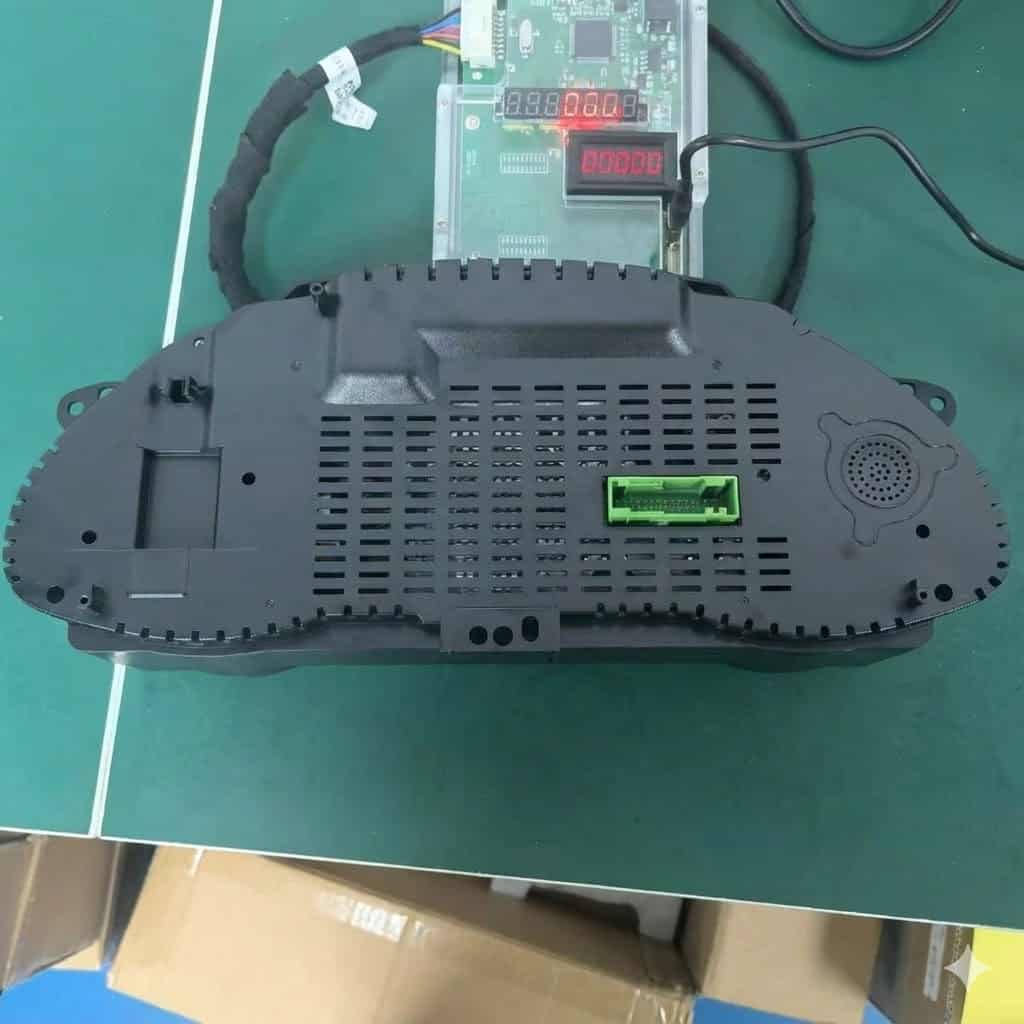
Rear housing and connector area. The digital display works together with the original Audi instrument PCB rather than replacing the vehicle's original instrument-data source.
The original Audi instrument PCB remains the source of the vehicle data. It is removed from the factory instrument cluster and installed into the new digital cluster.
This architecture is important because the retrofit is not asking an unrelated replacement module to recreate all of the car's instrument information from scratch.
Instead, the original Audi PCB continues to provide the underlying information, while the new cluster changes the way that information is presented to the driver.
- The original cluster must be removed.
- The original PCB/mainboard must be transferred.
- No additional coding is required after the transfer.
- No PCB soldering is required.
- No jumper-wire modification is required.
- No cutting of the original vehicle wiring is required.
What If the Original Audi Instrument Screen Is Already Failing?
A failed original display does not automatically prevent the upgrade. If the original instrument PCB is still working normally, the PCB can still be transferred into the new digital cluster.
This distinction matters to owners deciding whether they should repair the old display or use the problem as an opportunity to modernize the cockpit.
Will Mileage, Fuel, RPM and Warning Information Still Display?
Yes. Because the original Audi PCB remains inside the system, mileage, fuel level, RPM, door status, warnings and other available factory instrument information continue to come from the original vehicle electronics.
This is a major distinction between a real instrument-cluster retrofit and a screen that simply looks impressive in a product photograph.
The new LCD must still work as the driver's instrument panel every day.
Can CarPlay and Android Auto Navigation Display Directly in the Audi A5 Cluster?
Yes. The cluster supports direct CarPlay and Android Auto navigation-map display, with both wireless and wired connection methods.
This is one of the features that can justify the upgrade even for an owner whose original instruments still work normally.
Instead of looking toward the center console whenever the route changes, supported phone-navigation information can remain directly in the driver's primary viewing area.
- Apple CarPlay navigation display supported
- Android Auto navigation display supported
- Wireless connection supported
- Wired connection supported
- Navigation displayed in the driver instrument area
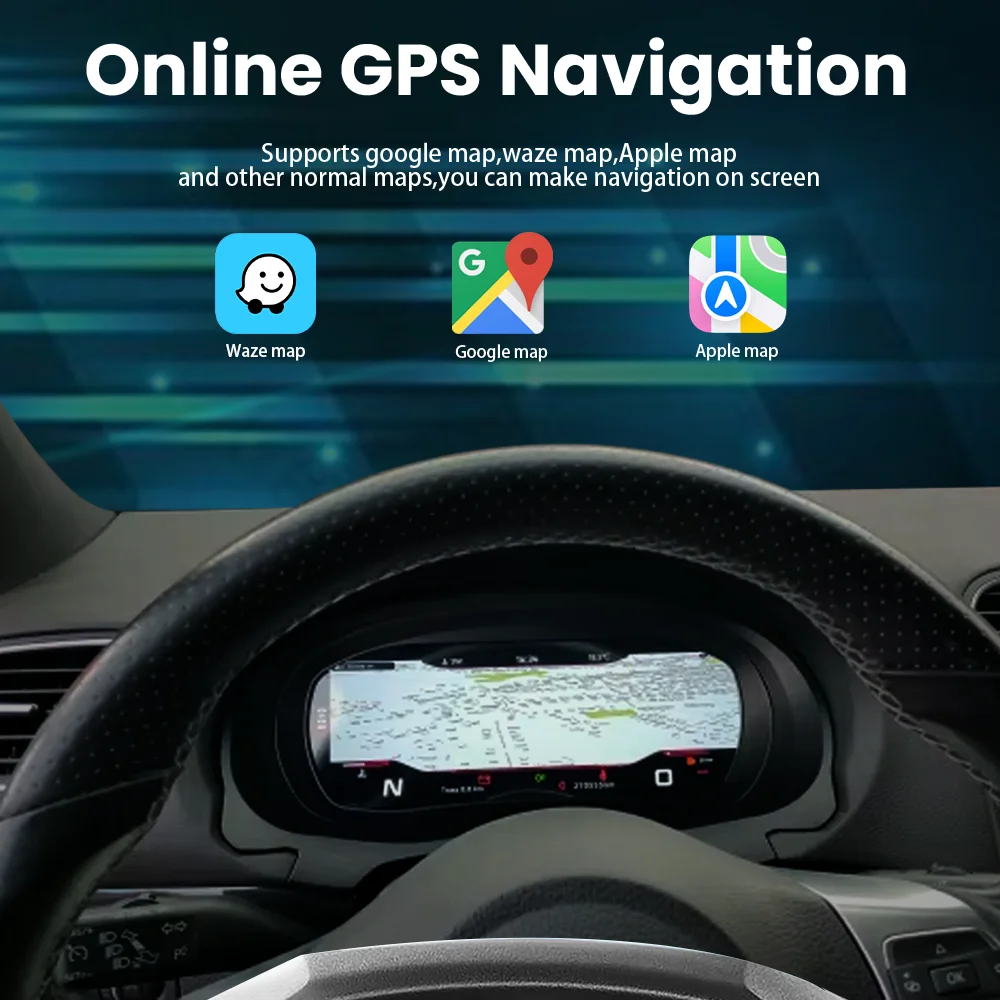
Navigation view: CarPlay and Android Auto map information can be placed directly in front of the driver.
Does Installing the Audi A5 Digital Cluster Require Cutting the Original Wiring?
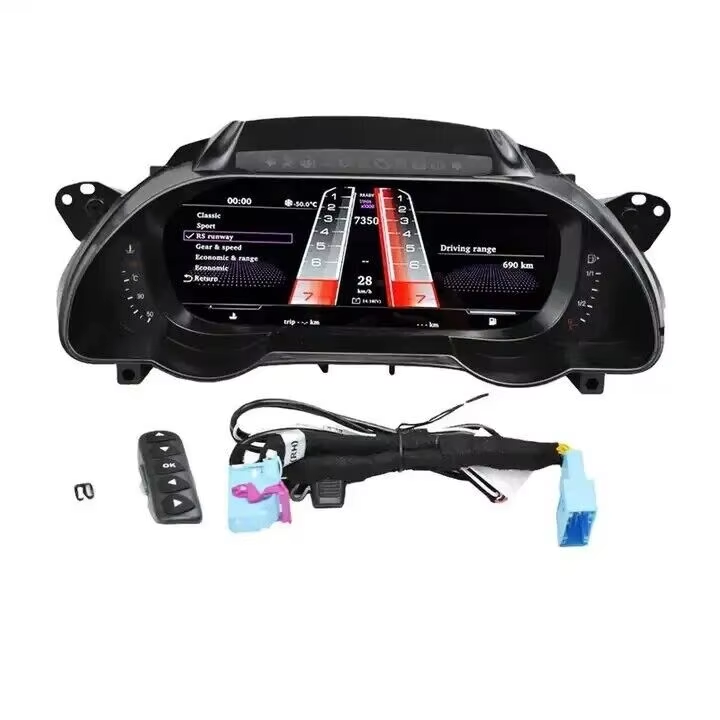
Vehicle-specific connection components. The supported installation route does not require cutting the original vehicle wiring.
No factory-wire cutting is required. However, the original cluster must be removed and its PCB transferred, which is why iKAGOO rates this as an L3 installation rather than a simple plug-in accessory.
This distinction is important.
The installation is designed to avoid destructive modification of the original wiring, but it still requires careful disassembly and handling of the original instrument electronics.
- No original harness cutting
- No PCB soldering
- No jumper wires
- No additional coding after PCB transfer
- Original cluster removal required
- Original PCB transfer required
Can the Original Audi Instrument Cluster Be Reinstalled Later?
Yes. The retrofit is reversible. The original Audi PCB can be removed from the digital cluster and installed back into the original instrument assembly.
This matters for owners who care about resale, originality or simply want the option to restore the factory instrument setup in the future.
The two clusters cannot work at the same time because the original PCB can only be installed in one instrument assembly at a time.
Why Does Wi-Fi Update Support Matter After Installation?
The cluster supports Wi-Fi updates for UI changes, system-function updates and CAN adaptation updates when an applicable update is available.
A vehicle electronics product should not be judged only by the installation day.
The car may stay with you for years. During that time, software refinements, interface changes or CAN-related adjustments may become relevant.
That is why long-term seller support is part of the product value.
A cheaper unit becomes poor value if there is nobody able to supply the correct update path or product-specific assistance after the sale.
You Are Not Only Buying a Screen. You Are Buying the Correct Retrofit Route and the Support Behind It.
iKAGOO sells this Audi A5 B8/B8.5 digital cluster as a vehicle-specific automotive electronics upgrade. The product, vehicle information, installation route and after-sales support are treated as one order—not as unrelated steps.
Why Can a Cheaper Audi A5 Digital Cluster Cost More After Installation?
Because the real cost of a vehicle-specific cluster is not only the hardware. Wrong configuration, repeated dashboard removal, incorrect harnesses, unsupported software and missing technical help can all create additional cost after purchase.
This becomes especially important once an installer is involved.
If a vehicle has to be opened twice because the first configuration was wrong, the buyer may pay for installation time twice even if the original product looked inexpensive.
The cluster may look correct but not follow the correct vehicle-specific interface route.
Labour savings disappear quickly when a product has to be removed, diagnosed and reinstalled.
A seller without a useful update path may leave the buyer with a problem that cannot be solved by changing hardware.
The installer blames the product; the seller blames the installer; the customer is left between them.
Repair the Original Cluster, Buy a Used Cluster or Upgrade to Digital?
The correct choice depends on what you are trying to achieve. Repair is for restoration. A digital cluster makes more sense when the goal is to change how the cabin feels and add a modern driver interface.
Best when you specifically want to preserve the original analog appearance and only need the existing instrument repaired.
Can make sense in some repair cases, but buyers still need to consider used-part condition, matching and the age of the replacement hardware.
Best suited to an owner with a healthy original PCB who wants retained vehicle data, a modern cockpit and CarPlay or Android Auto navigation closer to the driver's sightline.
Is an Audi A5 B8 Virtual Cockpit Retrofit Worth It?
For an Audi A5, S5 or RS5 B8/B8.5 owner who plans to keep the car, has a healthy original instrument PCB and wants a major cockpit change, this is one of the most visible technology upgrades available.
The strongest case is not “the original gauges are bad.”
The stronger case is that the rest of the car may still be worth keeping, while the instrument area is one of the clearest reminders of the vehicle's age.
Updating the display allows the owner to modernize what they see during every drive without replacing a car they still enjoy.
This upgrade makes the strongest sense if:
- You plan to keep the A5, S5 or RS5 for several more years.
- The original instrument PCB is healthy.
- The car currently uses mechanical or semi-digital instruments.
- You want a visible cockpit transformation rather than only a repair.
- You regularly use CarPlay or Android Auto navigation.
- You want the option to return the car to its original cluster later.
- You prefer a seller that remains responsible for the product route after shipping.
What Should You Confirm Before Buying an Audi A5 B8 Digital Cluster?
Start with the actual vehicle and original instrument—not only the product photo. A clear original cluster photo often tells more about the correct retrofit route than the model year alone.
- Audi A5, S5 or RS5 B8/B8.5
- Exact vehicle year
- Coupe, Sportback or Cabriolet
- LHD or RHD
- Original mechanical or semi-digital cluster
- Working original instrument PCB
- Clear original cluster photo
- Wider dashboard photo
- Previous dashboard or instrument modifications, if any
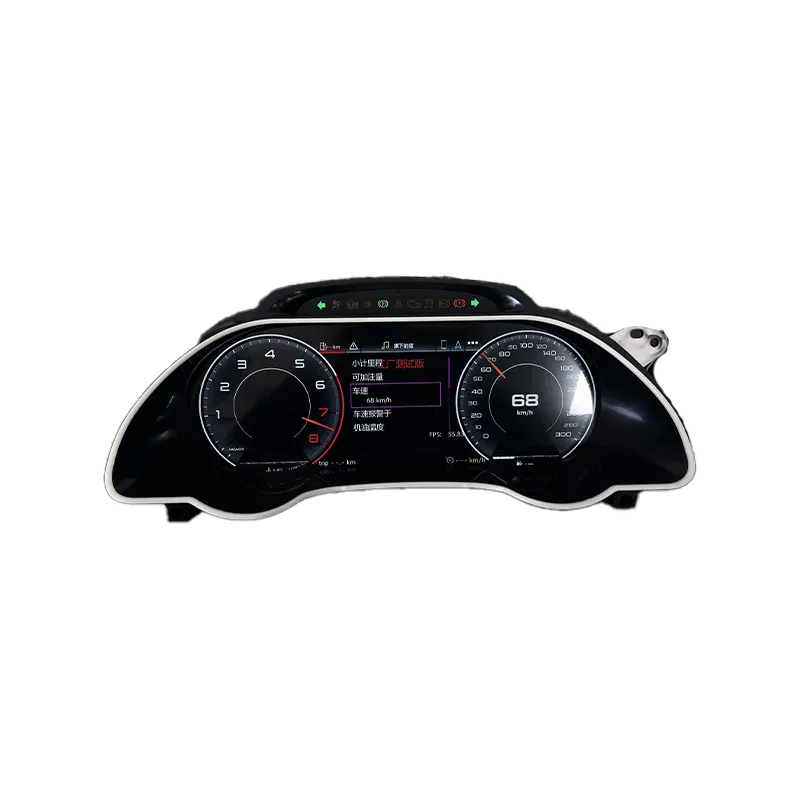
Audi A5 B8 Virtual Cockpit Retrofit 2008–2016
A vehicle-specific digital instrument-cluster upgrade for supported Audi A5, S5 and RS5 B8/B8.5 vehicles with an original mechanical or semi-digital cluster.
The original Audi PCB remains the vehicle-data source while the new instrument display modernizes the driver's view and adds CarPlay and Android Auto navigation capability.
- Original Audi instrument PCB retained
- Original vehicle data retained through the PCB
- No additional coding after PCB transfer
- No PCB soldering or jumper wires
- No original vehicle wiring cutting
- CarPlay navigation display
- Android Auto navigation display
- Wired and wireless connection support
- MPH / km/h switching
- Wi-Fi UI, function and CAN update path
Payment Does Not Mean the Product Is Blindly Packed and Shipped.
After payment is recorded, a vehicle-specific iKAGOO order enters the appropriate product review before final preparation. If additional vehicle information is needed, iKAGOO can request the relevant photos or configuration details before dispatch.
This order step exists for a practical reason: it is easier to correct missing information before an international parcel leaves than after an installer has already removed the original instrument cluster.
Audi A5 B8 Virtual Cockpit Buying Guide FAQ
Can an Audi A5 B8 be upgraded to a digital Virtual Cockpit?
Yes. Supported Audi A5, S5 and RS5 B8/B8.5 vehicles with an original mechanical or semi-digital instrument cluster can use the iKAGOO retrofit route when the original instrument PCB is functioning normally.
Does it fit both Audi A5 B8 and B8.5?
Yes. The supported route covers applicable B8/B8.5 A5, S5 and RS5 vehicles. The original cluster and actual vehicle configuration should still be checked rather than ordering only by the B8 or B8.5 label.
Does it support Audi S5 and RS5?
Yes. Supported A5, S5 and RS5 B8/B8.5 Coupe, Sportback and Cabriolet configurations can use this retrofit route.
Are petrol and diesel cars supported?
Yes. The supported retrofit route is not limited by petrol or diesel fuel type or engine displacement.
Does it work with manual and automatic transmissions?
Yes. Manual and automatic transmission configurations are supported.
Does the original Audi instrument PCB need to be transferred?
Yes. The original instrument PCB/mainboard is removed from the factory cluster and installed into the new digital instrument cluster.
Does the car require coding after the PCB transfer?
No additional coding or programming is required after the original PCB has been correctly transferred into this iKAGOO cluster route.
Does PCB transfer require soldering?
No. The original PCB does not require soldering, jumper wires or PCB modification for the supported installation route.
Does installation require cutting the Audi factory wiring?
No. The supported installation route does not require cutting or damaging the original vehicle main wiring.
Will the original mileage remain?
Yes. The original Audi instrument PCB remains the source of the vehicle instrument data, including mileage information presented through the new digital display.
Will fuel, RPM, door status and warnings still display?
Yes. These instrument signals remain based on information supplied by the original Audi PCB and are presented through the new cluster display.
Can I upgrade if my original LCD screen is broken?
Yes, provided the original instrument PCB is still functioning normally. A failed display does not prevent the retrofit when the original PCB remains healthy.
Can I use the retrofit if the original instrument PCB is faulty?
No. The original PCB must function because it remains the vehicle-data source for this retrofit architecture.
Can CarPlay navigation display directly in the digital cluster?
Yes. CarPlay navigation maps can display directly in the instrument cluster.
Can Android Auto navigation display directly in the cluster?
Yes. Android Auto navigation maps can also display directly in the instrument cluster.
Does CarPlay and Android Auto support wired and wireless connections?
Yes. Both wired and wireless connection methods are supported for the applicable CarPlay and Android Auto route.
Can the original Audi MMI navigation map display in the new cluster?
No. The original Audi MMI factory-navigation map is not the supported map source for this digital cluster. Navigation display is provided through the supported CarPlay and Android Auto route.
Can the cluster switch between MPH and km/h?
Yes. MPH and km/h unit switching is supported.
Can the cluster receive updates later?
Yes. Applicable Wi-Fi updates can include UI changes, system-function updates and CAN adaptation updates.
Can I reinstall my original Audi instrument cluster later?
Yes. The retrofit is reversible. The original PCB can be removed from the digital cluster and installed back into the original instrument assembly.
Can the original cluster and digital cluster work at the same time?
No. The original PCB can only be installed in one cluster assembly at a time.
Why should I buy a vehicle-specific cluster from iKAGOO instead of only choosing the lowest price?
Because the purchase involves more than the LCD itself. iKAGOO connects the vehicle-specific product route with compatibility review, original PCB installation logic, matched preparation, applicable Wi-Fi updates and after-sales product support. These factors become most important after the dashboard has already been opened.
Does iKAGOO confirm compatibility before shipping?
Vehicle-specific iKAGOO orders enter the appropriate compatibility and product review before final preparation. When additional information is required, iKAGOO may request original cluster, dashboard or other relevant vehicle details before dispatch.
Is the Audi A5 B8 Virtual Cockpit retrofit worth buying?
It is a strong upgrade for an owner who plans to keep the car, has a healthy original instrument PCB and wants a major cockpit improvement with retained original vehicle data, CarPlay or Android Auto navigation and a reversible installation route.
Do Not Choose This Upgrade Only by the Screen. Choose the Correct Vehicle Route.
If your Audi A5, S5 or RS5 B8/B8.5 still uses a mechanical or semi-digital instrument cluster and the original PCB is healthy, the iKAGOO retrofit provides a reversible path to a modern driver display while keeping the original Audi instrument electronics as the source of the vehicle data.
The hardware matters. Correct vehicle matching, original PCB handling, installation boundaries, software updates and support after delivery matter just as much.








Add comment
You must be logged in to post a comment.